







Question: Lab Insight: Apply the same steps as Lab 1 - 1 to the Alt Lab 1 - 1 Data.xlsx dataset, with a completed formatted trial
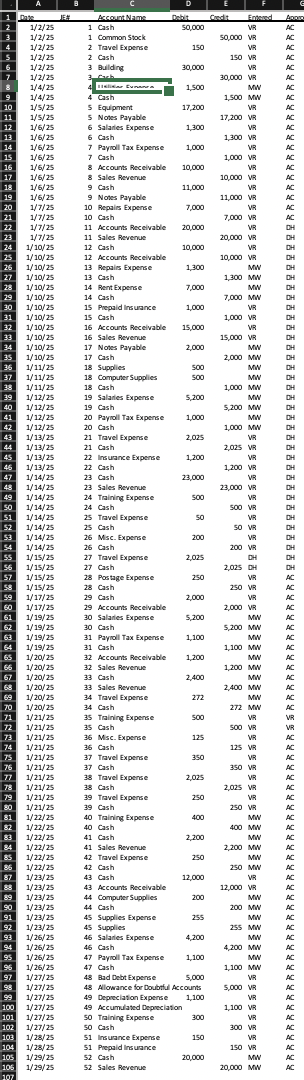
Lab Insight: Apply the same steps as Lab to the Alt Lab Data.xlsx dataset, with a completed formatted trial balance. Open Excel file Alt Lab Data.xlsx
The only exception is you need to order the final trial balance in this way:
Reorder the accounts in balance sheet Cash Accounts Receivable, Allowance for Doubtful Accounts, Prepaid Insurance, Computer Supplies, Supplies, Equipment, Building, Accumulated Depreciation, Notes Payable, Common Stock and then the accounts in income statement order Sales Revenue, Salaries Expense, Travel Expense, Rent Expense, Repairs Expense, Depreciation Expense, Insurance Expense, Misc. Expense, Payroll Tax Expense, Supplies Expense, Training Expense, Utilities Expense and Bad Debt Expense, Postage Expense To reorder the accounts, you can highlight the whole row, right click and select Cut, move to the row where you would like to insert it and then select Insert Cut Cells to get the row in the appropriate location.
Required:
Manipulate the journal entries over the sample period and create a trial balance.
Ask the Question: Can PivotTables be used to post journal entries and create a trial balance?
Master the Data: ProtectID is formed to provide ID privacy and protection. ProtectID begins business January and has journal entries in the first month, which we have now input into an Excel spreadsheet.
Software needed
Excel
Screen capture tool Windows: Snipping Tool; Mac: CmdShift
Data: Alt Lab Data.xlsx
Perform the Analysis: Refer to original Lab in the text for instructions and steps for each of the lab parts.
Step by Step Solution
There are 3 Steps involved in it
1 Expert Approved Answer
Step: 1 Unlock

Question Has Been Solved by an Expert!
Get step-by-step solutions from verified subject matter experts
Step: 2 Unlock
Step: 3 Unlock
 Study Help