







Question: Lab Instructions Create one file, lab6.cpp. This program should accept two command line arguments: an input text file and an output text file for writing
Lab Instructions Create one file, lab6.cpp. This program should accept two command line arguments: an input
text file and an output text file for writing results.
You will be given an input file of variable length that contains records from a book auction service. Each line will contain a record of the form:
1 $43.50 $74.50 $33.60 The Dark Tower 2 $23.15 $43.32 $19.53 Lord of the Rings Return of the King
3 $32.34 $50.65 Ender's Game
4 $21.50 $32.92 Clash of Kings
5 $34.32 $31.21 $37.43 $19.99 Feast for Crows 6 $28.50 $22.92 Hitchhiker's Guide to the Galaxy
Each record begins with an ID, a variable list of auction prices, and a book title.
You may only use C++ style file I/O to manipulate data. You may not use printf or scanf in your program.
Your Objectives:
Read through the input file breaking each line into its components
Find the average of all the list prices for each book
Print out a formatted record for each book, using setw() and other manipulators
If a book title is too long, replace the end of the title with ...
Sample Output Before we go any further, here is the expected output for the example file above:
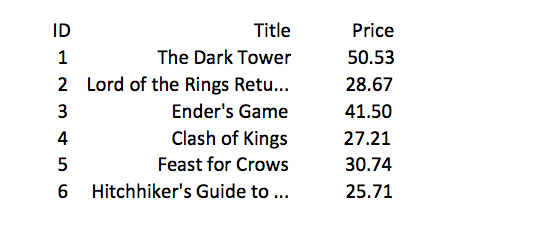
The ID column should be set to a width of 4 characters The Title column should be set to a width of 25 characters The Price column should be set to a width of 10 characters
This means that if a book title is greater than 25 characters you must erase everything past the 25th character and replace the last 3 characters with ....
Title The Dark Tower Lord of the Rings Retu... Ender's Game Clash of Kings Feast for Crows Price 50.53 28.67 41.50 27.21 30.74 25.71 ID 2 4 5 6 Hitchhiker's Guide to
Step by Step Solution
There are 3 Steps involved in it

Get step-by-step solutions from verified subject matter experts
 Study Help