







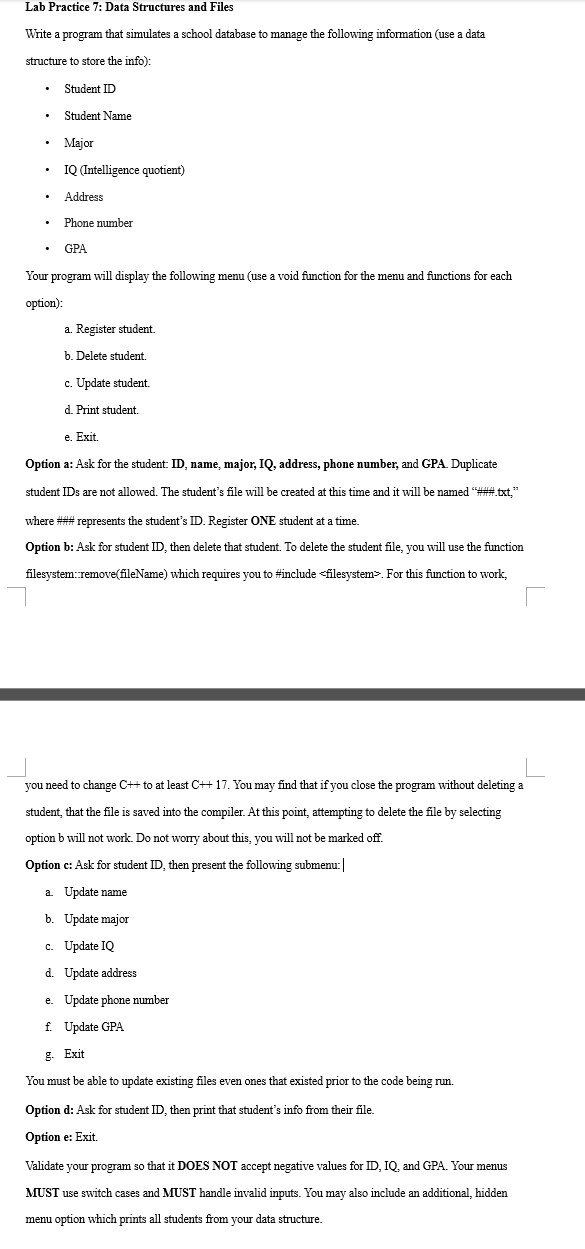
Question: Lab Practice 7 : Data Structures and Files Write a program that simulates a school database to manage the following information ( use a data
Lab Practice : Data Structures and Files
Write a program that simulates a school database to manage the following information use a data structure to store the info:
Student ID
Student Name
Major
IQ Intelligence quotient
Address
Phone number
GPA
Your program will display the following menu use a void function for the menu and functions for each option:
a Register student.
b Delete student.
c Update student.
d Print student.
e Exit.
Option a: Ask for the student: ID name, major, IQ address, phone number, and GPA. Duplicate student IDs are not allowed. The student's file will be created at this time and it will be named ##tst where ## represents the student's ID Register ONE student at a time.
Option b: Ask for student ID then delete that student. To delete the student file, you will use the function filesystem:removefileName which requires you to #include For this function to work,
you need to change mathrmC to at least mathrmC You may find that if you close the program without deleting a student, that the file is saved into the compiler. At this point, attempting to delete the file by selecting option b will not work. Do not worry about this, you will not be marked off.
Option c: Ask for student ID then present the following submenu:
a Update name
b Update major
c Update IQ
d Update address
e Update phone number
f Update GPA
g Exit
You must be able to update existing files even ones that existed prior to the code being run.
Option d: Ask for student ID then print that student's info from their file.
Option e: Exit.
Validate your program so that it DOES NOT accept negative values for ID IQ and GPA. Your menus MUST use switch cases and MUST handle invalid inputs. You may also include an additional, hidden menu option which prints all students from your data structure.
Step by Step Solution
There are 3 Steps involved in it
1 Expert Approved Answer
Step: 1 Unlock

Question Has Been Solved by an Expert!
Get step-by-step solutions from verified subject matter experts
Step: 2 Unlock
Step: 3 Unlock
 Study Help