





Question: Laboratory Exercise 4 - Linux File system VI. LABORATORY ACTIVITY TASKS: Creating empty files in Linux: Ordinary file -> touch filel (this command will lead
Laboratory Exercise 4 - Linux File system
Laboratory Exercise 4 - Linux File system VI. LABORATORY ACTIVITY TASKS: Creating
empty files in Linux: Ordinary file -> touch filel (this command will
lead to the creation of a file named filel) Hidden file ->
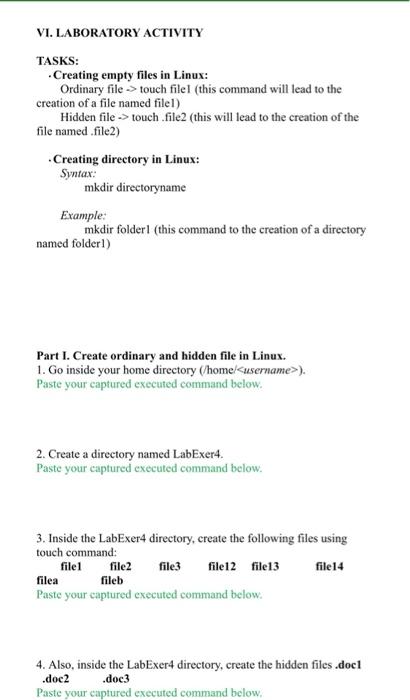
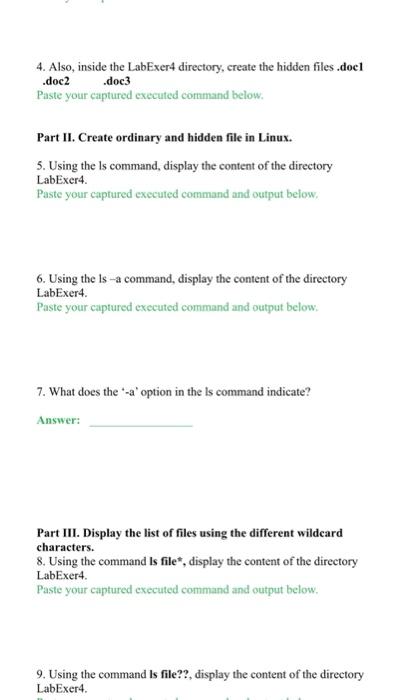
VI. LABORATORY ACTIVITY TASKS: Creating empty files in Linux: Ordinary file -> touch filel (this command will lead to the creation of a file named filel) Hidden file -> touch file (this will lead to the creation of the file named .file) Creating directory in Linux: Syntax: mkdir directoryname Example: mkdir folderl (this command to the creation of a directory named folderl) Part I. Create ordinary and hidden file in Linux. 1. Go inside your home directory (home/). Paste your captured executed command below. 2. Create a directory named LabExer4. Paste your captured executed command below. 3. Inside the LabExer4 directory, create the following files using touch command: file1 file2 file3 file12 file13 file14 filea fileb Paste your captured executed command below. 4. Also, inside the LabExer4 directory, create the hidden files.doc .doc2 .doc3 Paste your captured executed command below, 4. Also, inside the LabExer4 directory, create the hidden files.doel .doc2 .doc3 Paste your captured executed command below. Part II. Create ordinary and hidden file in Linux. 5. Using the Is command, display the content of the directory LabExer4. Paste your captured executed command and output below, 6. Using the is a command, display the content of the directory LabExer4. Paste your captured executed command and output below, 7. What does the "-a' option in the Is command indicate? Answer: Part III. Display the list of files using the different wildcard characters. 8. Using the command is file", display the content of the directory LabExer4 Paste your captured executed command and output below. 9. Using the command is file??, display the content of the directory LabExer 4. 9. Using the command is file??, display the content of the directory LabExer4. Paste your captured executed command and output below. 10. Using the command is file[123], display the content of the directory LabExer4. Paste your captured executed command and output below. 11. Using the command is file[1-3a-b], display the content of the directory LabExer4. Paste your captured executed command and output below. 12. Using the command is file[1][2-4), display the content of the directory LabExer4. Paste your captured executed command and output below. Part IV. Display the list of files/directories using the AUTOCOMPLETE (TAB) key. 13. Using the command is fi[tab), the characters fi will be completed into what word

Step by Step Solution

There are 3 Steps involved in it

1 Expert Approved Answer
Step: 1 Unlock blur-text-image
Question Has Been Solved by an Expert!

Get step-by-step solutions from verified subject matter experts

Step: 2 Unlock
Step: 3 Unlock

Students Have Also Explored These Related Databases Questions!