







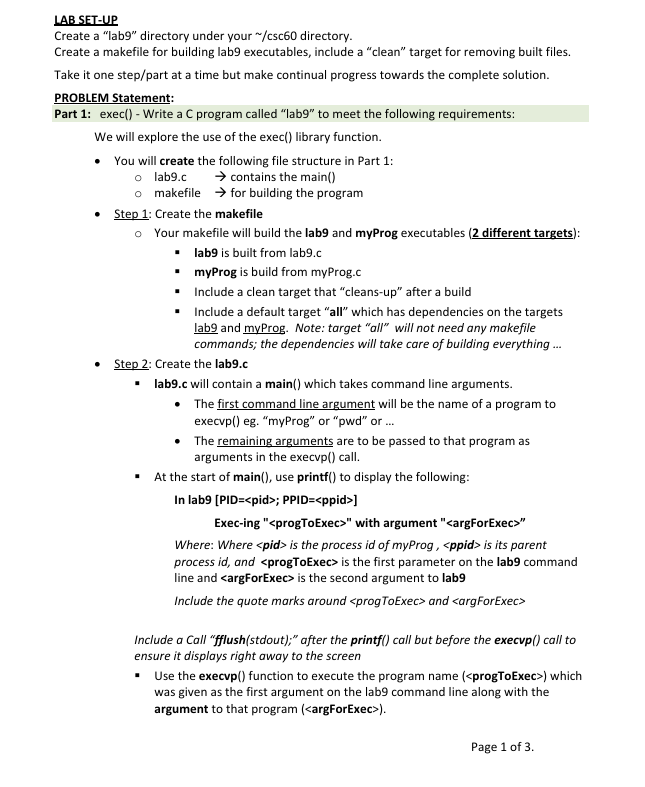
Question: LABSET - UP Create a lab 9 directory under your / csc 6 0 directory. Create a makefile for building lab 9 executables, include
LABSETUP
Create a "lab directory under your csc directory.
Create a makefile for building lab executables, include a "clean" target for removing built files.
Take it one steppart at a time but make continual progress towards the complete solution.
PROBLEM Statement:
Part : exec Write a C program called "lab to meet the following requirements:
We will explore the use of the exec library function.
You will create the following file structure in Part :
labc rightarrow contains the main
makefile rightarrow for building the program
Step : Create the makefile
Your makefile will build the lab and myProg executables different targets:
lab is built from labc
myProg is build from myProg.c
Include a clean target that "cleansup after a build
Include a default target "all" which has dependencies on the targets lab and myProg. Note: target "all" will not need any makefile commands; the dependencies will take care of building everything
Step : Create the labc
labc will contain a main which takes command line arguments.
The first command line argument will be the name of a program to execvp eg "myProg" or pwd or
The remaining arguments are to be passed to that program as arguments in the execvp call.
At the start of main use printf to display the following:
In labPID; PPID
Execing with argument
Where: Where is the process id of myProg, is its parent process id and is the first parameter on the lab command line and is the second argument to lab
Include the quote marks around and
Include a Call "fflushstdout; after the printf call but before the execvp call to ensure it displays right away to the screen
Use the execvp function to execute the program name which was given as the first argument on the lab command line along with the argument to that program
Eg to exec Is I" then you'll run "lab is l from the shell
Include a perror with the message "Call to execvp failed, only gets here on
error" in labc immediately after the call to execvp
Step : Create the myProg.c
myProg.c will contain a main which receives one command line argument.
Include an error check. If no arg is provided, print the following, then exit:
Usage: myProg
myProg will display the following line after processing the command line
parameters:
In myProg PID; PPID received argument
Where is the process id of myProg, is its parent process id and
is the first command line argument to myProg
Include the quote marks around
Have myProg call exit with the value of EXITFAILURE if incorrect number of
arguments provided. Call exit with EXITSUCCESS otherwise.
Run the program:
Ensure that the current directory is in your PATH environment variable
PATH:$PATH"
While in the lab directory, run make clean, then make to build the programs
From the shell, run: lab myProg
Did that work? If not, why did it not work? What did perror output?
Why does the parent lab and child myProg processes have the same
PID?
From the shell, run: lab is I then run: lab abcdef don't save output
What do you observe?
Now, run it again and save the output: lab myProg HiThere runout &
Then, examine the contents of runout
Part : forkexec Modify the labc program to use forkexec
We will explore using forkexec combo to start a new process running a different program.
Copy your labc file to a new file named labfc add labf build to the makefile
Modify labfc to perform a fork to first create a separate child process, then execvp
to run a new program in that child process.
Include a line to execute fork After the printfIn labPID;
Add conditional code for the program to determine if there was an error with the
fork call, or it is the parent or child process:
If in Child Process:
Display the following lines of outputindent the nd line with a tab: In Child PID; PPID
Execing with argument
Have the child process execvp the executable given on the command line as we did in Part
If in Parent Process:
logic following the fork, have it display the message:
In Parent : waiting for child to finish...
Where is the pid of the running parent process
After printing that, have the parent wait for the child to finish terminate
Include the example code from the mathbfW k lecture which implements the child return status macros W Macros" to check the exit status from a child process.
ie cutandpaste the parent code in the "else" code block in the example code into the end of labfc
From the shell, run: labf myProg HiThereYou
Did that work? If not, why did it not work? What did perror output?
What do you observe about the process IDs being presented
From the shell, run:" labf Is then run: "labf abc"don't save output
What do you observe? Is
Step by Step Solution
There are 3 Steps involved in it
1 Expert Approved Answer
Step: 1 Unlock

Question Has Been Solved by an Expert!
Get step-by-step solutions from verified subject matter experts
Step: 2 Unlock
Step: 3 Unlock
 Study Help