







Question: Langtons Ant Goals Review programming with dynamic arrays Convert program requirements to a program design Implement the program design In this project, we will implement
Langtons Ant
Goals
Review programming with dynamic arrays
Convert program requirements to a program design
Implement the program design
In this project, we will implement a program that simulates Langtons Ant. For explanation please read it on Wikipedia: https://en.wikipedia.org/wiki/Langton%27s_ant (Links to an external site.)Links to an external site.. Note that the Langtons Ant simulation can be considered as a cellular automaton, a model that has simple rules governing its replication or destruction.
Requirements
Langtons Ant Rule
The rule of Langtons Ant is very simple: the ant is placed onto the board that is filled with white spaces, and starts moving forward. For each step forward, the Langtons ant will follow 2 rules:
If the ant is on a white space, turn right 90 degrees and change the space to black.
If the ant is on a black space, turn left 90 degrees and change the space to white.
After that the ant moves to the next step and continue moving forward. The ant will follow these rules, and continue moving around the board, until the number of steps runs out.
Ant Class
The Ant class should contain all the information that includes:
The ants location
The ants orientation (the direction of the ant)
How do you keep track of the color of the boards spaces? How about the ants orientation?
How about class functions? Make sure only the class function can modify the variables of Ant class, which means outside program cannot directly change the variables inside the Ant class, and instead should call the functions inside Ant class to indirectly modify variables. You can determine whether you need to have a separate board class and how you should design it.
Langtons Ant Program
The ant starts at a user specified location on the board. For the initial direction of the ant, it can be either random, or fixed, or a choice from the user; it is up to your design decision. During each step, the program should print the board. If the space is occupied by an ant, no matter what the color of that square is, the program should print a * on that space; otherwise, if the space is white space, print a space character, and if the space is a black space, print a # character.
Below is an example printing output of a step of Langtons Ant with board of 5 rows and 5 columns: (Note that the space the ant is occupying is a white space)
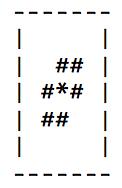
Please consider edge cases before you start programming. For example, what happens when the Ant hits the corner or side of the board? The program cannot let the ant go out of bound or it is going to cause segmentation error. How to solve the edge case is up to your design decision, but it must be handled properly. Here are some of the actions past students have taken in these edge cases:
Skip the step forward step, make another turn and then continue on.
Wrap the board around so the ant will appear on the other side.
Turn the ant around and send it back to the board.
Important: When encountering edge cases, crashing the program, or quitting the program is not a proper solution and your grade will be deducted. No matter what happened, you cannot terminate the game before it reaches the designated step.
Menu
In this project, we are going to implement menu functions that can be reused in later programs. Menu functions are functions that prints menu options to the screen for the user, and after the user makes a choice, verify the users input, and return the value back to the program. The menu function should be easily changeable to fit whatever program you are writing.
Note: If you want to write a menu class instead of a menu function, that is fine too.
Below is the detail of the menu functions for this project:
When the program starts the menu should provide 2 options:
Start Langtons Ant simulation
Quit
If the user decided to quit, the program should quit. Otherwise, start the Langtons Ant simulation. After the simulation starts, the program should prompt user for all the information to run the simulation, including:
The number of rows for the board.
The number of columns for the board.
The number of steps during simulation.
The starting row of the ant.
The starting column of the ant.
After the simulation ended, the menu should provide user 2 choices: play again, or quit.
You can customize the menu, or how the program prompt use for inputs however you want, as long as all the above requirements are met. You can even make the simulation information prompts a menu, by providing an option menu for each information, allowing user to modify the data as they wish before starting simulation, but it is not a requirement.
Input Validation
Input validation is the testing for input that is supplied from outside source. (including human input)
Consider the following scenario: if the program request for an input of integer and the user instead input a character of t, it would cause the program to crash. But with an input validation, the error is caught, and the input is requested again, until the user input a correct type of data.
The requirement of input validation, is to make sure the program
does not crash from undesired input
request for input repeatedly until the correct data is inputted.
A good way of planning input validation is to first think about what kind of input is desired for each input in a program. For example, for choosing the starting row of the ant, what type of data is desired? Integer. What kind of integer? Depending on design, the desired integer can be positive, and not higher than the number of rows the board has.
If you would like to add more feature to your input validation, or add a limit to the integer inputs, you are free to do so, as long as it makes sense and does not affect program testing.
If you have any question, there will be a discussion section on Piazza.
Document (Design + Reflection)
You need to create your program design BEFORE you start coding. Your design needs to be included in your document.
Simply stated, program design is identifying the problem to be solved, modularizing and describing the structure of program, and making a test table to that fulfills the requirements of the program.
For test table, please include test plan, expected output, and actual output. The test plan should be robust. The expected output is based on the requirement. If your actual output deviates from your expected output, that usually means the program behavior is deviating from the requirements. Following is a Examples Test Plan.pdf
In your reflection, you should explain what design changes you made, how you solved some problems you encountered, and what you learned for this project. The TA will grade on how well your implementation matches your design.
Note: There are a lot of details that are not determined in the requirements. They are left for you to decide, as long as your program meets the requirements. For more questions or clarification, feel free to post a question on Piazza, or send an email to your grading TA.
Extra Credit (5%)
At the start of simulation, ask user would like to use a random starting location for the ant. If this option selected, you dont need to ask the user for starting location of the ant.
Note: If you are doing extra credit, you must tell the user at the beginning by printing a message, and make sure you provide the option for ants random starting location. Otherwise TA cannot grant you extra credit.
What you need to submit:
All the program files including header and source files (.cpp/.hpp)
makefile
Your reflection pdf file
Important: Put all the files in a single .zip file and submit it on Canvas.
Grading
Programming style and documentation: 10%
Build the board using dynamic 2D array: 10%
Input validation functions: 10%
Create the source and header files for the Ant class properly: 15%
Print each step correctly, including running for the correct number of steps: 10%
The printing of each step allows the user to see the changes in the shape: 10%
Allow the user to specify the starting location of the ant: 10%
Implement a menu function that can be reused in later programs: 15%
Reflection document including: design description, test table (test plans, test results), and the reflection: 10%
Important Note
Keep in mind that this is a programming assignment. You are not writing a program to share with others for enjoyment. Past students have attempted to make the programs entertaining which also makes it harder to implement, and more often than not miss the requirements of the program, making it harder for the TA to grade. If you need some clarification, please post on Piazza or contact your grading TA.
Use the Internet ONLY for researching how the game works. Design and write your own program. A lot of online programs are more complicated than out requirements, and it is harder to reuse than to implement your own. Submitting anything you did not write is a violation of the universitys academic dishonest policy. Keep in mind, if you can find it using Google, the TAs can.
Use incremental development. Get one part working, test it. If it works, save a copy of the program and continue working on the next step in your plan. This ensures you have something to submit.
Suggested plan to design and code this project
Some students in the previous terms mentioned that this project is the most difficult assignment in the whole term. When they looked back at the end of the term, they found it is not that difficult. The main reason it looked so difficult is that it was mostly the first time you were thrown an assignment with a decent amount of freedom. Reading through the project the first time might give you some anxiety because you feel that you have no idea what you're going to do. Another reason is that this assignment requires some indepth class design which you might haven't touched in CS161.
First, get a pencil and some paper. Seriously. Low tech but it works. Develop an algorithm to apply the rules. Remember, drawing out the simplest of diagrams helps define the problem. Now that you have your algorithms developed, convert them to pseudocode or flowcharts. Walk through your pseudocode. Did you miss any details? Have you considered all the corner cases? Its much easier to find and fix logic errors now. Now it is time to dig out the keyboard and start entering code.
Rubric
Project 1 rubric
Project 1 rubric
Criteria Ratings Pts This criterion is linked to a Learning OutcomeProgramming style and documentation Doesn't separate class functions into their own corresponding .cpp and .hpp files. (-1) Program segfaults (- 5~10) Severe lack of comments (-3~5) 10.0 pts This criterion is linked to a Learning OutcomeBuild the board using dynamic 2D array Does not work for non-square grids (- 3~5) 10.0 pts This criterion is linked to a Learning OutcomeInput validation functions Rows and columns allow zerosegative numbers to be passed in (- 2~5) Input does not account for characters/letters (- 3~5) Some inputs crash the program (-3~5) Doesn't handle float input (-2) Input validation fails and creates an endless loop (-5~7) 10.0 pts This criterion is linked to a Learning OutcomeCreate the source and header files for the Ant class properly the program does not handle edge cases for the ant movement. (-5) 15.0 pts This criterion is linked to a Learning OutcomePrint each step correctly, including running for the correct number of steps No limits on the number of steps and program crashes on very large number of steps (-3) When step number is 1, the ant doesn't move one step (-3~5) 10.0 pts This criterion is linked to a Learning OutcomeThe printing of each step allows the user to see the changes in the shape 10.0 pts This criterion is linked to a Learning OutcomeAllow the user to specify the starting location of the ant Random option occasionally placing ant outside of board (-5) Can place ant out of bounds. (-5) 10.0 pts This criterion is linked to a Learning OutcomeImplement a menu function that can be reused in later program The menu option doesn't work as it intended to be (- 5~7) Doesn't ask user to play again or quit (- 3~5) Menu is part of the main function and not reusable (-5) 15.0 pts This criterion is linked to a Learning OutcomeReflection document including: design description, test table (test plans, test results), and the reflection No test table (-5) Test table is not robust (-2) Not enough design description/details (-3~5) 10.0 pts Total Points: 100.0
Step by Step Solution
There are 3 Steps involved in it

Get step-by-step solutions from verified subject matter experts
 Study Help