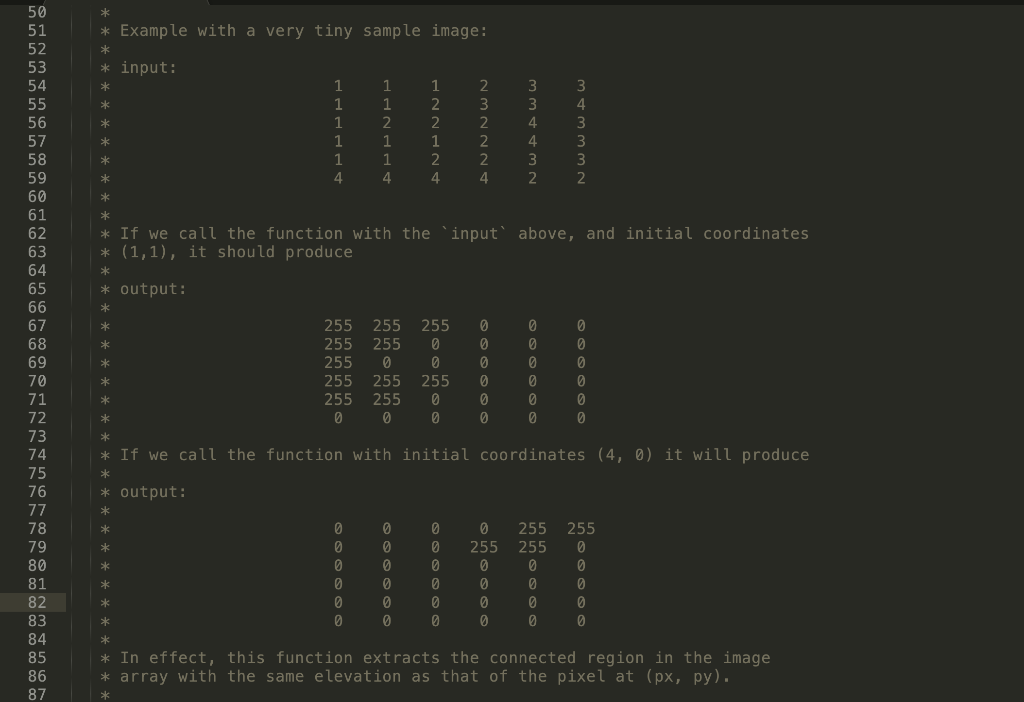
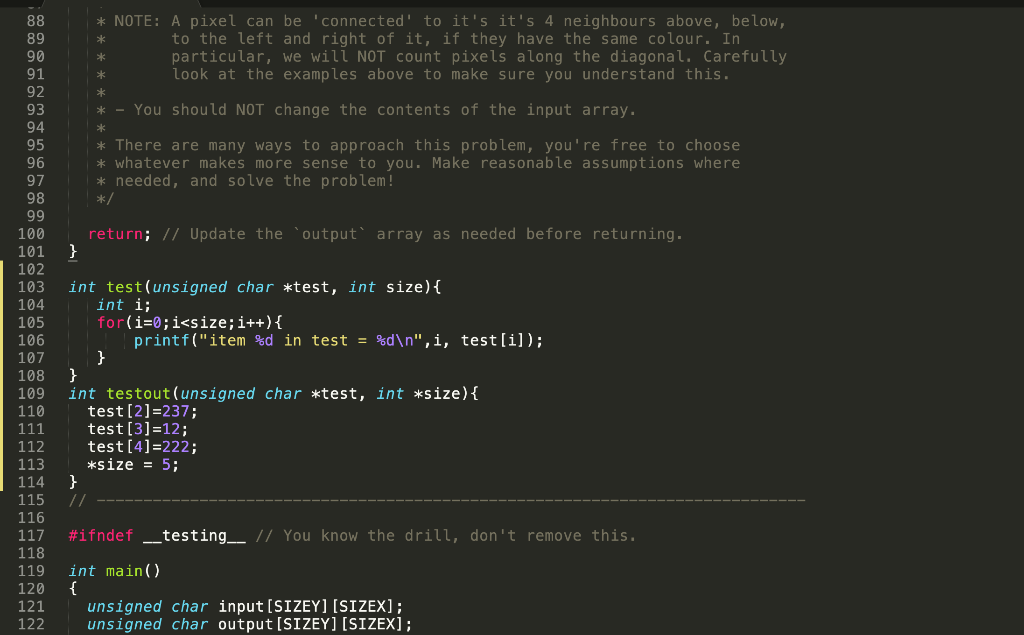
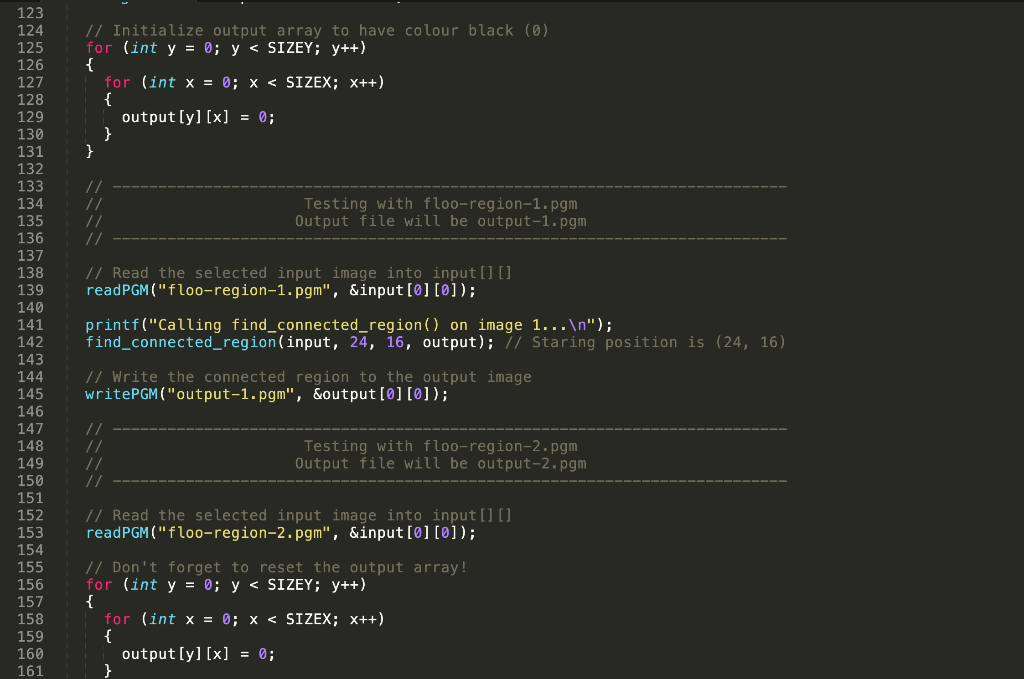
Question: Language is C. All code is in screenshots, please let me know for any questions/clarification. Thank you. L #include // Define the image size we
Language is C. All code is in screenshots, please let me know for any questions/clarification. Thank you.
L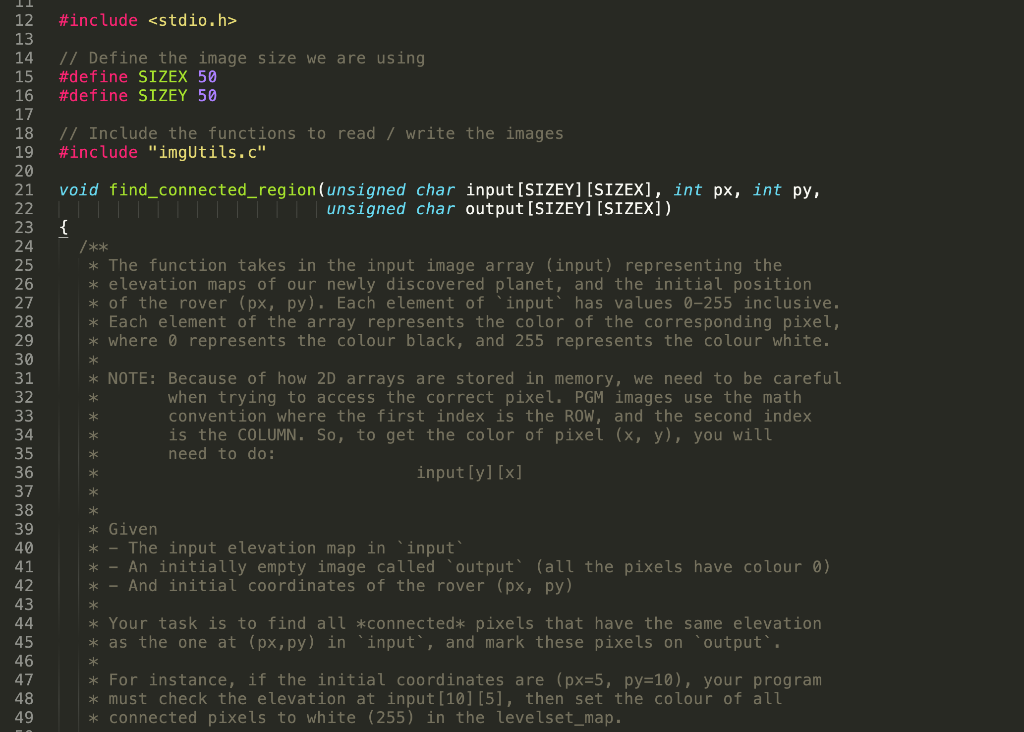
![input[SIZEY][SIZEX], int px, int py, mire meg unsigned char output[SIZE][SIZEX]). { /**](https://dsd5zvtm8ll6.cloudfront.net/si.experts.images/questions/2024/09/66f5105b9ebac_53966f5105b285ed.jpg)
#include // Define the image size we are using #define SIZEX 50 #define SIZEY 50 // Include the functions to read / write the images #include "imgUtils.c" void find_connected_region(unsigned char input[SIZEY][SIZEX], int px, int py, mire meg unsigned char output[SIZE][SIZEX]). { /** * The function takes in the input image array (input) representing the * elevation maps of our newly discovered planet, and the initial position * of the rover (px, py). Each element of 'input' has values 0-255 inclusive. * Each element of the array represents the color of the corresponding pixel, * where o represents the colour black, and 255 represents the colour white. * 12 13 14 15 16 17 18 19 20 21 22 23 24 25 26 27 28 29 30 31 32 33 34 35 36 37 38 39 40 41 42 43 44 45 46 47 48 49 * * NOTE: Because of how 2D arrays are stored in memory, we need to be careful when trying to access the correct pixel. PGM images use the math convention where the first index is the ROW, and the second index is the COLUMN. So, to get the color of pixel (x, y), you will need to do: input[y][x] * * * * * * * Given * The input elevation map in 'input' An initially empty image called output (all the pixels have colour 0) * - And initial coordinates of the rover (px, py) * * * Your task is to find all *connected* pixels that have the same elevation * as the one at (px,py) in 'input', and mark these pixels on "output'. * * For instance, if the initial coordinates are (px=5, py=10), your program * must check the elevation at input[10][5], then set the colour of all * connected pixels to white (255) in the levelset_map. * Example with a very tiny sample image: * input: 3 4 1 1 1 4 1 1 2 1 1 4. 1 2 2 1 2 4 = NNNWN 4 * If we call the function with the 'input' above, and initial coordinates * (1,1), it should produce * * output: 50 51 52 53 54 55 56 57 58 59 60 61 62 63 64 65 66 67 68 69 70 71 72 73 74 75 76 77 78 79 80 81 82 83 84 85 86 87 * 255 255 255 255 255 0 255 255 255 255 0 0 255 0 0 255 0 0 0 0 0 0 0 0 0 0 0 @ 0 0 0 0 0 0 ** * If we call the function with initial coordinates (4, 0) it will produce output: 0 0 0 0 0 0 255 0 0 0 0 0 0 0 0 0 0 0 0 0 255 255 0 0 0 0 255 0 0 0 0 0 0 0 * * In effect, this function extracts the connected region in the image * array with the same elevation as that of the pixel at (px, py). * * NOTE: A pixel can be 'connected to it's it's 4 neighbours above, below, to the left and right of it, if they have the same colour. In particular, we will NOT count pixels along the diagonal. Carefully look at the examples above to make sure you understand this. * * * * * - You should NOT change the contents of the input array. * * There are many ways to approach this problem, you're free to choose * whatever makes more sense to you. Make reasonable assumptions where * needed, and solve the problem! */ return; // Update the output' array as needed before returning. } 88 89 90 91 92 93 94 95 96 97 98 99 100 101 102 103 104 105 106 107 108 109 110 111 112 113 114 115 116 117 118 119 120 121 122 int test(unsigned char *test, int size) { int i; for(i=0;i









 Study Help