







Question: Language: Python Program used: PyCharm Interpreter: 3.6.1 at ~/anaconda/bin/python ---------- ---------- Starter code: # Crew roster for Captain Tractor Jack. def print_menu(): Prints the
Language: Python
Program used: PyCharm
Interpreter: 3.6.1 at ~/anaconda/bin/python
----------
 ----------
Starter code:
# Crew roster for Captain Tractor Jack.
def print_menu(): """ Prints the program menu to the console. :return: None """ print('Menu:') print('a - Add a new name') print('d - Delete a name') print('l - Print all names') print('s - Search for a name.') print('q - Quit program.') print('Enter the letter next to the menu item you wish to use: ', end="")
# Initialize the crew_roster to be empty. crew_roster = []
# Print the menu and ask for the first menu selectionl. print_menu() action = input() print()
while action != 'q': if action == 'a': # TODO: 1. Prompt the user to input a name and then read the name from the console. # TODO: 2. Add the entered name to the end of the list referred to by crew_roster. # TODO: 3. Remove the print('Not implemented yet.') line. print('Not implemented yet.') elif action == 'd': # TODO: 1. Prompt the user to input a name and read a name from the console. # TODO: If the name is on the roster, remove it from the list crew_roster. # TODO: 2. Print a message indicating whether a name was removed or not. # TODO: 3. Remove the print('Not implemented yet.') line. print('Not implemented yet.') elif action == 'l': # TODO: 1. Print a numbered list of names in the crew_roster list on the console, # TODO: one per line. (See the sample output to see how this should look) # TODO: 3. Remove the print('Not implemented yet.') line. print('Not implemented yet.') elif action == 's': # TODO: 1. Prompt the user to input a name and read a name from the console. # TODO: 2. If the name is in the list crew_roster print "Arrr, he's one of ours!" # TODO: to the console. If the name is not in the list crew_roster, print # TODO: "Arrr! That scurvy dog ain't a member of this crew!" to the console. # TODO: 3. Remove the print('Not implemented yet.') line. print('Not implemented yet.') elif action == 'q': pass else: print('That was not a valid choice! Try again.')
print_menu() action = input() print()
print("Everything's better with pirates! Goodbye.")
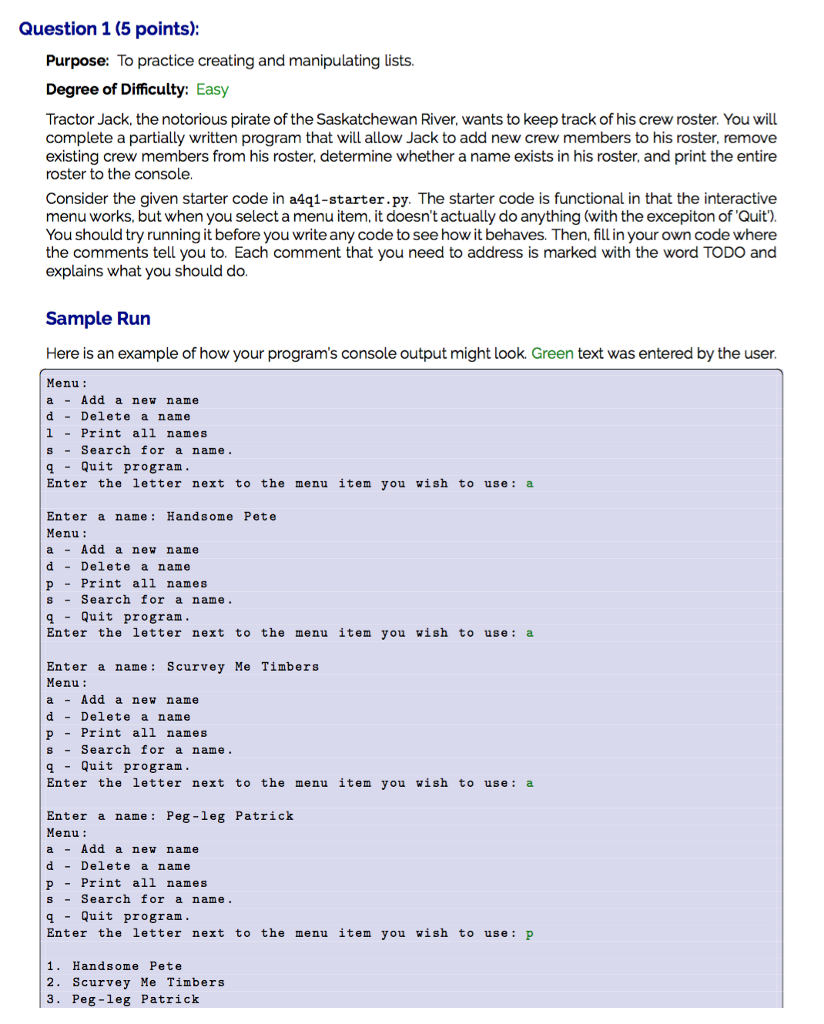
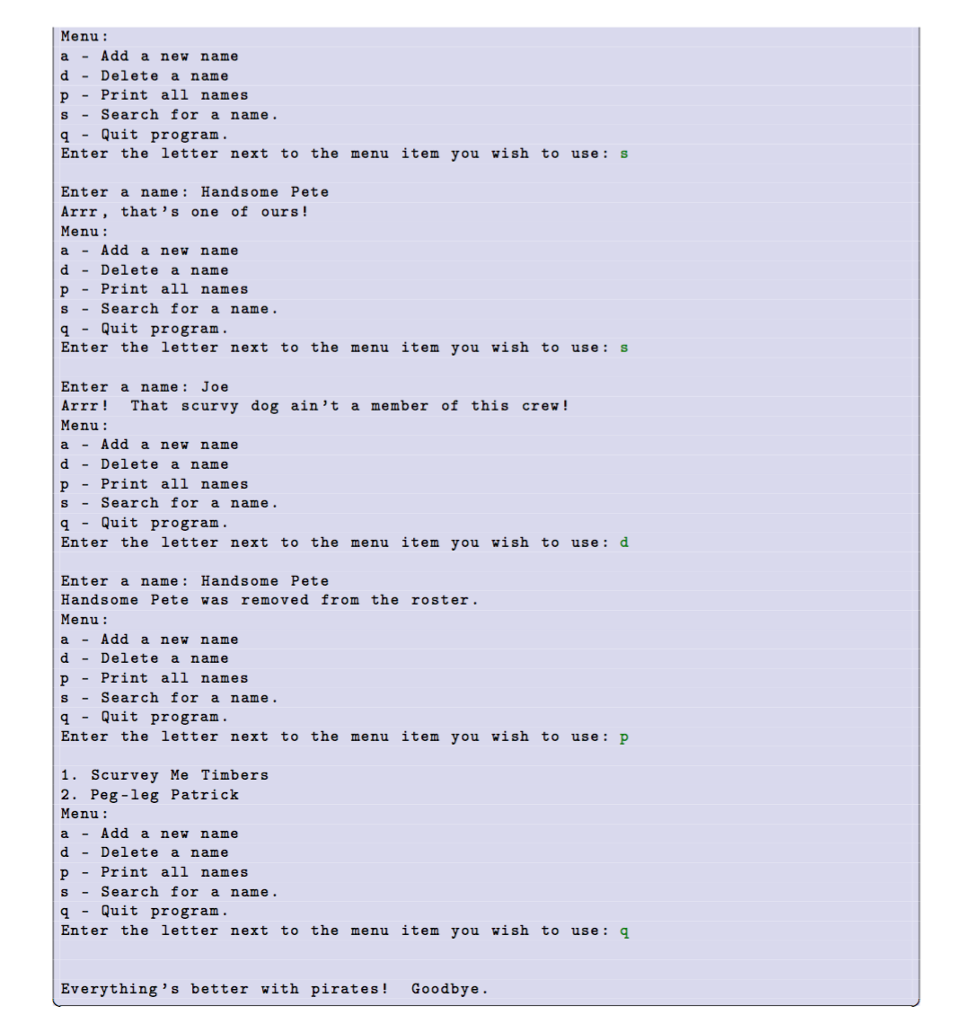
Question 1 (5 points) Purpose: To practice creating and manipulating lists. Degree of Difficulty: Easy Tractor Jack, the notorious pirate of the Saskatchewan River, wants to keep track of his crew roster. You will complete a partially written program that will allow Jack to add new crew members to his roster, remove existing crew members from his roster, determine whether a name exists in his roster, and print the entire roster to the console Consider the given starter code in a4qi-starter.py. The starter code is functional in that the interactive menu works, but when you select a menu item, it doesn't actually do anything (with the excepiton of 'Quit). You should try running it before you write any code to see how it behaves. Then, fill in your own code where the comments tell you to. Each comment that you need to address is marked with the word TODO and explains what you should do. Sample Run Here is an example of how your program's console output might look. Green text was entered by the user Menu: a Add a new name d Delete a name 1 Print all names sSearch for a name. qQuit program Enter the letter next to the menu item you wish to use:a Enter a name: Handsome Pete Menu: a -Add a new name d -Delete a name p- Print all names s-Search for a name q Quit program Enter the letter next to the menu item you wish to usea Enter a name Scurvey Me Timbers Menu: a Add a new name d Delete a name p - Print all names s -Search for a name. qQuit program Enter the letter next to the menu item you wish to use a Enter a name Peg-leg Patrick Menu: a Add a new name d -Delete a name p - Print all names sSearch for a name. qQuit program Enter the letter next to the menu item you wish to use: p 1. Handsome Pete 2. Scurvey Me Timbers 3. Peg-1eg Patrick
Step by Step Solution
There are 3 Steps involved in it

Get step-by-step solutions from verified subject matter experts
 Study Help