







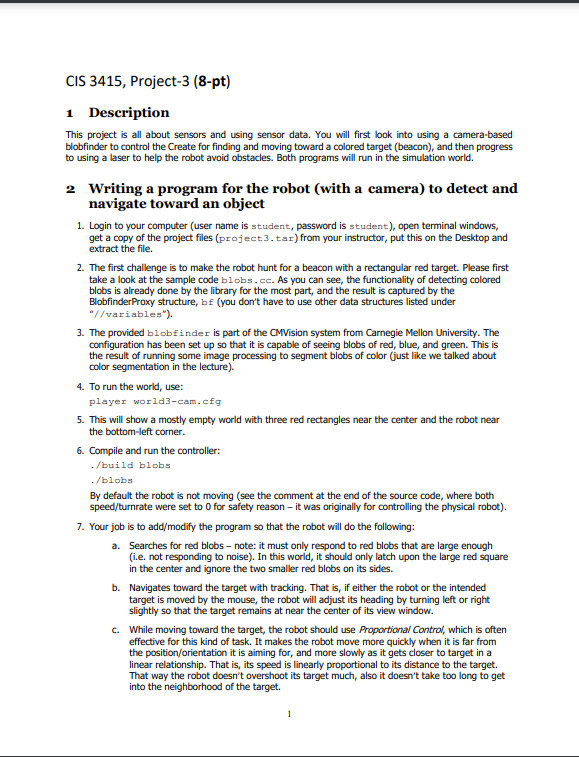
Question: / * * * laser - roomba.cc * * Sample code for a robot that has two front bumpers and a laser scanner. * Suitable
laserroomba.cc
Sample code for a robot that has two front bumpers and a laser scanner.
Suitable for use with the roomba.
Written by: Simon Parsons
Date: th October
#include
#include
using namespace PlayerCc;
Function headers
void printLaserDataLaserProxy& sp;
void printRobotDataBumperProxy& bp;
main
int mainint argc, char argv
Variables
int counter ;
double speed; How fast do we want the robot to go forwards?
double turnrate; How fast do we want the robot to turn?
playerlaserdata laser; For handling laser data
Set up proxies. These are the names we will use to connect to
the interface to the robot.
PlayerClient robotlocalhost;
BumperProxy bp&robot,;
PositiondProxy pp&robot,;
LaserProxy sp &robot, ;
Allow the program to take charge of the motors take care now
ppSetMotorEnabletrue;
Main control loop
whiletrue
Update information from the robot.
robot.Read;
Print information about the laser. Check the counter first to stop
problems on startup
ifcounter
printLaserDatasp;
Print data on the robot to the terminal
printRobotDatabp;
If either bumper is pressed, stop. Otherwise just go forwards
ifbp bp
speed;
turnrate;
else
speed;
turnrate ;
What are we doing?
std::cout "Speed: speed std::endl;
std::cout "Turn rate: turnrate std::endl std::endl;
Send the commands to the robot
ppSetSpeedspeed turnrate;
Count how many times we do this
counter;
end of main
void printLaserDataLaserProxy& sp
double maxRange, minLeft, minRight, range, bearing;
int points;
This illustrates the things the proxy provides. These should be selfexplanatory
if you look at the print statements, except possible GetRange and GetBearing
These allow you to access one particular reading. You might want to use this
to look through all the values in a given arc to find the closest object.
maxRange spGetMaxRange;
minLeft spMinLeft;
minRight spMinRight;
points spGetCount;
range spGetRange;
bearing spGetBearing;
std::cout "Laser says..." std::endl;
std::cout "Maximum distance I can see: maxRange std::endl;
std::cout "Number of readings I return: points std::endl;
std::cout "Closest thing on left: minLeft std::endl;
std::cout "Closest thing on right: minRight std::endl;
std::cout "Range of a single point: range std::endl;
std::cout "Bearing of a single point: bearing std::endl;
return;
End of printLaserData
printRobotData
Print out data on the state of the bumpers and the current location
of the robot.
void printRobotDataBumperProxy& bp
Print out what the bumpers tell us:
std::cout "Left bumper: bp std::endl;
std::cout "Right bumper: bp std::endl;
Might want to add odometry data here also, but then you'd have
to pass the position proxy to the function.
End of printRobotData
Step by Step Solution
There are 3 Steps involved in it
1 Expert Approved Answer
Step: 1 Unlock

Question Has Been Solved by an Expert!
Get step-by-step solutions from verified subject matter experts
Step: 2 Unlock
Step: 3 Unlock
 Study Help