







Question: | lask 3 - Develop an application tor target selection with the Bubble Cursor Task 3 continues with Task 2 . In Task 3 ,
lask Develop an application tor target selection with the Bubble Cursor
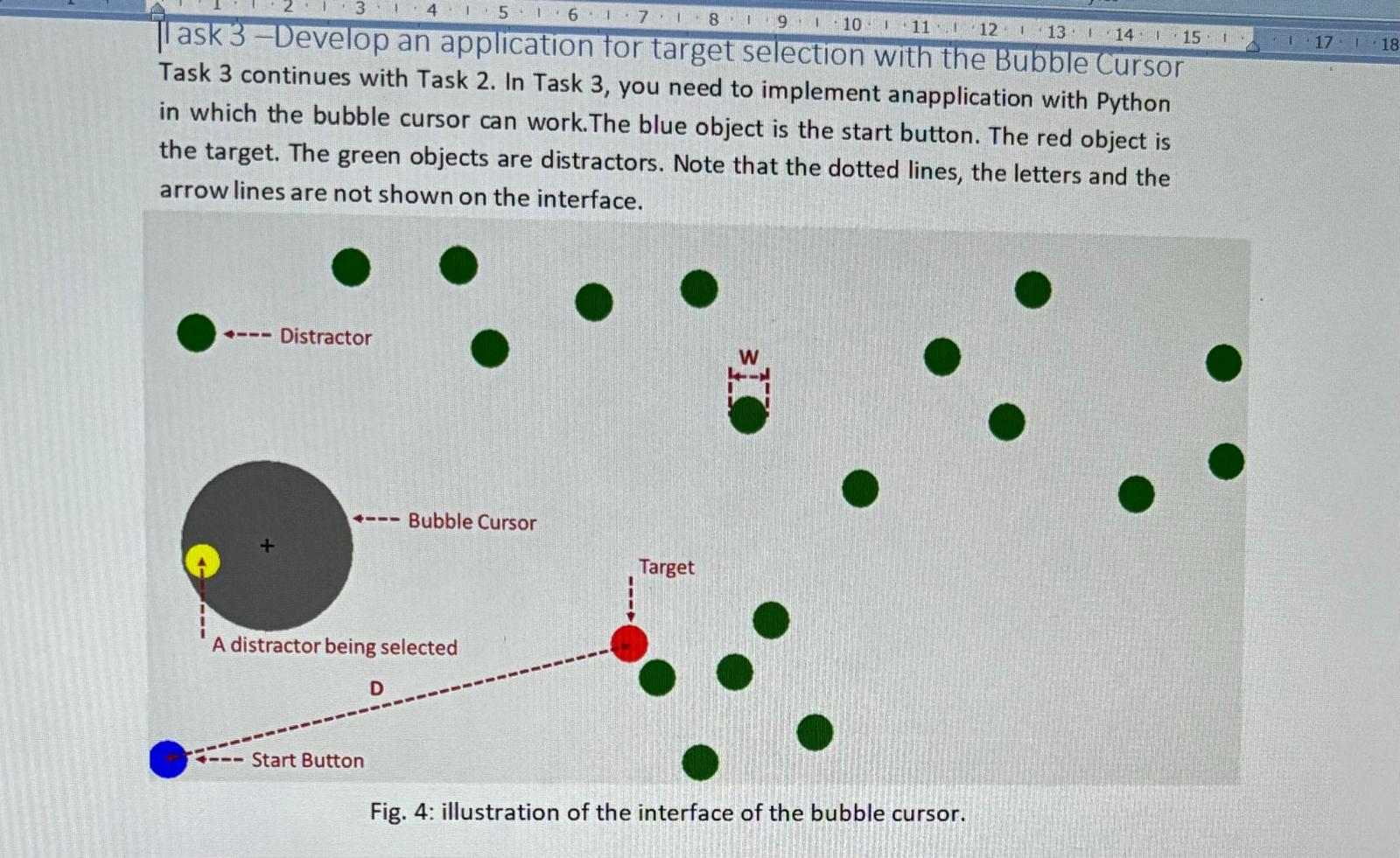
Task continues with Task In Task you need to implement anapplication with Python
in which the bubble cursor can work.The blue object is the start button. The red object is
the target. The green objects are distractors. Note that the dotted lines, the letters and the
arrow lines are not shown on the interface.
Fig. : illustration of the interface of the bubble cursor.
The requirements are as follows:
The size of the start button, target and distractorW is set as pixels in diameter radius They are circular objects with the same size Fig
Target distance D is the distance between thecentre of the start button to the target.Target Distance D is set as pixels.
The start button is always placed at the bottomleft corner of the window. There is no requirement of target position but make sure that D is pixels.
There are distractors, target and start button on the interface. Distractors are presented randomly in the window. Distractors, the target and the start buttonshould not overlap.
Just implement the interface with the required objects ie a start button, a target, and distractors All objectsare selectable by the bubble cursor, but no furtherinteractionsare needed when they are selected.As the area cursor in Lab a selectable object turns yellow when it is within the activation area of the bubble cursor Fig
Hints: you need to generate the start button, target and distractors in objectsmanagement.py
The start button can be a blue object. The target can be a red object. All distractors are green objects. When generating these objects, make sure their size is pixels in diameter radius and the distance between the target and the start button is pixels.
Step by Step Solution
There are 3 Steps involved in it
1 Expert Approved Answer
Step: 1 Unlock

Question Has Been Solved by an Expert!
Get step-by-step solutions from verified subject matter experts
Step: 2 Unlock
Step: 3 Unlock
 Study Help