







Question: Last week you created a business process model using the BPMN language. This time you will use that process model to begin a data model.
Last week you created a business process model using the BPMN language. This time you will use that process model to begin a data model. Let's look at lemonade stand example:
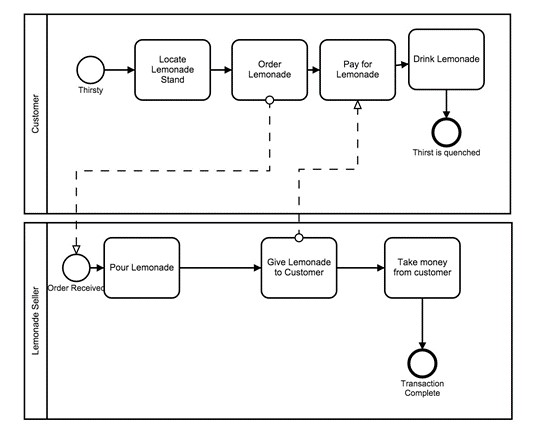
What data types are associated with this model? Several, as it turns out:
accounts receivable (what others owe you)
accounts payable (what you owe others)
general ledger (complete transaction records)
inventory (cups, lemons, etc.)
As you can see, you can pull quite a bit out of even a simple business process diagram. Even this simple example produces multiple data tables for inventory, customer transactions, accounting and sales. For this activity, use the BPMN diagram you created for the previous week and produce a set of data tables associated with that process. The tables should be in the format below:
| Field Name | Description | Data Type |
Your tables should:
Provide an accurate representation of the data associated with the elements and "swimlanes" in your BPMN.
Be clearly formatted and presentable so that your tables are professional looking and easy to interpret.
If necessary, back up your reasoning with references to reputable sources cited in standard format.
Step by Step Solution
There are 3 Steps involved in it

Get step-by-step solutions from verified subject matter experts
 Study Help