Question: lbcount.c map.c CIS 345/545 Sec. 50 Homework 1 Spring 2021 (Due: Feb. 3) This warm-up homework helps you understand what is really inside of a
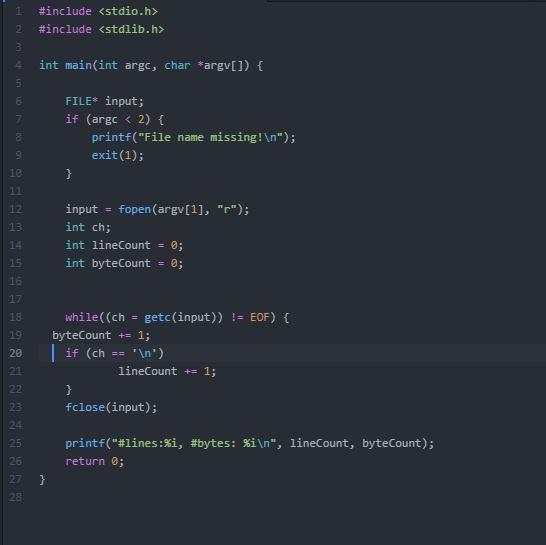 lbcount.c
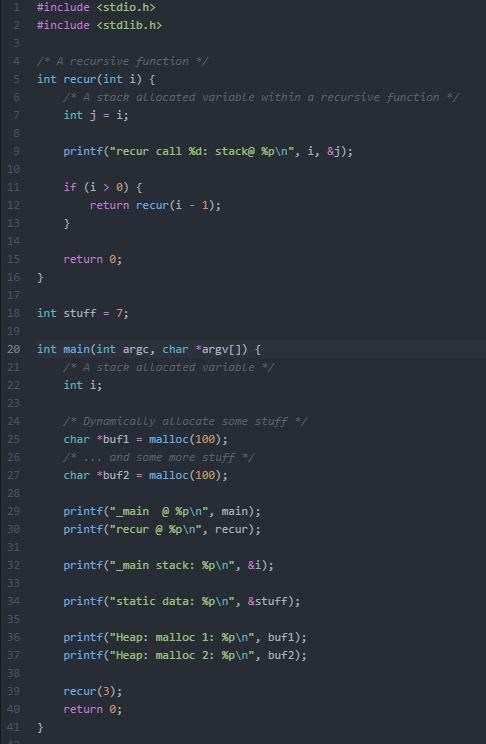 map.c
map.c
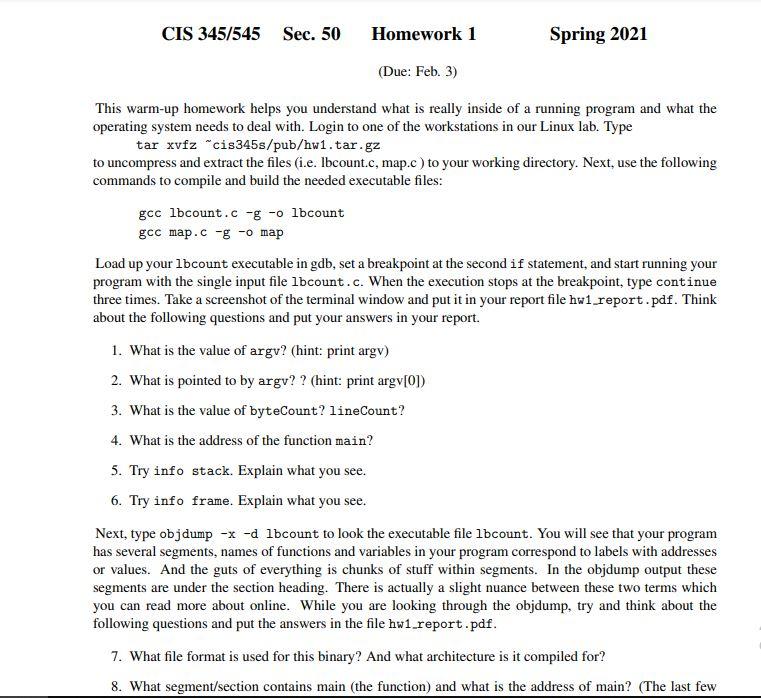
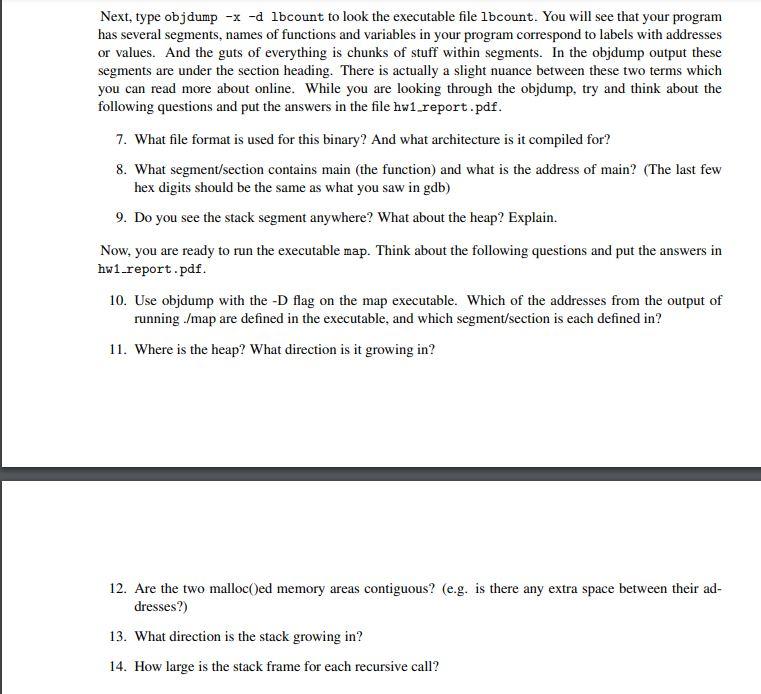
CIS 345/545 Sec. 50 Homework 1 Spring 2021 (Due: Feb. 3) This warm-up homework helps you understand what is really inside of a running program and what the operating system needs to deal with. Login to one of the workstations in our Linux lab. Type tar xvfz "cis345s/pub/hw1.tar.gz to uncompress and extract the files (.e. Ibcount.c, map.c) to your working directory. Next, use the following commands to compile and build the needed executable files: gcc lbcount.c -g -o lbcount gcc map.c -g -o map Load up your lbcount executable in gdb, set a breakpoint at the second if statement, and start running your program with the single input file lbcount.c. When the execution stops at the breakpoint, type continue three times. Take a screenshot of the terminal window and put it in your report file hwi report.pdf. Think about the following questions and put your answers in your report. 1. What is the value of argv? (hint: print argy) 2. What is pointed to by argv? ? (hint: print argv[0]) 3. What is the value of byteCount? lineCount? 4. What is the address of the function main? 5. Try info stack. Explain what you see. 6. Try info frame. Explain what you see. Next, type objdump -x -d lbcount to look the executable file lbcount. You will see that your program has several segments, names of functions and variables in your program correspond to labels with addresses or values. And the guts of everything is chunks of stuff within segments. In the objdump output these segments are under the section heading. There is actually a slight nuance between these two terms which you can read more about online. While you are looking through the objdump, try and think about the following questions and put the answers in the file hw1_report.pdf. 7. What file format is used for this binary? And what architecture is it compiled for? 8. What segment/section contains main (the function) and what is the address of main? (The last few Next, type objdump -x -d lbcount to look the executable file lbcount. You will see that your program has several segments, names of functions and variables in your program correspond to labels with addresses or values. And the guts of everything is chunks of stuff within segments. In the objdump output these segments are under the section heading. There is actually a slight nuance between these two terms which you can read more about online. While you are looking through the objdump, try and think about the following questions and put the answers in the file hw1.report.pdf. 7. What file format is used for this binary? And what architecture is it compiled for? 8. What segment/section contains main (the function) and what is the address of main? (The last few hex digits should be the same as what you saw in gdb) 9. Do you see the stack segment anywhere? What about the heap? Explain. Now, you are ready to run the executable map. Think about the following questions and put the answers in hwi.report.pdf. 10. Use objdump with the -D flag on the map executable. Which of the addresses from the output of running ./map are defined in the executable, and which segment/section is each defined in? 11. Where is the heap? What direction is it growing in? 12. Are the two malloc()ed memory areas contiguous? (e.g. is there any extra space between their ad- dresses?) 13. What direction is the stack growing in? 14. How large is the stack frame for each recursive call? #include #include 2 3 4 5 int main(int argc, char *argv[]) { E 7 8 FILE* input; if (argc #include 3 5 A recursive function */ int recur(int i) { A stack allocated variable within a recursive function * int j = i; 5 printf("recur call %d: stack@ %p ", i, &j); 9 10 11 12 13 if (i > 0) { return recur(i - 1); } 14 return 0; 15 16 18 int stuff = 7; 19 20 int main(int arge, char *argv[]) { A stack allocated variable int i; 21 22 23 24 25 26 27 1 Dynamically allocate some stuff */ char *buf1 = malloc(100); ... and some more stuff * char *buf2 = malloc(100); 28 29 30 31 32 printf("_main @ %p ", main); printf("recur @p ", recur); printf("_main stack: %p ", &i); 33 34 printf("static data: Sp ", &stuff); 35 36 37 38 printf("Heap: malloc 1: %p ", bufl); printf("Heap: malloc 2: %p ", buf2); 39 recur(3); return 0; 40 } CIS 345/545 Sec. 50 Homework 1 Spring 2021 (Due: Feb. 3) This warm-up homework helps you understand what is really inside of a running program and what the operating system needs to deal with. Login to one of the workstations in our Linux lab. Type tar xvfz "cis345s/pub/hw1.tar.gz to uncompress and extract the files (.e. Ibcount.c, map.c) to your working directory. Next, use the following commands to compile and build the needed executable files: gcc lbcount.c -g -o lbcount gcc map.c -g -o map Load up your lbcount executable in gdb, set a breakpoint at the second if statement, and start running your program with the single input file lbcount.c. When the execution stops at the breakpoint, type continue three times. Take a screenshot of the terminal window and put it in your report file hwi report.pdf. Think about the following questions and put your answers in your report. 1. What is the value of argv? (hint: print argy) 2. What is pointed to by argv? ? (hint: print argv[0]) 3. What is the value of byteCount? lineCount? 4. What is the address of the function main? 5. Try info stack. Explain what you see. 6. Try info frame. Explain what you see. Next, type objdump -x -d lbcount to look the executable file lbcount. You will see that your program has several segments, names of functions and variables in your program correspond to labels with addresses or values. And the guts of everything is chunks of stuff within segments. In the objdump output these segments are under the section heading. There is actually a slight nuance between these two terms which you can read more about online. While you are looking through the objdump, try and think about the following questions and put the answers in the file hw1_report.pdf. 7. What file format is used for this binary? And what architecture is it compiled for? 8. What segment/section contains main (the function) and what is the address of main? (The last few Next, type objdump -x -d lbcount to look the executable file lbcount. You will see that your program has several segments, names of functions and variables in your program correspond to labels with addresses or values. And the guts of everything is chunks of stuff within segments. In the objdump output these segments are under the section heading. There is actually a slight nuance between these two terms which you can read more about online. While you are looking through the objdump, try and think about the following questions and put the answers in the file hw1.report.pdf. 7. What file format is used for this binary? And what architecture is it compiled for? 8. What segment/section contains main (the function) and what is the address of main? (The last few hex digits should be the same as what you saw in gdb) 9. Do you see the stack segment anywhere? What about the heap? Explain. Now, you are ready to run the executable map. Think about the following questions and put the answers in hwi.report.pdf. 10. Use objdump with the -D flag on the map executable. Which of the addresses from the output of running ./map are defined in the executable, and which segment/section is each defined in? 11. Where is the heap? What direction is it growing in? 12. Are the two malloc()ed memory areas contiguous? (e.g. is there any extra space between their ad- dresses?) 13. What direction is the stack growing in? 14. How large is the stack frame for each recursive call? #include #include 2 3 4 5 int main(int argc, char *argv[]) { E 7 8 FILE* input; if (argc #include 3 5 A recursive function */ int recur(int i) { A stack allocated variable within a recursive function * int j = i; 5 printf("recur call %d: stack@ %p ", i, &j); 9 10 11 12 13 if (i > 0) { return recur(i - 1); } 14 return 0; 15 16 18 int stuff = 7; 19 20 int main(int arge, char *argv[]) { A stack allocated variable int i; 21 22 23 24 25 26 27 1 Dynamically allocate some stuff */ char *buf1 = malloc(100); ... and some more stuff * char *buf2 = malloc(100); 28 29 30 31 32 printf("_main @ %p ", main); printf("recur @p ", recur); printf("_main stack: %p ", &i); 33 34 printf("static data: Sp ", &stuff); 35 36 37 38 printf("Heap: malloc 1: %p ", bufl); printf("Heap: malloc 2: %p ", buf2); 39 recur(3); return 0; 40 }









 Study Help