







Question: le php/1180629 CPT%20341%20Spring%20201 9%20-%20roject2.pdf CPT 341 Visual Basic.NET Project 2-Spring Semester 2019 Basic Encryption Develp a Windows Forms application thut wil generate a random key
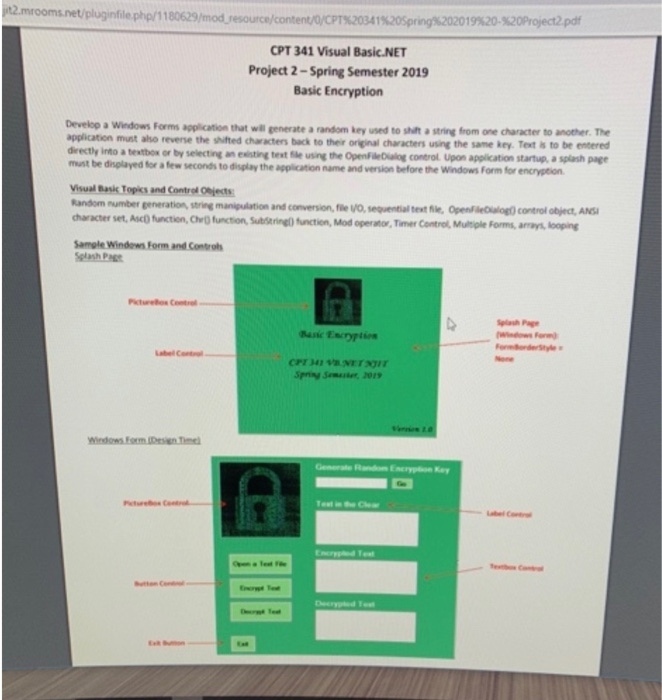
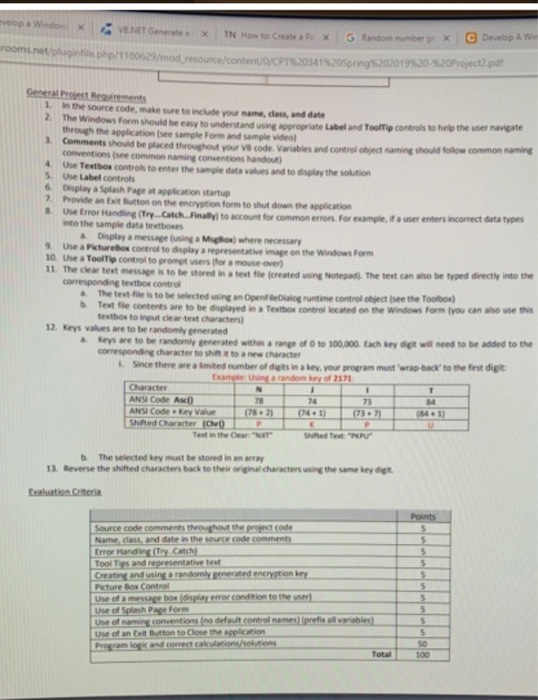
le php/1180629 CPT%20341%20Spring%20201 9%20-%20roject2.pdf CPT 341 Visual Basic.NET Project 2-Spring Semester 2019 Basic Encryption Develp a Windows Forms application thut wil generate a random key used to shilt astring from one character to another. The application must aho reverse the shuifted characters back to their original characters using the same key. Text is to be entered directly into a textbox or by selecting an eeting text , usng the Openfadaing control upon application startup, aspl sh page disglay the application name and version before the Windows Form for encryption must be displayed for a few seconds to Visual Basic Topics and Control Onjects Random sumber generation, string manipulation and conversion, file VO, sequential text ie chracter set, AscONnction, Ov0fun Saarine0fuction, Mod operator, Timer Cotrol, Munplefones, amn looping Opalog) control object, AN Samgle Windews Form and Control Selash Page ': v.NET Generate b X TN How to Create , p, x | G Random nnter 9 2019%20 %20Proyect2pdf 1. In the source code, make sure to include your name, class, and date 2. The Windows Form should be easy to understand using appropriate Label and Toolfip controls to help the user navigate through the application (see sample Form and sample video Comments shouid be placed throughout your V8 code. Variables and control oeject naming conventions (see common naming conventions handout) should follow common naming 4 Use Textbox controls to enter the sample data values and to dsplay the solution S. Use Label controls 6 Display a Splash Page at application startup Provide an Exit Bution on the emcryption form to shut down the application Use Error Handling (Try Catch Finally) to account for common errors For example, if a user enters incorrect data types into the sample data textboses a Display a message (using a Magiox) where necessary 9 Use a Picturebos control to dsplay a representative image on the Windows Form 10. Use a ToolTip control to prompt users (for a mouse over) 11. The clear test message is to be stored in atest file (created using Notepad). The text can aso be typed directly into the corresponding textbos control a The tesit file is to be selected using an Open eDialog r b Text fle runtime control object (see the Toolbox) contents are to be displayed in a Textbox control located on the Windows Form (you can aso use textbox to input clear test characters 12. Keys values are to be randomly generated a Keys are to be randomly generated within a ange of 0 to 100,000. Each key dgt will need to be added to the corresponding character to shift it to a new character L Since there are a Imited number of digts in a key, your program must wrap-back to the first digit Cnample thing & rendom bey of 2171 Character ANSI Code Au 18 74 84 hifted Character Text in the Clear "NT b. The selected key must be stored in an array 13. Reverse the shifted characters back to their original characters using the same key digt Source code comments throughout the project code Name class, and date in the source code comments Error Handing (Try Catch Tool Tips and representative test Creating and using a randomly neated encrytion kry Pcture Box Contol Use of a message box (osplay eorcondition to the ue) Use of Splash Page Ferm control nemes) iprefis alf variet Use of an Exit Button to Close the application Total 100
Step by Step Solution
There are 3 Steps involved in it

Get step-by-step solutions from verified subject matter experts
 Study Help