







Question: Learning objectives Edit, compile and run Java programs Utilize arrays to store information Apply basic object-oriented programming concepts Understand the university policies for academic integrity
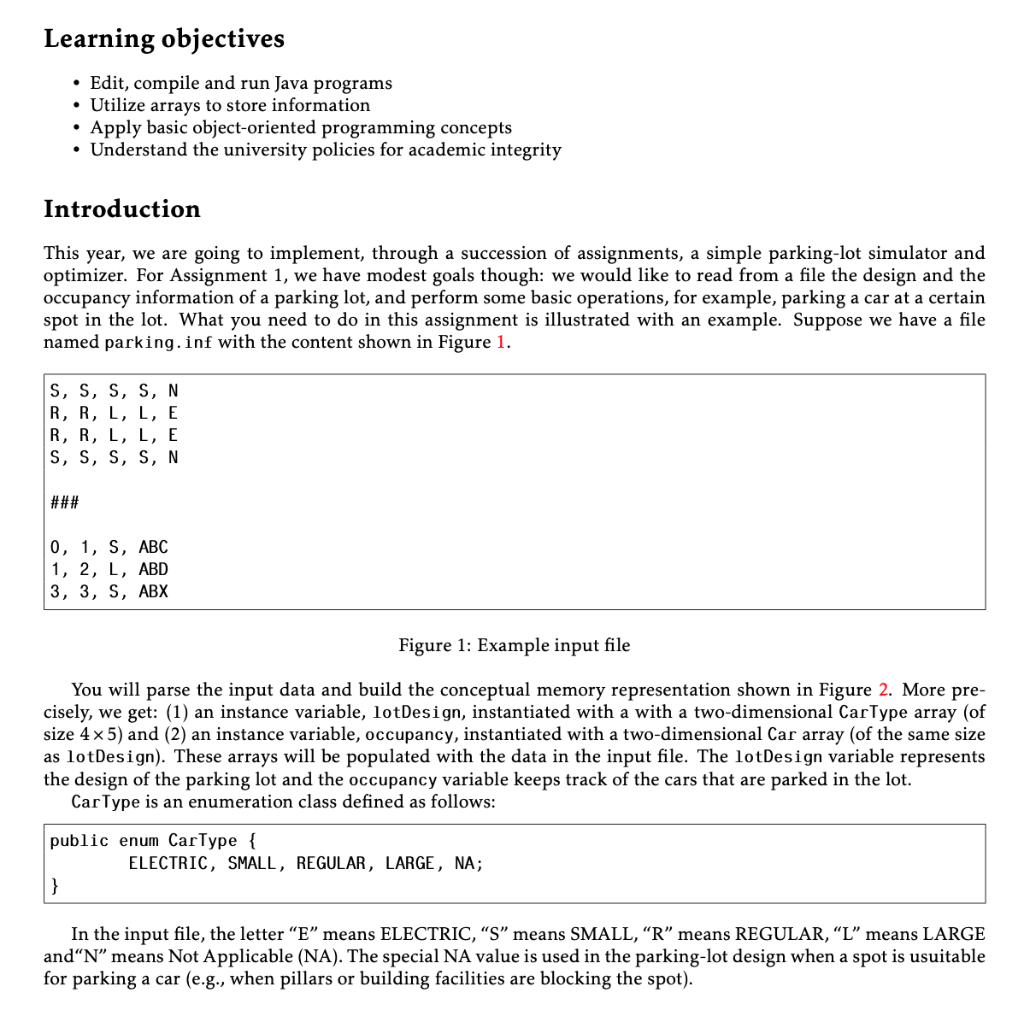
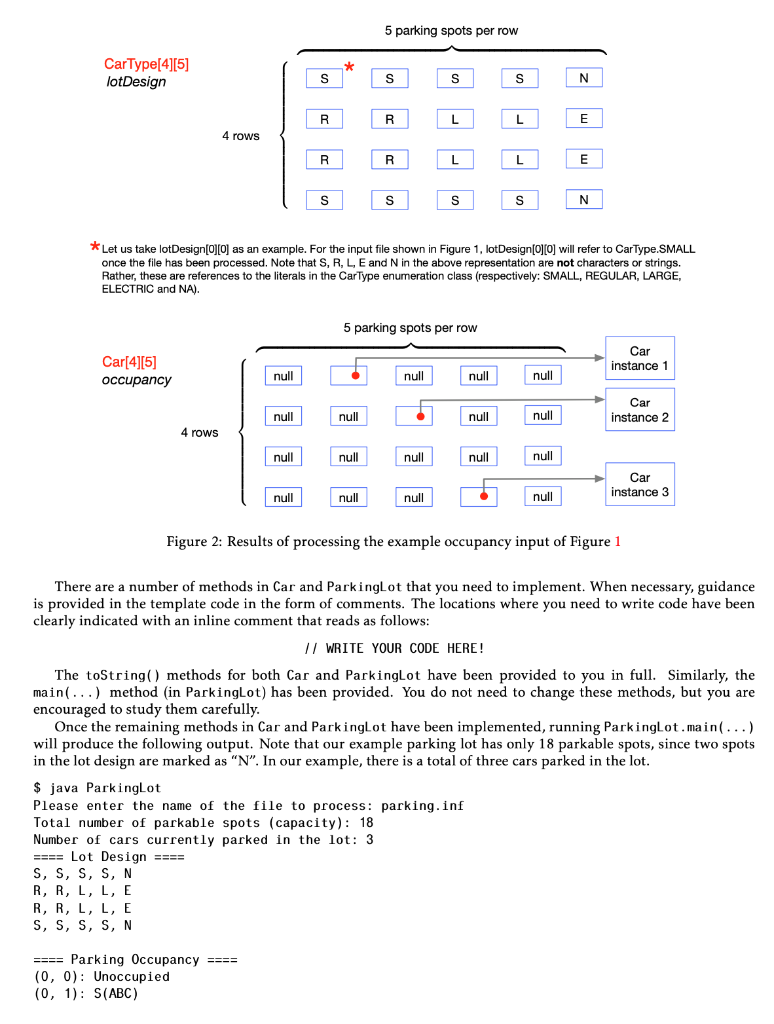
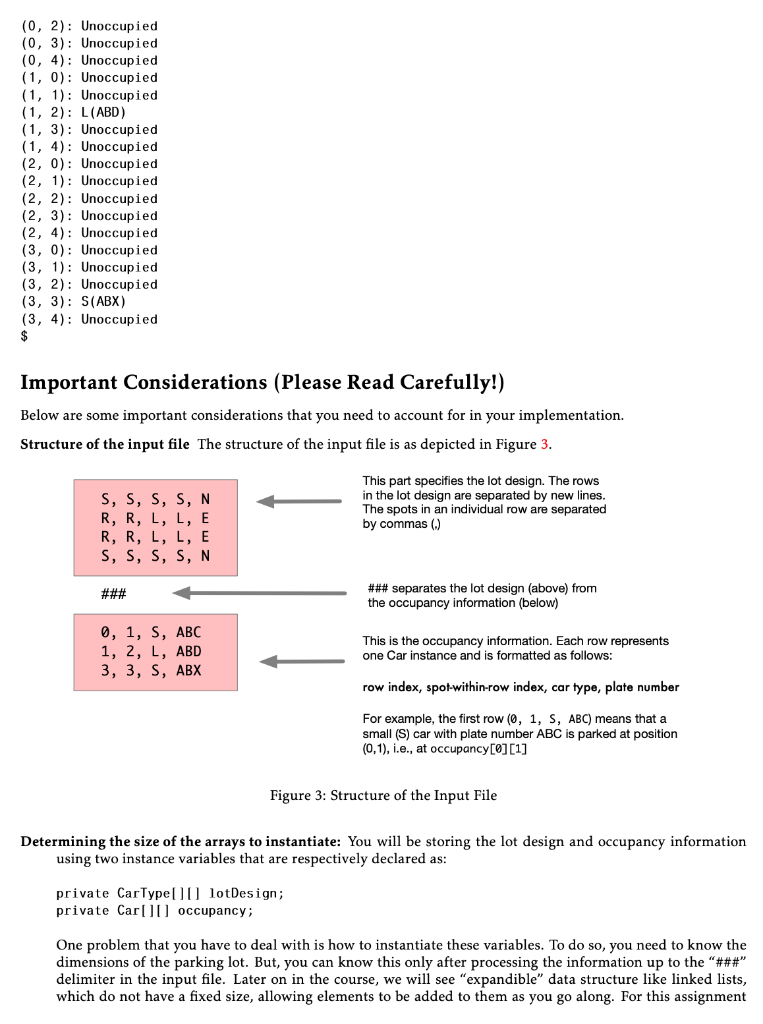
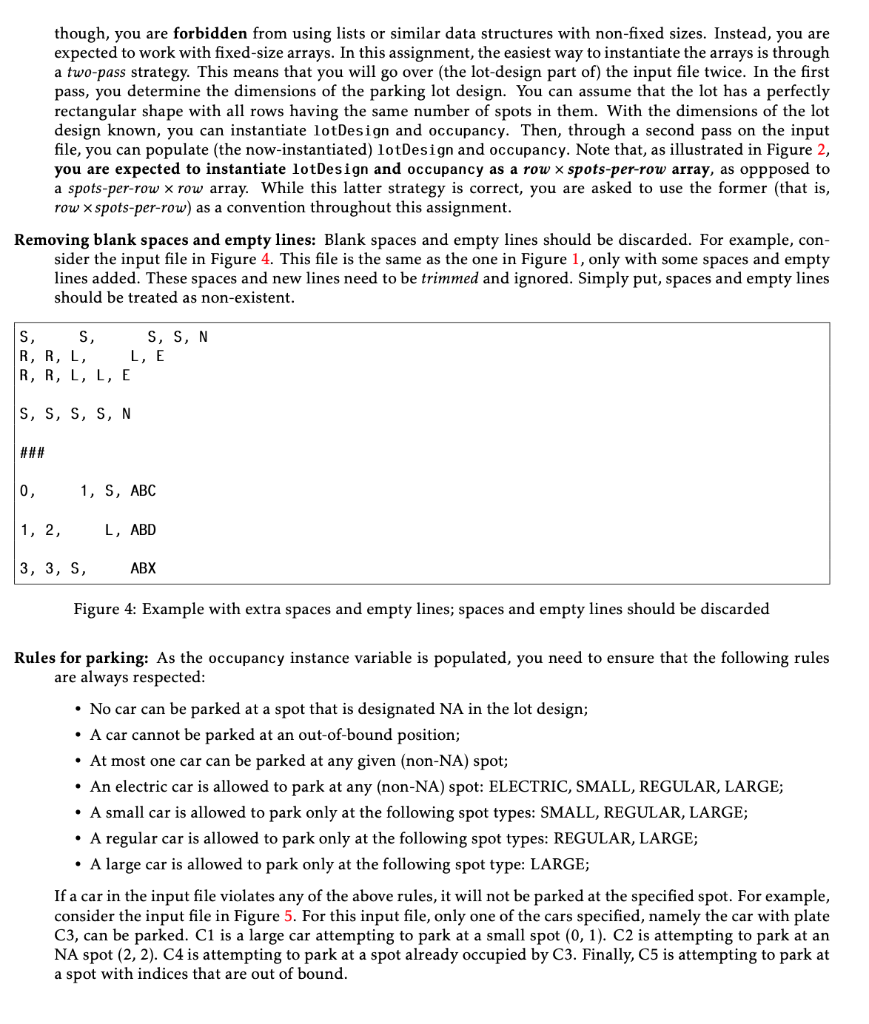
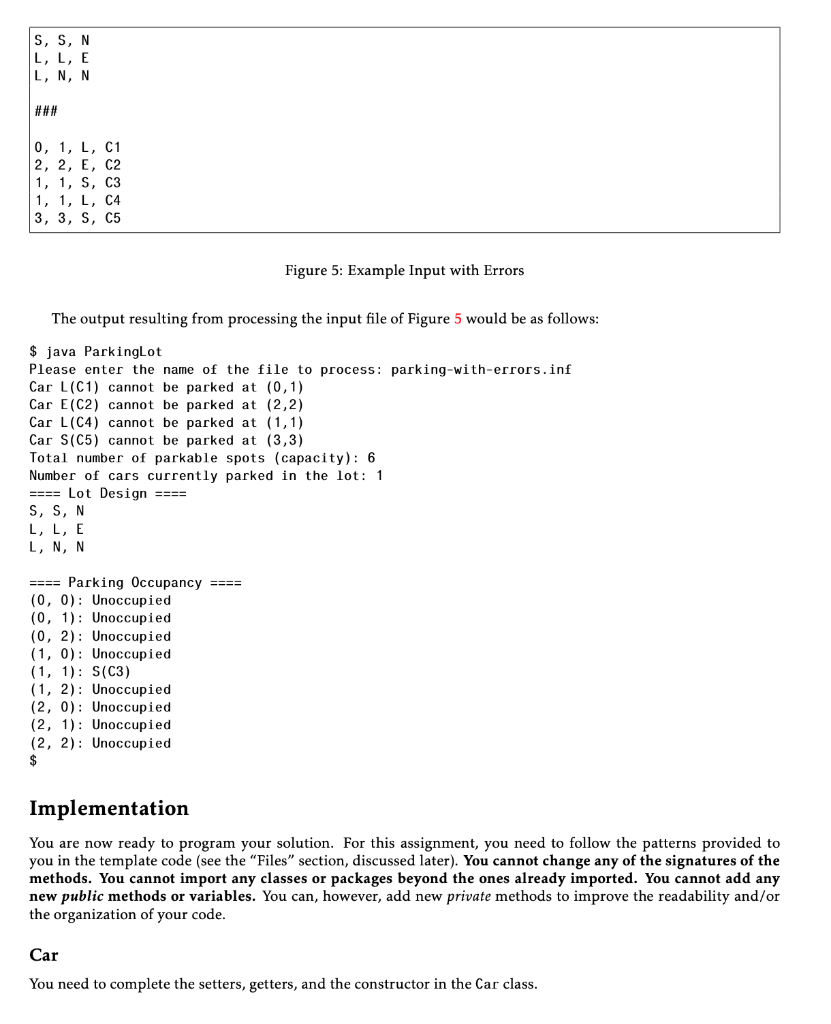
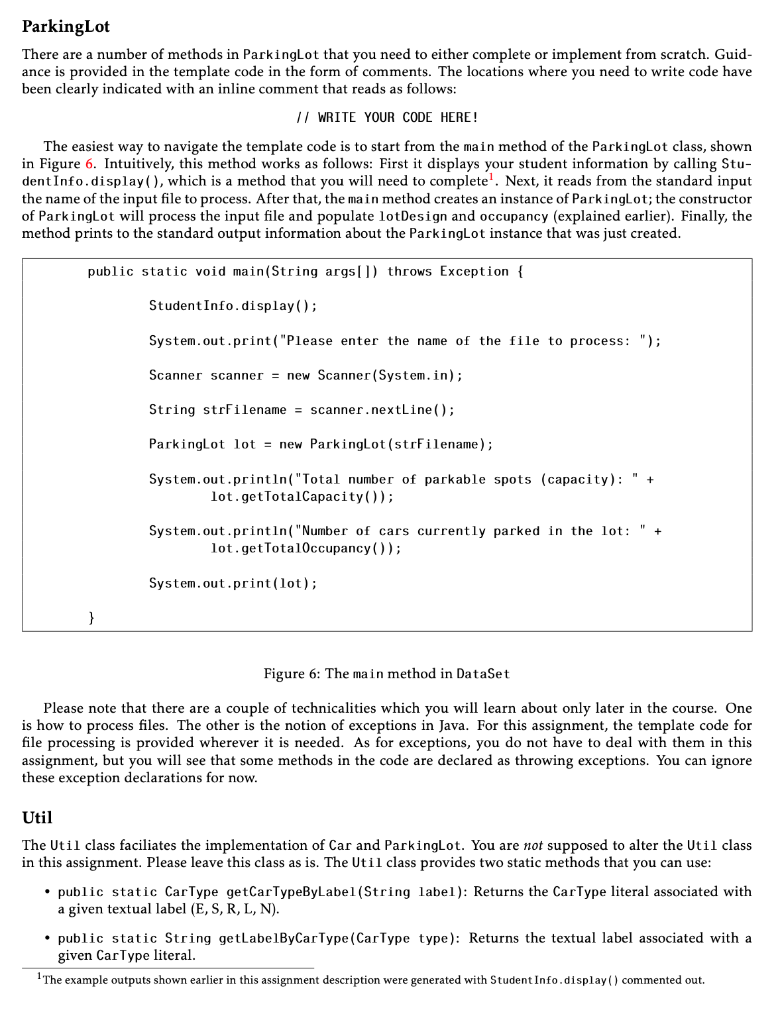
Learning objectives Edit, compile and run Java programs Utilize arrays to store information Apply basic object-oriented programming concepts Understand the university policies for academic integrity Introduction This year, we are going to implement, through a succession of assignments, a simple parking-lot simulator and optimizer. For Assignment 1, we have modest goals though: we would like to read from a file the design and the occupancy information of a parking lot, and perform some basic operations, for example, parking a car at a certain spot in the lot. What you need to do in this assignment is illustrated with an example. Suppose we have a file named parking.inf with the content shown in Figure 1. S, S, S, S, N R, R, L, L, E R, R, L, L, E S, S, S, S, N ### 0, 1, S, ABC 1, 2, L, ABD 3, 3, S, ABX Figure 1: Example input file You will parse the input data and build the conceptual memory representation shown in Figure 2. More pre- cisely, we get: (1) an instance variable, lotDesign, instantiated with a with a two-dimensional CarType array (of size 4 x 5) and (2) an instance variable, occupancy, instantiated with a two-dimensional Car array (of the same size as lotDesign). These arrays will be populated with the data in the input file. The lotDesign variable represents the design of the parking lot and the occupancy variable keeps track of the cars that are parked in the lot. Car Type is an enumeration class defined as follows: public enum CarType { ELECTRIC, SMALL, REGULAR, LARGE, NA; } In the input file, the letter E means ELECTRIC, S means SMALL, R means REGULAR, L means LARGE andN means Not Applicable (NA). The special NA value is used in the parking-lot design when a spot is usuitable for parking a car (e.g., when pillars or building facilities are blocking the spot). 5 parking spots per row * CarType[4][5] lotDesign S S cs S S N R R L L E 4 rows R R L 1 E S S S S N *Let us take lotDesign[0][0] as an example. For the input file shown in Figure 1, lotDesign[0][0] will refer to CarType.SMALL once the file has been processed. Note that S, R, L, E and N in the above representation are not characters or strings. Rather, these are references to the literals in the CarType enumeration class (respectively: SMALL, REGULAR, LARGE, ELECTRIC and NA). 5 parking spots per row Car[4][5] occupancy Car instance 1 null null null null null null null null Car instance 2 4 rows null null null null null Car instance 3 null null null . null Figure 2: Results of processing the example occupancy input of Figure 1 There are a number of methods in Car and ParkingLot that you need to implement. When necessary, guidance is provided in the template code in the form of comments. The locations where you need to write code have been clearly indicated with an inline comment that reads as follows: // WRITE YOUR CODE HERE! The toString() methods for both Car and Parkinglot have been provided to you in full. Similarly, the main(...) method (in Parking Lot) has been provided. You do not need to change these methods, but you are encouraged to study them carefully. Once the remaining methods in Car and Parkinglot have been implemented, running Parkinglot.main(...) will produce the following output. Note that our example parking lot has only 18 parkable spots, since two spots in the lot design are marked as "N". In our example, there is a total of three cars parked in the lot. $ java Parkinglot Please enter the name of the file to process: parking.inf Total number of parkable spots (capacity): 18 Number of cars currently parked in the lot: 3 ==== Lot Design ==== S, S, S, S, N R, R, L, LE R, R, L, L, E S, S, S, S, N ==== Parking Occupancy ==== (0, 0): Unoccupied (0, 1): S(ABC) (0, 2): Unoccupied (0, 3): Unoccupied (0, 4): Unoccupied (1, 0): Unoccupied (1, 1): Unoccupied (1, 2): L(ABD) (1, 3): Unoccupied (1, 4): Unoccupied (2, 0): Unoccupied (2, 1): Unoccupied (2, 2): Unoccupied (2, 3): Unoccupied (2, 4): Unoccupied (3, 0): Unoccupied (3, 1): Unoccupied (3, 2): Unoccupied (3, 3): S(ABX) (3, 4): Unoccupied Important Considerations (Please Read Carefully!) Below are some important considerations that you need to account for in your implementation. Structure of the input file The structure of the input file is as depicted in Figure 3. S, S, S, S, N R, R, L, L, E R, R, L, L, E S, S, S, S, N This part specifies the lot design. The rows in the lot design are separated by new lines. The spots in an individual row are separated by commas ( ### ### separates the lot design (above) from the occupancy information (below) 0, 1, S, ABC 1, 2, L, ABD 3, 3, S, ABX This is the occupancy information. Each row represents one Car instance and is formatted as follows: row index, spot-within-row index, car type, plate number For example, the first row (0, 1, S, ABC) means that a small (S) car with plate number ABC is parked at position (0,1), i.e., at occupancy[0][1] Figure 3: Structure of the Input File Determining the size of the arrays to instantiate: You will be storing the lot design and occupancy information using two instance variables that are respectively declared as: private CarTypelotDesign; private Card occupancy; One problem that you have to deal with is how to instantiate these variables. To do so, you need to know the dimensions of the parking lot. But, you can know this only after processing the information up to the "###" delimiter in the input file. Later on in the course, we will see "expandible" data structure like linked lists, which do not have a fixed size, allowing elements to be added to them as you go along. For this assignment though, you are forbidden from using lists or similar data structures with non-fixed sizes. Instead, you are expected to work with fixed-size arrays. In this assignment, the easiest way to instantiate the arrays is through a two-pass strategy. This means that you will go over (the lot-design part of the input file twice. In the first pass, you determine the dimensions of the parking lot design. You can assume that the lot has a perfectly rectangular shape with all rows having the same number of spots in them. With the dimensions of the lot design known, you can instantiate lotDesign and occupancy. Then, through a second pass on the input file, you can populate (the now-instantiated) lotDesign and occupancy. Note that, as illustrated in Figure 2, you are expected to instantiate lotDesign and occupancy as a row x spots-per-row array, as oppposed to a spots-per-row x row array. While this latter strategy is correct, you are asked to use the former (that is, row x spots-per-row) as a convention throughout this assignment. Removing blank spaces and empty lines: Blank spaces and empty lines should be discarded. For example, con- sider the input file in Figure 4. This file is the same as the one in Figure 1, only with some spaces and empty lines added. These spaces and new lines need to be trimmed and ignored. Simply put, spaces and empty lines should be treated as non-existent. S, S, S, S, N R, R, L, L, E R, R, L, L, E S, S, S, S, N ### 0, 1, S, ABC 1, 2, L, ABD 3, 3, S, ABX Figure 4: Example with extra spaces and empty lines; spaces and empty lines should be discarded Rules for parking: As the occupancy instance variable is populated, you need to ensure that the following rules are always respected: No car can be parked at a spot that is designated NA in the lot design; A car cannot be parked at an out-of-bound position; . At most one car can be parked at any given (non-NA) spot; An electric car is allowed to park at any (non-NA) spot: ELECTRIC, SMALL, REGULAR, LARGE; A small car is allowed to park only at the following spot types: SMALL, REGULAR, LARGE; A regular car is allowed to park only at the following spot types: REGULAR, LARGE; A large car is allowed to park only at the following spot type: LARGE; If a car in the input file violates any of the above rules, it will not be parked at the specified spot. For example, consider the input file in Figure 5. For this input file, only one of the cars specified, namely the car with plate C3, can be parked. Ci is a large car attempting to park at a small spot (0,1). C2 is attempting to park at an NA spot (2, 2). C4 is attempting to park at a spot already occupied by C3. Finally, C5 is attempting to park at a spot with indices that are out of bound. S, S, N L, L, E L, N, N ### 0, 1, L. C1 2, 2, E, C2 1, 1, S, C3 1, 1, L, C4 3, 3, S, C5 Figure 5: Example Input with Errors The output resulting from processing the input file of Figure 5 would be as follows: $ java Parkinglot Please enter the name of the file to process: parking-with-errors.inf Car L(C1) cannot be parked at (0,1) Car E(C2) cannot be parked at (2,2) Car L(C4) cannot be parked (1,1) Car S(C5) cannot be parked at (3,3) Total number of parkable spots (capacity): 6 Number of cars currently parked in the lot: 1 ==== Lot Design ==== S, S, N L, L, E L, N, N ==== Parking Occupancy ==== (0, 0): Unoccupied (0, 1): Unoccupied (0, 2): Unoccupied (1, 0): Unoccupied (1, 1): S(C3) (1, 2): Unoccupied (2, 0): Unoccupied (2, 1): Unoccupied (2, 2): Unoccupied $ Implementation You are now ready to program your solution. For this assignment, you need to follow the patterns provided to you in the template code (see the "Files" section, discussed later). You cannot change any of the signatures of the methods. You cannot import any classes or packages beyond the ones already imported. You cannot add any new public methods or variables. You can, however, add new private methods to improve the readability and/or the organization of your code. Car You need to complete the setters, getters, and the constructor in the Car class. Parking Lot There are a number of methods in Parkinglot that you need to either complete or implement from scratch. Guid- ance is provided in the template code in the form of comments. The locations where you need to write code have been clearly indicated with an inline comment that reads as follows: // WRITE YOUR CODE HERE! The easiest way to navigate the template code is to start from the main method of the Parking Lot class, shown in Figure 6. Intuitively, this method works as follows: First it displays your student information by calling Stu- dent Info.display(), which is a method that you will need to complete'. Next, it reads from the standard input the name of the input file to process. After that, the main method creates an instance of Parkinglot; the constructor of ParkingLot will process the input file and populate lotDesign and occupancy (explained earlier). Finally, the method prints to the standard output information about the ParkingLot instance that was just created. public static void main(String args[]) throws Exception { Student Info.display(); System.out.print("Please enter the name of the file to process: "); Scanner scanner = new Scanner(System.in); String strFilename = scanner.nextLine(); Parkinglot lot = new Parking Lot (strFilename); System.out.println("Total number of parkable spots (capacity): lot.getTotalCapacity()); System.out.println("Number of cars currently parked in the lot: " + lot.getTotalOccupancy()); System.out.print(lot); } Figure 6: The main method in DataSet Please note that there are a couple of technicalities which you will learn about only later in the course. One is how to process files. The other is the notion of exceptions in Java. For this assignment, the template code for file processing is provided wherever it is needed. As for exceptions, you do not have to deal with them in this assignment, but you will see that some methods in the code are declared as throwing exceptions. You can ignore these exception declarations for now. Util The Util class faciliates the implementation of Car and ParkingLot. You are not supposed to alter the Util class in this assignment. Please leave this class as is. The Util class provides two static methods that you can use: public static CarType get CarTypeByLabel (String label): Returns the CarType literal associated with a given textual label (E, S, R, L, N). public static String getLabelByCar Type (CarType type): Returns the textual label associated with a given CarType literal. 1 The example outputs shown earlier in this assignment description were generated with Student Info.display() commented out. Learning objectives Edit, compile and run Java programs Utilize arrays to store information Apply basic object-oriented programming concepts Understand the university policies for academic integrity Introduction This year, we are going to implement, through a succession of assignments, a simple parking-lot simulator and optimizer. For Assignment 1, we have modest goals though: we would like to read from a file the design and the occupancy information of a parking lot, and perform some basic operations, for example, parking a car at a certain spot in the lot. What you need to do in this assignment is illustrated with an example. Suppose we have a file named parking.inf with the content shown in Figure 1. S, S, S, S, N R, R, L, L, E R, R, L, L, E S, S, S, S, N ### 0, 1, S, ABC 1, 2, L, ABD 3, 3, S, ABX Figure 1: Example input file You will parse the input data and build the conceptual memory representation shown in Figure 2. More pre- cisely, we get: (1) an instance variable, lotDesign, instantiated with a with a two-dimensional CarType array (of size 4 x 5) and (2) an instance variable, occupancy, instantiated with a two-dimensional Car array (of the same size as lotDesign). These arrays will be populated with the data in the input file. The lotDesign variable represents the design of the parking lot and the occupancy variable keeps track of the cars that are parked in the lot. Car Type is an enumeration class defined as follows: public enum CarType { ELECTRIC, SMALL, REGULAR, LARGE, NA; } In the input file, the letter E means ELECTRIC, S means SMALL, R means REGULAR, L means LARGE andN means Not Applicable (NA). The special NA value is used in the parking-lot design when a spot is usuitable for parking a car (e.g., when pillars or building facilities are blocking the spot). 5 parking spots per row * CarType[4][5] lotDesign S S cs S S N R R L L E 4 rows R R L 1 E S S S S N *Let us take lotDesign[0][0] as an example. For the input file shown in Figure 1, lotDesign[0][0] will refer to CarType.SMALL once the file has been processed. Note that S, R, L, E and N in the above representation are not characters or strings. Rather, these are references to the literals in the CarType enumeration class (respectively: SMALL, REGULAR, LARGE, ELECTRIC and NA). 5 parking spots per row Car[4][5] occupancy Car instance 1 null null null null null null null null Car instance 2 4 rows null null null null null Car instance 3 null null null . null Figure 2: Results of processing the example occupancy input of Figure 1 There are a number of methods in Car and ParkingLot that you need to implement. When necessary, guidance is provided in the template code in the form of comments. The locations where you need to write code have been clearly indicated with an inline comment that reads as follows: // WRITE YOUR CODE HERE! The toString() methods for both Car and Parkinglot have been provided to you in full. Similarly, the main(...) method (in Parking Lot) has been provided. You do not need to change these methods, but you are encouraged to study them carefully. Once the remaining methods in Car and Parkinglot have been implemented, running Parkinglot.main(...) will produce the following output. Note that our example parking lot has only 18 parkable spots, since two spots in the lot design are marked as "N". In our example, there is a total of three cars parked in the lot. $ java Parkinglot Please enter the name of the file to process: parking.inf Total number of parkable spots (capacity): 18 Number of cars currently parked in the lot: 3 ==== Lot Design ==== S, S, S, S, N R, R, L, LE R, R, L, L, E S, S, S, S, N ==== Parking Occupancy ==== (0, 0): Unoccupied (0, 1): S(ABC) (0, 2): Unoccupied (0, 3): Unoccupied (0, 4): Unoccupied (1, 0): Unoccupied (1, 1): Unoccupied (1, 2): L(ABD) (1, 3): Unoccupied (1, 4): Unoccupied (2, 0): Unoccupied (2, 1): Unoccupied (2, 2): Unoccupied (2, 3): Unoccupied (2, 4): Unoccupied (3, 0): Unoccupied (3, 1): Unoccupied (3, 2): Unoccupied (3, 3): S(ABX) (3, 4): Unoccupied Important Considerations (Please Read Carefully!) Below are some important considerations that you need to account for in your implementation. Structure of the input file The structure of the input file is as depicted in Figure 3. S, S, S, S, N R, R, L, L, E R, R, L, L, E S, S, S, S, N This part specifies the lot design. The rows in the lot design are separated by new lines. The spots in an individual row are separated by commas ( ### ### separates the lot design (above) from the occupancy information (below) 0, 1, S, ABC 1, 2, L, ABD 3, 3, S, ABX This is the occupancy information. Each row represents one Car instance and is formatted as follows: row index, spot-within-row index, car type, plate number For example, the first row (0, 1, S, ABC) means that a small (S) car with plate number ABC is parked at position (0,1), i.e., at occupancy[0][1] Figure 3: Structure of the Input File Determining the size of the arrays to instantiate: You will be storing the lot design and occupancy information using two instance variables that are respectively declared as: private CarTypelotDesign; private Card occupancy; One problem that you have to deal with is how to instantiate these variables. To do so, you need to know the dimensions of the parking lot. But, you can know this only after processing the information up to the "###" delimiter in the input file. Later on in the course, we will see "expandible" data structure like linked lists, which do not have a fixed size, allowing elements to be added to them as you go along. For this assignment though, you are forbidden from using lists or similar data structures with non-fixed sizes. Instead, you are expected to work with fixed-size arrays. In this assignment, the easiest way to instantiate the arrays is through a two-pass strategy. This means that you will go over (the lot-design part of the input file twice. In the first pass, you determine the dimensions of the parking lot design. You can assume that the lot has a perfectly rectangular shape with all rows having the same number of spots in them. With the dimensions of the lot design known, you can instantiate lotDesign and occupancy. Then, through a second pass on the input file, you can populate (the now-instantiated) lotDesign and occupancy. Note that, as illustrated in Figure 2, you are expected to instantiate lotDesign and occupancy as a row x spots-per-row array, as oppposed to a spots-per-row x row array. While this latter strategy is correct, you are asked to use the former (that is, row x spots-per-row) as a convention throughout this assignment. Removing blank spaces and empty lines: Blank spaces and empty lines should be discarded. For example, con- sider the input file in Figure 4. This file is the same as the one in Figure 1, only with some spaces and empty lines added. These spaces and new lines need to be trimmed and ignored. Simply put, spaces and empty lines should be treated as non-existent. S, S, S, S, N R, R, L, L, E R, R, L, L, E S, S, S, S, N ### 0, 1, S, ABC 1, 2, L, ABD 3, 3, S, ABX Figure 4: Example with extra spaces and empty lines; spaces and empty lines should be discarded Rules for parking: As the occupancy instance variable is populated, you need to ensure that the following rules are always respected: No car can be parked at a spot that is designated NA in the lot design; A car cannot be parked at an out-of-bound position; . At most one car can be parked at any given (non-NA) spot; An electric car is allowed to park at any (non-NA) spot: ELECTRIC, SMALL, REGULAR, LARGE; A small car is allowed to park only at the following spot types: SMALL, REGULAR, LARGE; A regular car is allowed to park only at the following spot types: REGULAR, LARGE; A large car is allowed to park only at the following spot type: LARGE; If a car in the input file violates any of the above rules, it will not be parked at the specified spot. For example, consider the input file in Figure 5. For this input file, only one of the cars specified, namely the car with plate C3, can be parked. Ci is a large car attempting to park at a small spot (0,1). C2 is attempting to park at an NA spot (2, 2). C4 is attempting to park at a spot already occupied by C3. Finally, C5 is attempting to park at a spot with indices that are out of bound. S, S, N L, L, E L, N, N ### 0, 1, L. C1 2, 2, E, C2 1, 1, S, C3 1, 1, L, C4 3, 3, S, C5 Figure 5: Example Input with Errors The output resulting from processing the input file of Figure 5 would be as follows: $ java Parkinglot Please enter the name of the file to process: parking-with-errors.inf Car L(C1) cannot be parked at (0,1) Car E(C2) cannot be parked at (2,2) Car L(C4) cannot be parked (1,1) Car S(C5) cannot be parked at (3,3) Total number of parkable spots (capacity): 6 Number of cars currently parked in the lot: 1 ==== Lot Design ==== S, S, N L, L, E L, N, N ==== Parking Occupancy ==== (0, 0): Unoccupied (0, 1): Unoccupied (0, 2): Unoccupied (1, 0): Unoccupied (1, 1): S(C3) (1, 2): Unoccupied (2, 0): Unoccupied (2, 1): Unoccupied (2, 2): Unoccupied $ Implementation You are now ready to program your solution. For this assignment, you need to follow the patterns provided to you in the template code (see the "Files" section, discussed later). You cannot change any of the signatures of the methods. You cannot import any classes or packages beyond the ones already imported. You cannot add any new public methods or variables. You can, however, add new private methods to improve the readability and/or the organization of your code. Car You need to complete the setters, getters, and the constructor in the Car class. Parking Lot There are a number of methods in Parkinglot that you need to either complete or implement from scratch. Guid- ance is provided in the template code in the form of comments. The locations where you need to write code have been clearly indicated with an inline comment that reads as follows: // WRITE YOUR CODE HERE! The easiest way to navigate the template code is to start from the main method of the Parking Lot class, shown in Figure 6. Intuitively, this method works as follows: First it displays your student information by calling Stu- dent Info.display(), which is a method that you will need to complete'. Next, it reads from the standard input the name of the input file to process. After that, the main method creates an instance of Parkinglot; the constructor of ParkingLot will process the input file and populate lotDesign and occupancy (explained earlier). Finally, the method prints to the standard output information about the ParkingLot instance that was just created. public static void main(String args[]) throws Exception { Student Info.display(); System.out.print("Please enter the name of the file to process: "); Scanner scanner = new Scanner(System.in); String strFilename = scanner.nextLine(); Parkinglot lot = new Parking Lot (strFilename); System.out.println("Total number of parkable spots (capacity): lot.getTotalCapacity()); System.out.println("Number of cars currently parked in the lot: " + lot.getTotalOccupancy()); System.out.print(lot); } Figure 6: The main method in DataSet Please note that there are a couple of technicalities which you will learn about only later in the course. One is how to process files. The other is the notion of exceptions in Java. For this assignment, the template code for file processing is provided wherever it is needed. As for exceptions, you do not have to deal with them in this assignment, but you will see that some methods in the code are declared as throwing exceptions. You can ignore these exception declarations for now. Util The Util class faciliates the implementation of Car and ParkingLot. You are not supposed to alter the Util class in this assignment. Please leave this class as is. The Util class provides two static methods that you can use: public static CarType get CarTypeByLabel (String label): Returns the CarType literal associated with a given textual label (E, S, R, L, N). public static String getLabelByCar Type (CarType type): Returns the textual label associated with a given CarType literal. 1 The example outputs shown earlier in this assignment description were generated with Student Info.display() commented out
Step by Step Solution
There are 3 Steps involved in it

Get step-by-step solutions from verified subject matter experts
 Study Help