







Question: Learning Objectives Turtles built-in functions Creating void functions Creating returning functions Importing and using some function in the random module Use of colours Problem Description
Learning Objectives Turtles built-in functions Creating void functions Creating returning functions Importing and using some function in the random module Use of colours Problem Description
Write a program which draws with builtin turtle functions so that the program: a. Includes some colour, fills in some areas with some colour, changes the pen colour in some parts b. the turtle does at least three right or left turns c. the pen changes from being up to down at least a couple of times d. there are at least three forloops e. You create at least three void (or nonfruitful) functions (i.e. not returning any value), where the functions do drawings and/or pen movements but do not return any values f. You create at least two functions which have some parameters (they may be productive or void functions, and they may be functions that count for the previous requirement) g. The defined functions are called (used and passed arguments to the parameters as needed) h. The program generates some random values and uses them (such as random colours) Organize your program as follows: place the definitions of the functions first, and after including all the definitions place the top or main level. Call the functions from the top/main level, and functions may call other functions (as long as the called functions are placed earlier in the python file).
The drawings you obtain are completely up to you. -please draw a building or a house if you can
Enjoy the creative process! WHAT TO SUBMIT
1. Your code needs to follow the general coding guidelines
2. In your programs, place the import statements of any modules you may need (such as import turtle or import turtle) outside the functions you define and place them at the "top level" of the program. By doing so, the module name (turtle, depending on how you imported) is global, and thus you will be able to use the module functions (via the dot notation) using the module name (turtle) everywhere (i.e. turtle. forward(...) ): BOTH at the top level or main program and also inside any functions you define (with no need to include the module name as a parameter to the functions).
3. Your functions must be defined (placed in the .py file, with def) before they are used (i.e., called or invoked and passed arguments). They may all be called from the top level, and only if a function needs to use another function may you call them from another function.
4. YOU ARE ENCOURAGED NOT TO CALL a function from another function when the first function (e.g. funA) ends, and you want to continue execution in the other (funB) function. RATHER, to accomplish that two functions are executed one after the other, the top level (or whichever level needs to execute the two functions) should call the two functions in order. In this example, first, call funA and then call funB.
5. Name your functions and variables reasonably (to suggest their purpose).
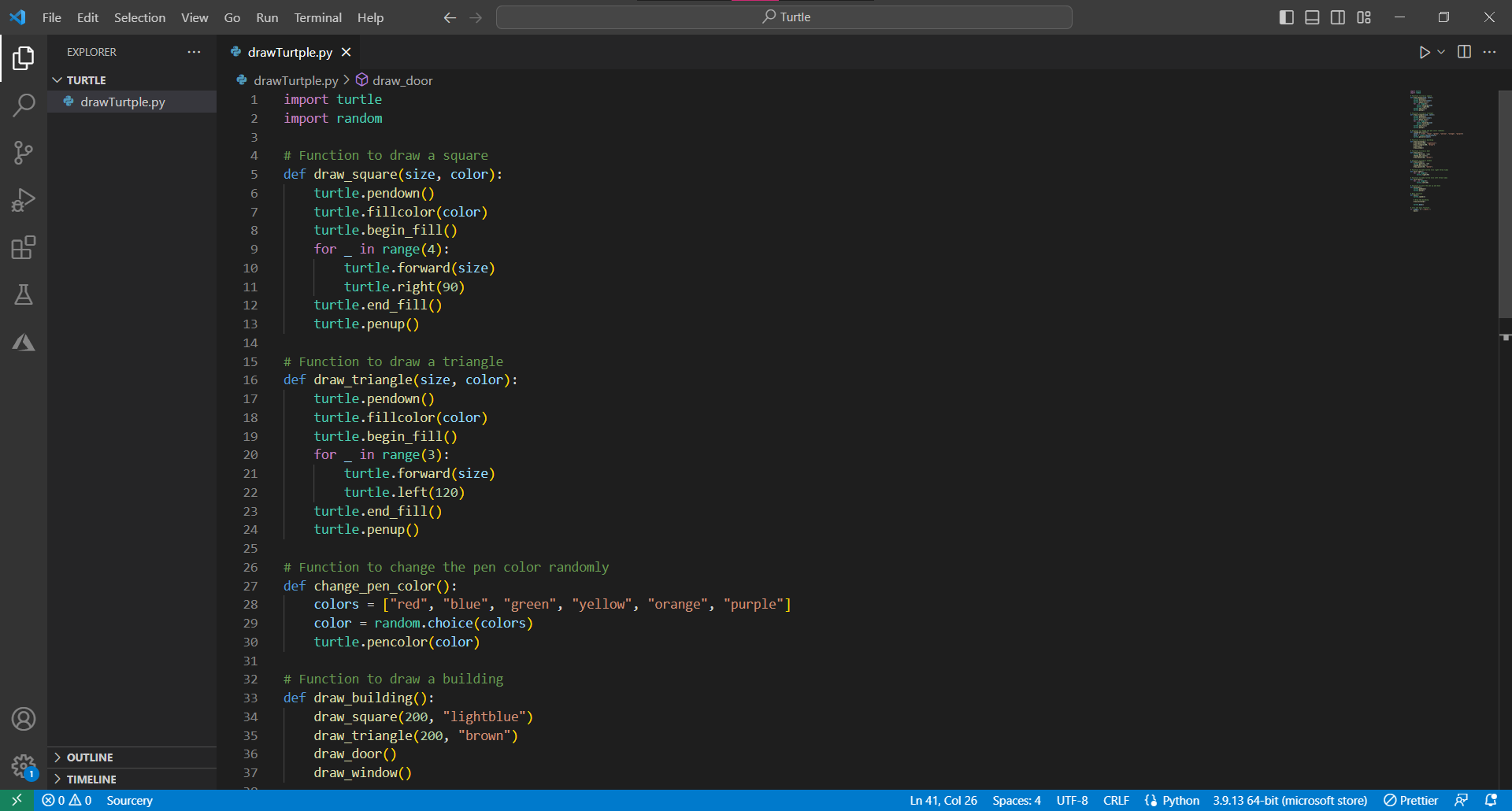
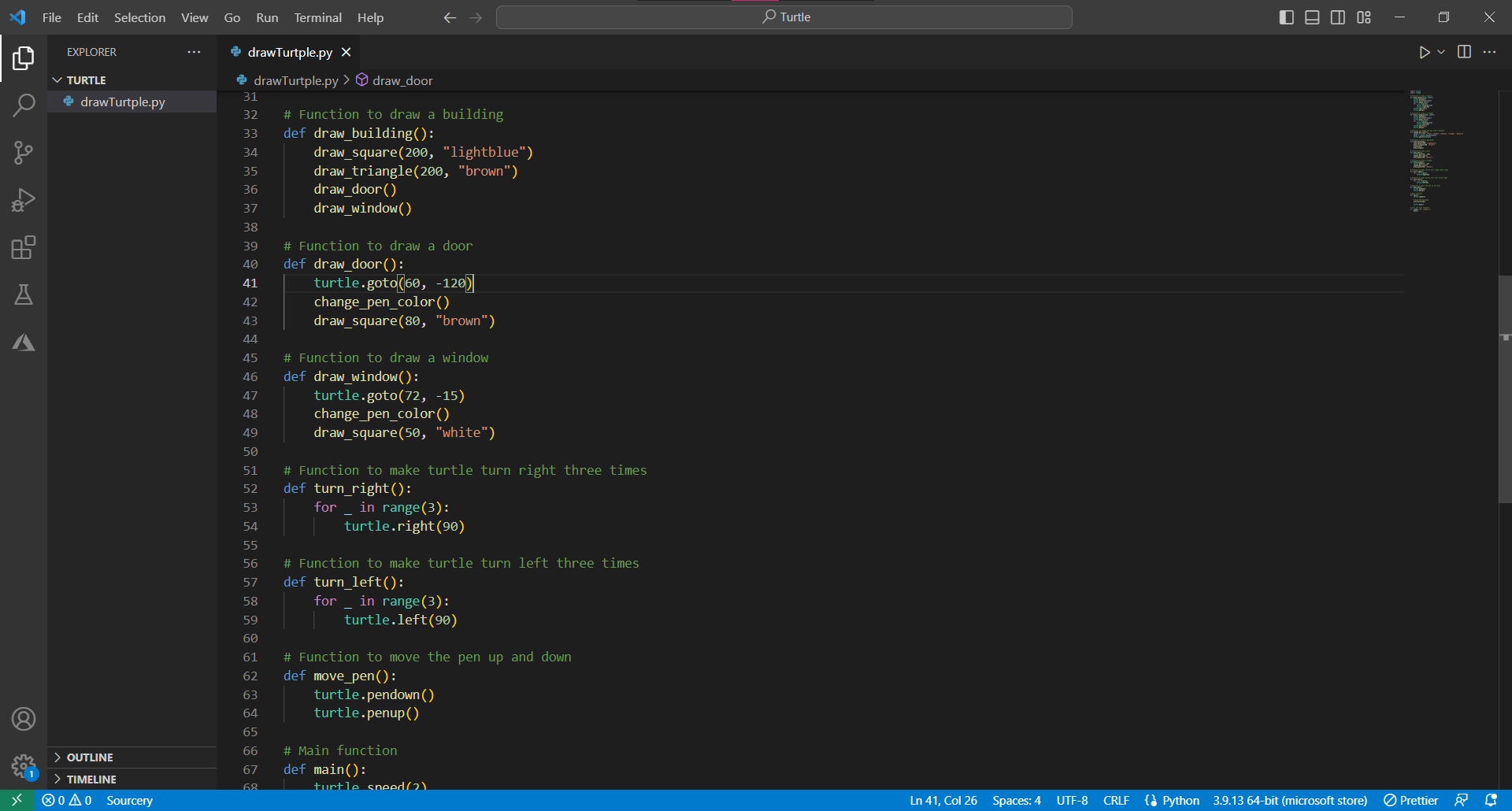
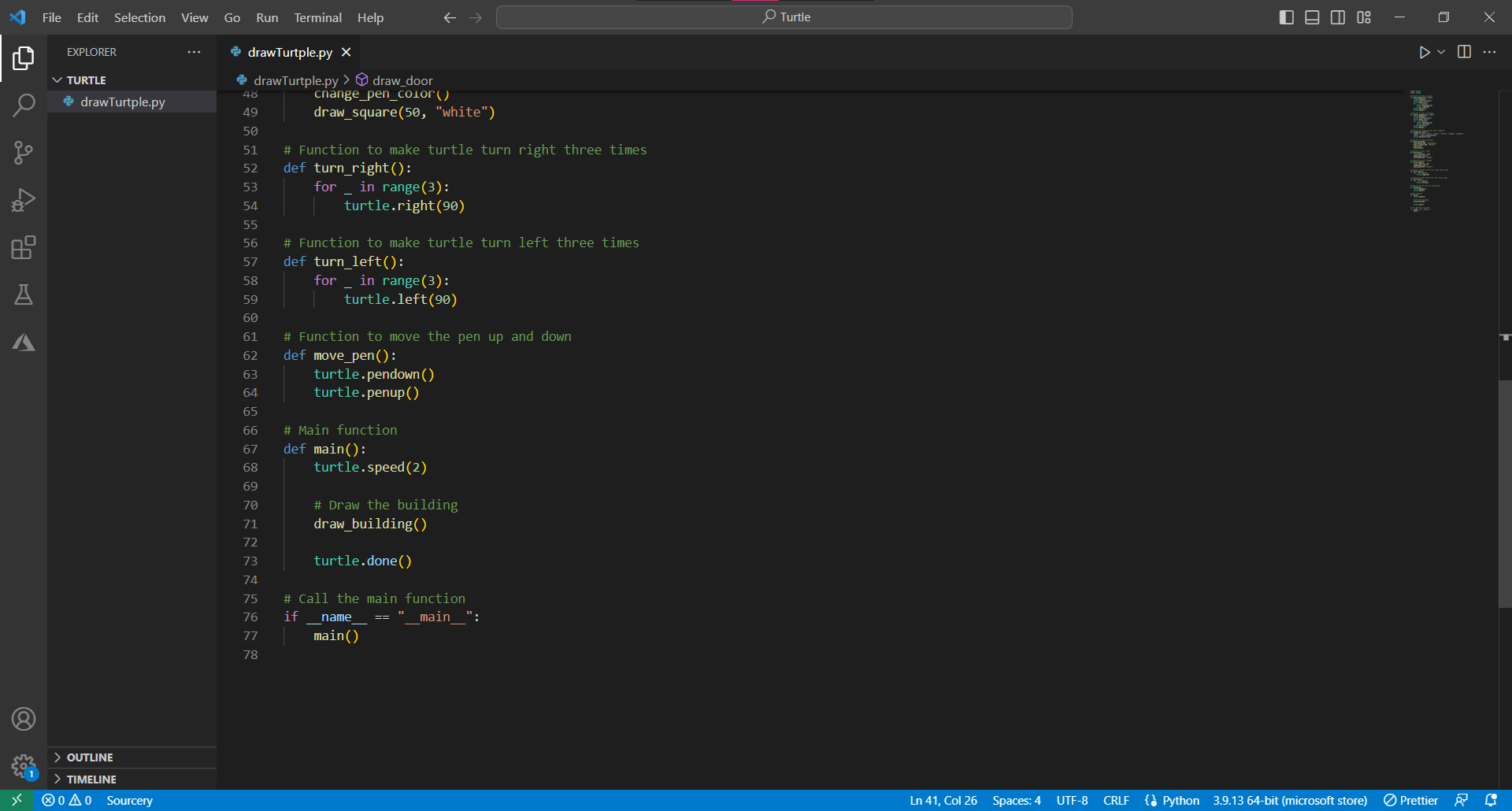
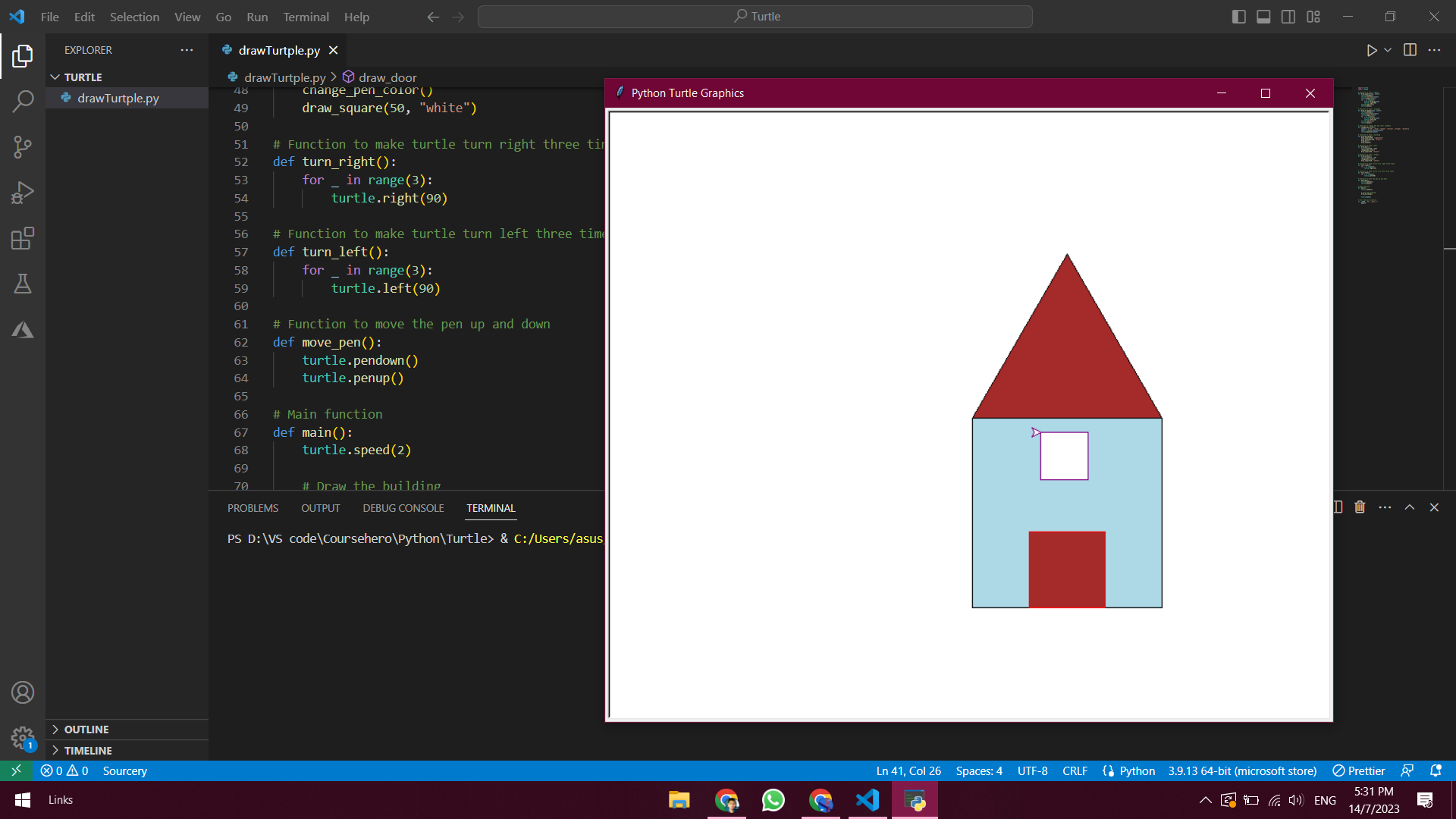
XJ File Edit Selection View Go Run Terminal Help Turtle - X L EXPLORER . . . drawTurtple.py X DI ... TURTLE drawTurtple.py > draw_door drawTurtple.py import turtle import random A W # Function to draw a square 5 def draw_square(size, color) : 6 turtle. pendown () turtle. fillcolor(color) 8 turtle. begin_fill() 9 for _ in range(4) : 10 turtle. forward(size) 11 turtle. right(90) 12 turtle. end_fill() 13 turtle . penup() A 14 15 # Function to draw a triangle 16 def draw_triangle(size, color) : 17 turtle . pendown () 18 turtle. fillcolor(color) 19 turtle. begin_fill() 20 for _ in range(3) : 21 turtle. forward(size) 22 turtle. left(120) 23 turtle. end_fill() 24 turtle. penup() 25 26 # Function to change the pen color randomly 27 def change_pen_color () : 28 colors = ["red", "blue", "green", "yellow", "orange", "purple"] 29 color = random. choice(colors) 30 turtle. pencolor(color) 31 32 # Function to draw a building 33 def draw_building () : 34 draw_square(200, "lightblue") 35 draw_triangle(200, "brown") > OUTLINE 36 draw_door() 291 > TIMELINE 37 draw_window() o A 0 Sourcery Ln 41, Col 26 Spaces: 4 UTF-8 CRLF { Python 3.9.13 64-bit (microsoft store) PrettierTurtle - X XJ File Edit Selection View Go Run Terminal Help DVI ... L EXPLORER . . . drawTurtple.py X TURTLE drawTurtple.py > draw_door drawTurtple.py 31 32 # Function to draw a building 33 def draw_building () : 34 draw_square(200, "lightblue") 35 draw_triangle(200, "brown") 36 draw_door() 37 draw_window( ) 38 39 # Function to draw a door 40 def draw_door() : 41 turtle. goto(60, -120) 42 change_pen_color() 43 draw_square(80, "brown") A 44 45 # Function to draw a window 46 def draw window() : 47 turtle. goto(72, -15) 48 change_pen_color() 49 draw_square(50, "white") 50 51 # Function to make turtle turn right three times 52 def turn_right() : 53 for _ in range(3) : 54 turtle. right(90) 55 56 # Function to make turtle turn left three times 57 def turn_left( ) : 58 for in range(3) : 59 turtle. left(90) 60 61 # Function to move the pen up and down 62 def move_pen() : 63 turtle. pendown () 64 turtle. penup() 65 > OUTLINE 66 # Main function 291 67 def main() : > TIMELINE 68 turtle sneed(?) o A 0 Sourcery Ln 41, Col 26 Spaces: 4 UTF-8 CRLF { Python 3.9.13 64-bit (microsoft store) PrettierTurtle - X XJ File Edit Selection View Go Run Terminal Help DVI ... L EXPLORER . . . drawTurtple.py X TURTLE drawTurtple.py > draw_door 48 change_pen_color() drawTurtple.py 49 draw_square(50, "white") 50 51 # Function to make turtle turn right three times 52 def turn_right() : 53 for _ in range (3) : 54 turtle. right(90) 55 56 # Function to make turtle turn left three times 57 def turn_left( ) : 58 for in range (3) : 59 turtle. left(90) 60 A 61 # Function to move the pen up and down 62 def move_pen() : 63 turtle . pendown ( ) 64 turtle. penup() 65 66 # Main function 67 def main( ) : 68 turtle . speed(2) 69 70 # Draw the building 71 draw_building() 72 73 turtle. done() 74 75 # Call the main function 76 if _name == main ": 77 main( ) 78 > OUTLINE 291 > TIMELINE Ln 41, Col 26 Spaces: 4 UTF-8 CRLF { Python 3.9.13 64-bit (microsoft store) Prettier o A 0 SourceryXI Edit Selection View Go Run Terminal Help Turtle X EXPLORER drawTurtple.py X DVI ... TURTLE drawTurtple.py > draw_door O drawTurtple.py 48 change_pen_color() Python Turtle Graphics X 49 draw_square(50, "white") 50 51 # Function to make turtle turn right three ti 52 def turn_right( ) : 53 for in range (3) : 54 turtle. right(90) 55 56 # Function to make turtle turn left three time 57 def turn_left( ) : 58 for _ in range(3) : 59 turtle. left(90) 60 A 61 # Function to move the pen up and down 62 def move_pen( ) : 63 turtle. pendown () 64 turtle. penup() 65 66 # Main function 67 def main() : 68 turtle. speed(2) 69 70 # Draw the building PROBLEMS OUTPUT DEBUG CONSOLE TERMINAL DO ...AX PS D: \\VS code\\Coursehero\\Python\\Turtle> & C:/Users/asus > OUTLINE 27 1 > TIMELINE 0 4 0 Sourcery Ln 41, Col 26 S Spaces: 4 UTF-8 CRLF { Python 3.9.13 64-bit (microsoft store) Prettier AGOCX ~ 0 0 71) ENG 5:31 PM Links 14/7/2023
Step by Step Solution
There are 3 Steps involved in it

Get step-by-step solutions from verified subject matter experts
 Study Help