







Question: Let's finally deal with that pesky Export commodities column! It's not a number, but represents a list of items. It is common to deal with
Let's finally deal with that pesky "Export commodities" column! It's not a number, but represents a list of items. It is common to deal with
data that is not numeric arbitrary strings, strings representing single items, strings representing listsets of items, etc To deal with these
nonnumeric columns, we need to encode them. That is we need to convert them from a nonnumeric form to a numeric one.
In computer science, there are many encodings and encoding methods. An encoding that you are probably already familiar with is ASCII,
which is a way to represent Latin letters as numbers. Encodings are just agreed upon ways to represent nonnumeric values as numbers.
In machine learning and data science, probably the most popular encoding method is the OneHot encoding. In OneHot encoding, we take
all the possible values an item can take and assign each possible value an index. Presence of that value results in a which absence results in
a Essentially, we are turning a list of items into a series of binary columns which ask Do you have this value?".
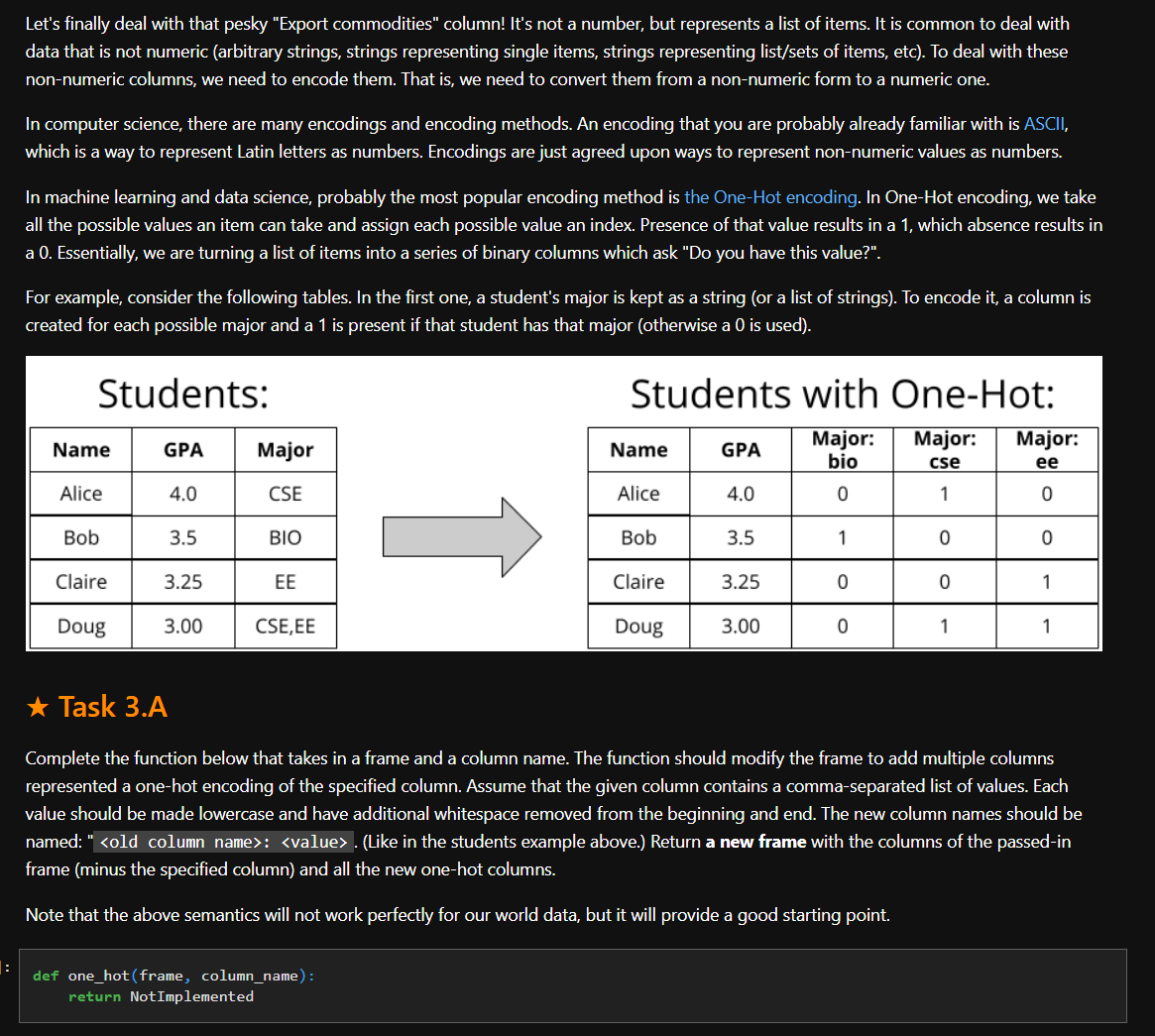
For example, consider the following tables. In the first one, a student's major is kept as a string or a list of strings To encode it a column is
created for each possible major and a is present if that student has that major otherwise a is used
Students:
Students with OneHot:
Task A
Complete the function below that takes in a frame and a column name. The function should modify the frame to add multiple columns
represented a onehot encoding of the specified column. Assume that the given column contains a commaseparated list of values. Each
value should be made lowercase and have additional whitespace removed from the beginning and end. The new column names should be
named: old column name:
Step by Step Solution
There are 3 Steps involved in it
1 Expert Approved Answer
Step: 1 Unlock

Question Has Been Solved by an Expert!
Get step-by-step solutions from verified subject matter experts
Step: 2 Unlock
Step: 3 Unlock
 Study Help