







Question: Limit = (elementSequence's indexNumber element) *1.6 -2.84 Finally, the program will calculate and print out the sum all the elements in the sequence that are
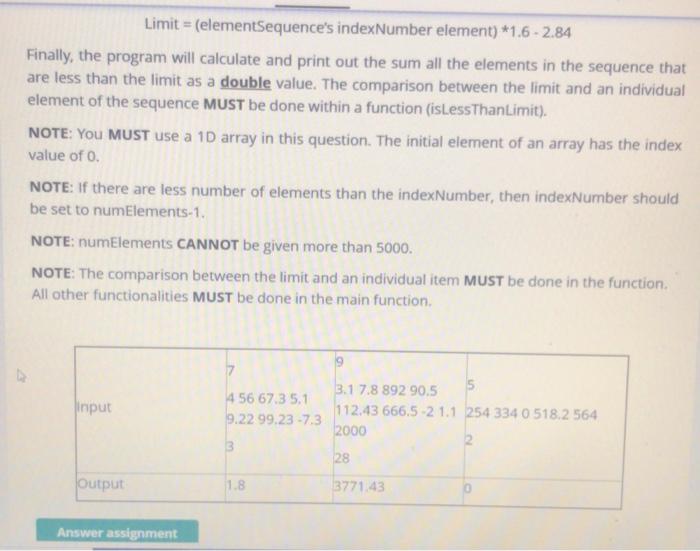
Limit = (elementSequence's indexNumber element) *1.6 -2.84 Finally, the program will calculate and print out the sum all the elements in the sequence that are less than the limit as a double value. The comparison between the limit and an individual element of the sequence MUST be done within a function (isLessThanLimit). NOTE: You MUST use a 10 array in this question. The initial element of an array has the index value of 0. NOTE: If there are less number of elements than the indexNumber, then indexNumber should be set to numElements-1. NOTE: numElements CANNOT be given more than 5000. NOTE: The comparison between the limit and an individual item MUST be done in the function. All other functionalities MUST be done in the main function, 7 Input 456 67.3 5.1 9.22 99.23 -7.3 3.1 7.8 892 90.5 5 112.43 666.5-2 1.1 254 334 0 518.2 564 2000 2 28 3 Output 1.8 3771.43 Answer assignment Limit = (elementSequence's indexNumber element) *1.6 -2.84 Finally, the program will calculate and print out the sum all the elements in the sequence that are less than the limit as a double value. The comparison between the limit and an individual element of the sequence MUST be done within a function (isLessThanLimit). NOTE: You MUST use a 10 array in this question. The initial element of an array has the index value of 0. NOTE: If there are less number of elements than the indexNumber, then indexNumber should be set to numElements-1. NOTE: numElements CANNOT be given more than 5000. NOTE: The comparison between the limit and an individual item MUST be done in the function. All other functionalities MUST be done in the main function, 7 Input 456 67.3 5.1 9.22 99.23 -7.3 3.1 7.8 892 90.5 5 112.43 666.5-2 1.1 254 334 0 518.2 564 2000 2 28 3 Output 1.8 3771.43 Answer assignment
Step by Step Solution
There are 3 Steps involved in it

Get step-by-step solutions from verified subject matter experts
 Study Help