







Question: Limit user input to 8 digits only. My MainActivity currently public class MainActivity extends AppCompatActivity { private String textView3; @Override protected void onCreate(Bundle savedInstanceState) {
Limit user input to 8 digits only.
My MainActivity currently
public class MainActivity extends AppCompatActivity { private String textView3; @Override protected void onCreate(Bundle savedInstanceState) { super.onCreate(savedInstanceState); setContentView(R.layout.activity_main); } } activity_xml file
How can i do the if statements to achieve this
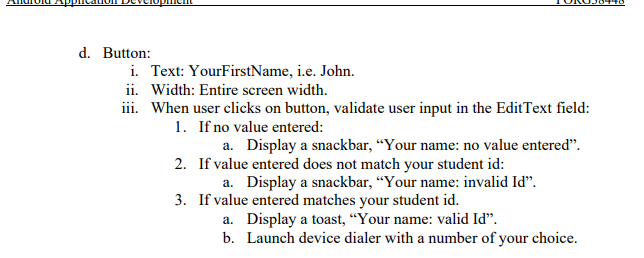
d. Button: i. Text: YourFirstName, i.e. John. ii. Width: Entire screen width. iii. When user clicks on button, validate user input in the Edit Text field: 1. If no value entered: a. Display a snackbar, Your name: no value entered. 2. If value entered does not match your student id: a. Display a snackbar, "Your name: invalid Id. 3. If value entered matches your student id. a. Display a toast, Your name: valid Id. b. Launch device dialer with a number of your choice. d. Button: i. Text: YourFirstName, i.e. John. ii. Width: Entire screen width. iii. When user clicks on button, validate user input in the Edit Text field: 1. If no value entered: a. Display a snackbar, Your name: no value entered. 2. If value entered does not match your student id: a. Display a snackbar, "Your name: invalid Id. 3. If value entered matches your student id. a. Display a toast, Your name: valid Id. b. Launch device dialer with a number of your choice
Step by Step Solution
There are 3 Steps involved in it

Get step-by-step solutions from verified subject matter experts
 Study Help