







Question: linkhttps://mathbitsnotebook.com/Geometry/TrigApps/TAUsingLawSines.html Outcomes: SIMULATING A REAL-WORLD PROBLEM Write programs that obtain user input. Write programs that compute mathematical results. Write programs that work with Strings. Write
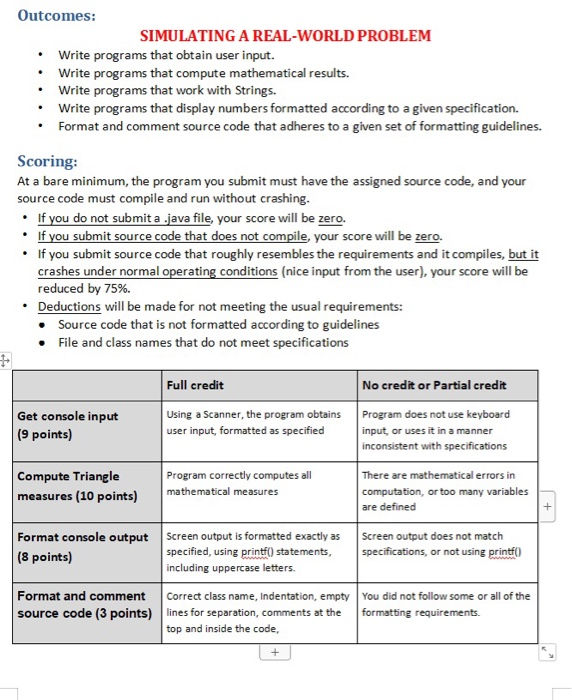
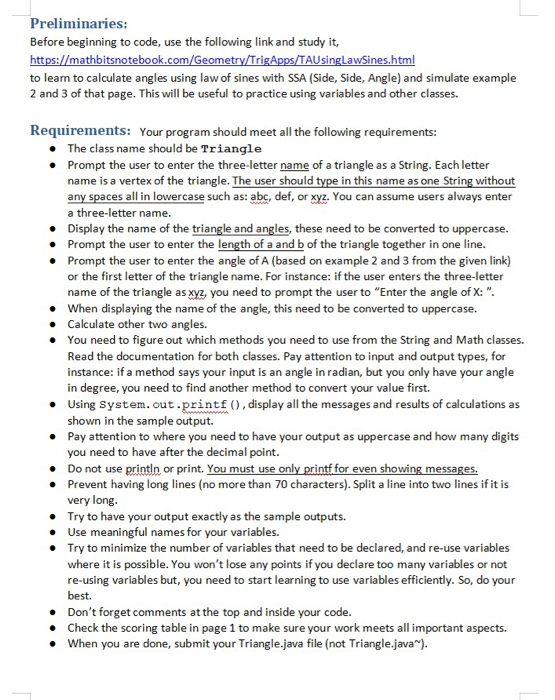
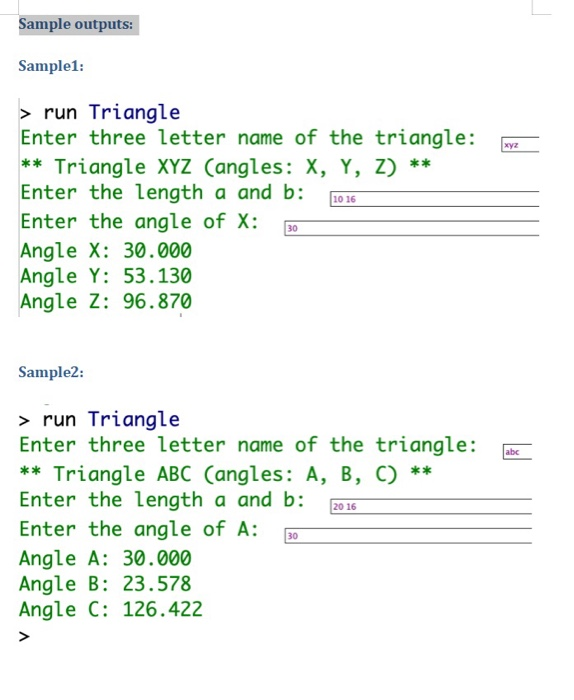
Outcomes: SIMULATING A REAL-WORLD PROBLEM Write programs that obtain user input. Write programs that compute mathematical results. Write programs that work with Strings. Write programs that display numbers formatted according to a given specification. Format and comment source code that adheres to a given set of formatting guidelines. Scoring: At a bare minimum, the program you submit must have the assigned source code, and your source code must compile and run without crashing. . If you do not submit a java file, your score will be zero. . If you submit source code that does not compile, your score will be zero. If you submit source code that roughly resembles the requirements and it compiles, but it crashes under normal operating conditions (nice input from the user), your score will be reduced by 75%. Deductions will be made for not meeting the usual requirements: Source code that is not formatted according to guidelines File and class names that do not meet specifications Full credit No credit or Partial credit Get console input (9 points) Using a Scanner, the program obtains user input, formatted as specified Program does not use keyboard input, or uses it in a manner inconsistent with specifications Compute Triangle measures (10 points) Program correctly computes all mathematical measures There are mathematical errors in computation, or too many variables are defined Format console output (8 points) Screen output is formatted exactly as specified, using printf() statements, including uppercase letters. Screen output does not match specifications, or not using printfo Format and comment source code (3 points) Correct class name, Indentation, empty lines for separation, comments at the top and inside the code, You did not follow some or all of the formatting requirements. Preliminaries: Before beginning to code, use the following link and study it, etry/TrigApps/TAUsinglawSines.html to leam to calculate angles using law of sines with SSA (Side, Side, Angle) and simulate example 2 and 3 of that page. This will be useful to practice using variables and other classes. Requirements: Your program should meet all the following requirements: The class name should be Triangle Prompt the user to enter the three-letter name of a triangle as a String. Each letter name is a vertex of the triangle. The user should type in this name as one String without any spaces all in lowercase such as: abc, def, or xyz. You can assume users always enter a three-letter name. Display the name of the triangle and angles, these need to be converted to uppercase. Prompt the user to enter the length of a and b of the triangle together in one line. Prompt the user to enter the angle of A (based on example 2 and 3 from the given link) or the first letter of the triangle name. For instance: if the user enters the three-letter name of the triangle as xyz, you need to prompt the user to "Enter the angle of X:". When displaying the name of the angle, this need to be converted to uppercase. Calculate other two angles. You need to figure out which methods you need to use from the String and Math classes. Read the documentation for both classes. Pay attention to input and output types, for instance: if a method says your input is an angle in radian, but you only have your angle in degree, you need to find another method to convert your value first. Using System.out.printf(), display all the messages and results of calculations as shown in the sample output. Pay attention to where you need to have your output as uppercase and how many digits you need to have after the decimal point. Do not use println or print. You must use only printf for even showing messages. Prevent having long lines (no more than 70 characters). Split a line into two lines if it is very long. Try to have your output exactly as the sample outputs. Use meaningful names for your variables. Try to minimize the number of variables that need to be declared, and re-use variables where it is possible. You won't lose any points if you declare too many variables or not re-using variables but, you need to start learning to use variables efficiently. So, do your best. Don't forget comments at the top and inside your code. Check the scoring table in page 1 to make sure your work meets all important aspects. When you are done, submit your Triangle.java file (not Triangle.java). Sample outputs: Sample1: 272 > run Triangle Enter three letter name of the triangle: ** Triangle XYZ (angles: X, Y, Z) ** Enter the length a and b: 10.16 Enter the angle of X: 30 Angle X: 30.000 Angle Y: 53.130 Angle Z: 96.870 Sample2: > run Triangle Enter three letter name of the triangle: ** Triangle ABC (angles: A, B, C) ** Enter the length a and b: 2016 Enter the angle of A: 30 Angle A: 30.000 Angle B: 23.578 Angle C: 126.422
Step by Step Solution
There are 3 Steps involved in it

Get step-by-step solutions from verified subject matter experts
 Study Help