







Question: Linux: 1. List all the users who are currently logged on. Save the list in a separate file logged_users and display. 2. Use the commands
Linux:
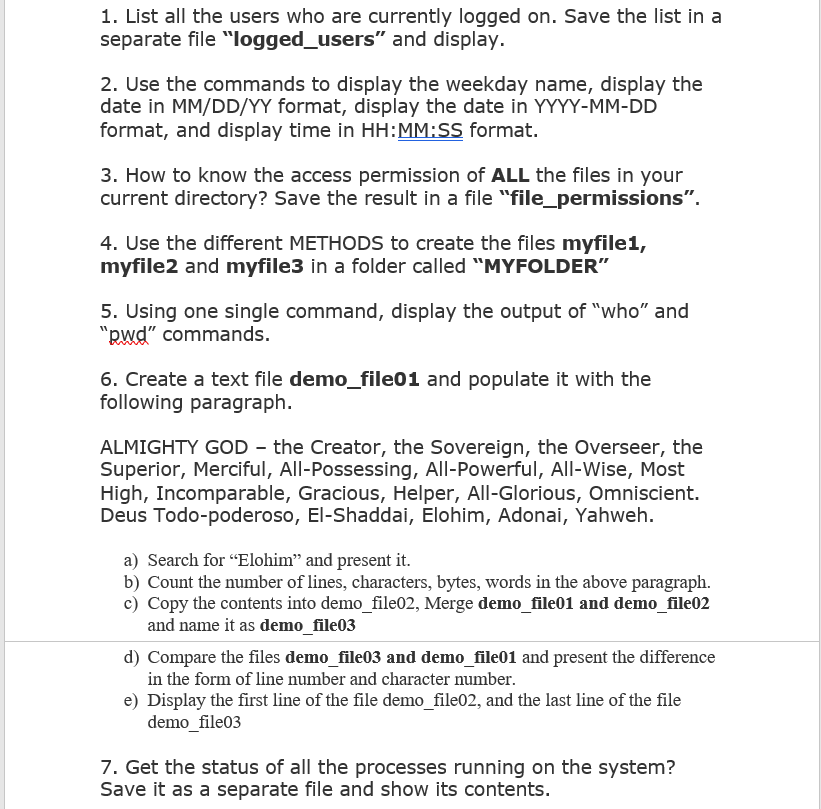
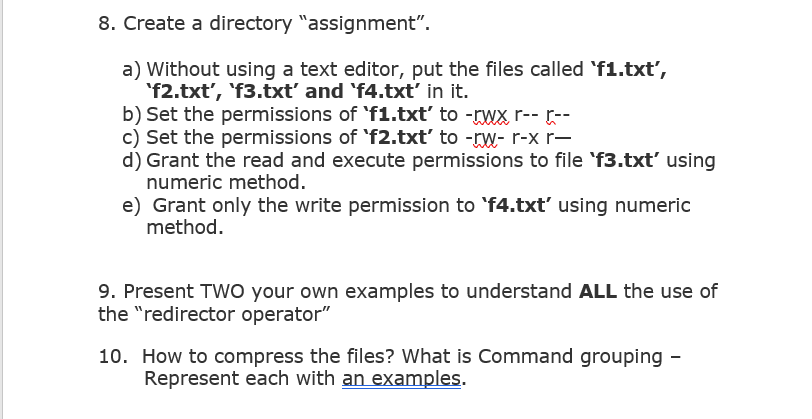
1. List all the users who are currently logged on. Save the list in a separate file "logged_users" and display. 2. Use the commands to display the weekday name, display the date in MM/DD/YY format, display the date in YYYY-MM-DD format, and display time in HH:MM:SS format. 3. How to know the access permission of ALL the files in your current directory? Save the result in a file "file_permissions". 4. Use the different METHODS to create the files myfile1, myfile2 and myfile3 in a folder called "MYFOLDER" 5. Using one single command, display the output of "who" and RWd" commands. 6. Create a text file demo_file01 and populate it with the following paragraph. ALMIGHTY GOD-the Creator, the Sovereign, the Overseer, the Superior, Merciful, All-Possessing, All-Powerful, All-Wise, Most High, Incomparable, Gracious, Helper, All-Glorious, Omniscient. Deus Todo-poderoso, El-Shaddai, Elohim, Adonai, Yahweh. a) Search for "Elohim" and present it. b) Count the number of lines, characters, bytes, words in the above paragraph c) Copy the contents into demo _file02, Merge demo_file01 and demo file02 and name it as demo file03 d) Compare the files demo file03 and demo file01 and present the difference in the form of line number and character number. e) Display the first line of the file demo_file02, and the last line of the file demo_file03 7. Get the status of all the processes running on the system? Save it as a separate file and show its contents
Step by Step Solution
There are 3 Steps involved in it

Get step-by-step solutions from verified subject matter experts
 Study Help