







Question: linux commnd line share the screenshots - Adding a user actually irvolves specitying user-related information: such as default shell, home directory, user ID, group ID,
linux commnd line
share the screenshots
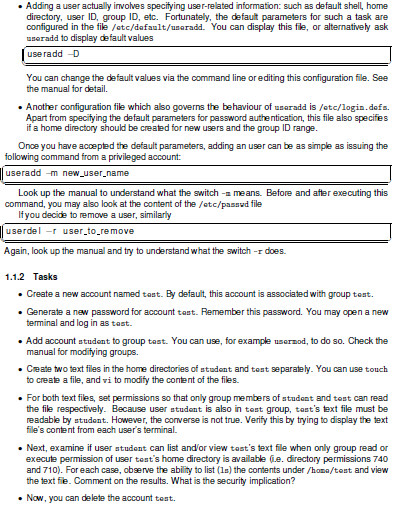
- Adding a user actually irvolves specitying user-related information: such as default shell, home directory, user ID, group ID, etc. Fortunately, the defaut parameters for such a task are configured in the file /etc/dafault/unaradd. You can display this fle, or alternatively ask uneradd to display default values You can change the default values via the command line or editing this configuration file. See the manual for detail. - Another configuration file which also governs the behaviour of uaradd is /etc/login. defa. Apart from specitying the default parameters for password authentication, this file also specifes if a home directory should be created for new users and the group ID range. Once you have accepted the default parameters, adding an user can be as simple as issuing the following command from a privileged account: useradd mew_user_name Look up the manual to understand what the switch -m means. Before and after executing this command, you may also look at the content of the /etc/pasavd file If you decide to remove a user, similarly userdel -r user_to_remove Again, look up the manual and try to understand what the switch r does. 1.1.2 Tasks - Create a new acoount named tast. By default, this account is associated with group test. - Generate a new password for account tast. Remember this password. You may open a new terminal and log in as tast. - Add account student to group tast. You can use, for example usernod, to do so. Check the manual for moditying groups. - Create two text files in the home directories of atudent and test separately. You can use touch to create a file, and vi to modify the content of the files. - For both text files, set permissions so that only group members of atudent and tost can read the file respectively. Because user atudent is also in tost group, tast's text file must be readable by atudent. However, the corverse is not true. Verify this by trying to display the text file's content from each user's terminal. - Next, examine if user atudent can list and/or view tast's text file when only group read or execute permission of user test's home directory is available (i.e. directory permissions 740 and 710 ). For each case, observe the ability to list (1a) the contents under/hona/test and view the text fie. Comment on the results. What is the security implication? - Now, you can delete the account teat
Step by Step Solution
There are 3 Steps involved in it

Get step-by-step solutions from verified subject matter experts
 Study Help