







Question: LINUX Create a script that prints out a schedule for a selected student. The output and approach will be the same as used for the
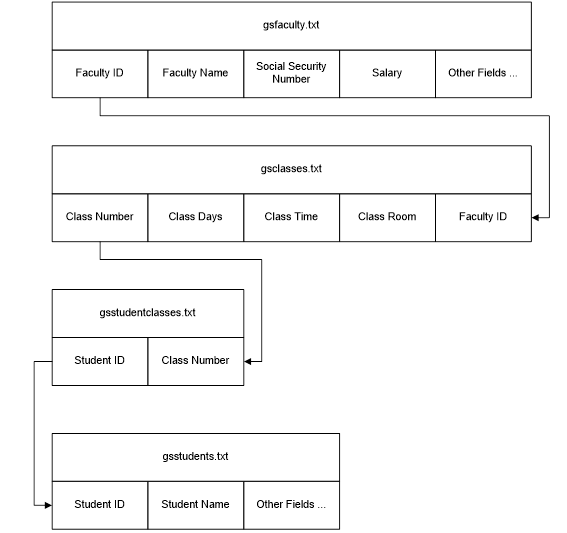
LINUX Create a script that prints out a schedule for a selected student. The output and approach will be the same as used for the faculty member in hw#2. Print the script and a screen print of the output as indicated below.
heres the four files and their content
gsstudents.txt
E1000001#JOHN DOE E1000002#MARY ELIZABETH DOE E1000003#WANDA SUE DOE
gsclasses.txt
CGE357#M-W-F#8:00 AM CST#DA212#E0000002 CGE425#T-R#12:50 PM CST#DA211#E0000001 CGE477#T-R#9:40 AM CST#DA212#E0000003 CS111#M#6:30 PM CST#DA211#E0000004 CS111#M-W#3:30 PM CST#DA211#E0000004 CS111#M-W-F#10:30 AM CST#DA211#E0000002 CS205#T-R#12:50 PM CST#DA204#E0000002 CS255#T-R#12:50 PM CST#DA212#E0000003 CS315#T-R#9:40 AM CST#DA204#E0000002 CS320#M-W-F#1:00 PM CST#DA212#E0000003 CS360#M-W-F#9:15 AM CST#DA212#E0000002 CS435#M-W-F#11:45 PM CST#DA212#E0000003 CS475#T-R#9:40 AM CST#DA212#E0000003 CS504#T#6:30 PM CST#DA204#E0000002 CS511#T#6:30 PM CST#DA204#E0000002 IS224#M-W-F#2:15 PM CST#DA212#E0000001 IS425#M#6:30 PM CST#DA213#E0000001 MDS523#ONLINE#N/A#N/A#E0000001 MDS534#ONLINE#N/A#N/A#E0000001 MTH345#M-W-F#1:00 PM CST#DA305#E0000004
gsfaculty.txt
E0000001#JASON KIM#123-45-6789#250000.00 E0000002#ARNOLD GHANE#222-22-2222#500000.00 E0000003#JAKE JONES#333-33-3333#100000.00 E0000004#BLAKE ZACK#444-44-4444#10.00
gsstudentclasses.txt E1000001#CS111 E1000001#CS205 E1000001#CGE425 E1000001#MTH345 E1000002#CS111 E1000002#CS205 E1000002#IS425 E1000002#MTH345 E1000003#CS111 E1000003#CS205 E1000003#IS425
WORKING SCRIPT FROM HW2 TO USE AS BASE FOR THIS QUESTION
########################### # ########################### clear echo -n "Enter the name of a faculty member: "; read facname echo $facname > gstemp1 tr -s [a-z] [A-Z] gstemp2 fgrep -f gstemp2 gsfaculty.txt | cut -c 1-8 > gstemp3 fgrep -f gstemp3 gsclasses.txt > gstemp4 echo "Faculty Schedule for: $facname" echo "Course Days Time Location" awk -F# '{printf "%s\t %s\t %s\t %s ", $1, $2, $3, $4}' gstemp4the script needs to be tweaked showing student schedule insted of faculty
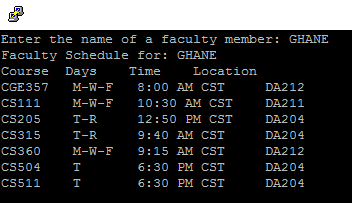
gsfaculty.tt Faculty IDF Faculty NameSocial Security Salary Other Fields Number gsclasses.txt Class NumberClass Days Class Time Class Room Faculty ID gsstudentclasses.txt Student ID Class Number gsstudents.txt Student ID Student Name Other Fields Enter the name of a faculty member: GHANE Faculty Schedule for: GHANE Course Days CGE357 M-W-F 8:00 AM CST CS111 CS205 CS315 CS360 CS504 CS511 Time Location DA212 DA211 DA204 DA204 DA212 DA204 DA204 M-W-F 10:30 AM CST 12:50 PM CST 9:40 AM CST 9:15 AM CST 6:30 PM CST 6:30 PM CST M-W-F gsfaculty.tt Faculty IDF Faculty NameSocial Security Salary Other Fields Number gsclasses.txt Class NumberClass Days Class Time Class Room Faculty ID gsstudentclasses.txt Student ID Class Number gsstudents.txt Student ID Student Name Other Fields Enter the name of a faculty member: GHANE Faculty Schedule for: GHANE Course Days CGE357 M-W-F 8:00 AM CST CS111 CS205 CS315 CS360 CS504 CS511 Time Location DA212 DA211 DA204 DA204 DA212 DA204 DA204 M-W-F 10:30 AM CST 12:50 PM CST 9:40 AM CST 9:15 AM CST 6:30 PM CST 6:30 PM CST M-W-F
Step by Step Solution
There are 3 Steps involved in it

Get step-by-step solutions from verified subject matter experts
 Study Help