





Question: linux Login to your Fedora Server Environment as root and proceed with the steps below. Type the commands in the word document and submit on

linux linux Login to your Fedora Server Environment as
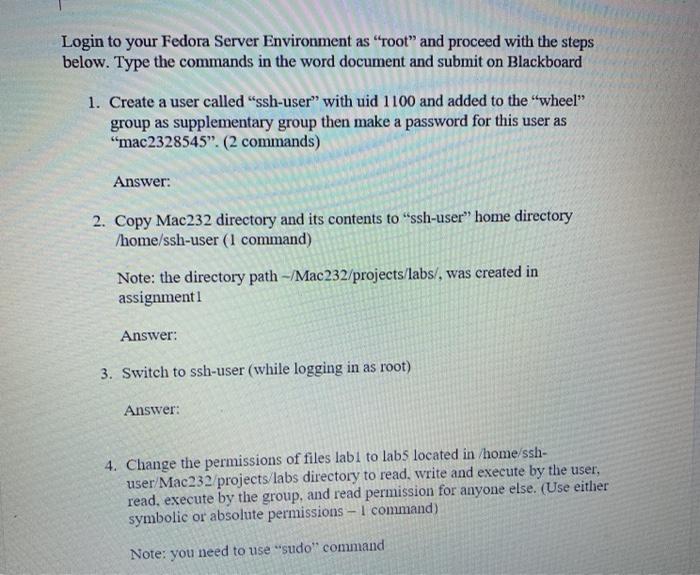
Login to your Fedora Server Environment as root and proceed with the steps below. Type the commands in the word document and submit on Blackboard 1. Create a user called "ssh-user" with uid 1100 and added to the "wheel" group as supplementary group then make a password for this user as "mac2328545". (2 commands) Answer: 2. Copy Mac232 directory and its contents to "ssh-user" home directory /home/ssh-user (1 command) Note: the directory path -/Mac232/projects/labs/, was created in assignment1 Answer: 3. Switch to ssh-user (while logging in as root) Answer: 4. Change the permissions of files labi to labs located in /home/ssh- user/Mac232/projects/labs directory to read, write and execute by the user, read, execute by the group, and read permission for anyone else. (Use either symbolic or absolute permissions - I command) Note: you need to use "sudo" command

Step by Step Solution

There are 3 Steps involved in it

1 Expert Approved Answer
Step: 1 Unlock blur-text-image

Question Has Been Solved by an Expert!

Get step-by-step solutions from verified subject matter experts

Step: 2 Unlock
Step: 3 Unlock

Students Have Also Explored These Related General Management Questions!