Question: LINUX ONLY Fill in the blanks. Compile the following code. What is the output of the code? #include #include #include #include int main (int argc,
LINUX ONLY
Fill in the blanks. Compile the following code. What is the output of the code?
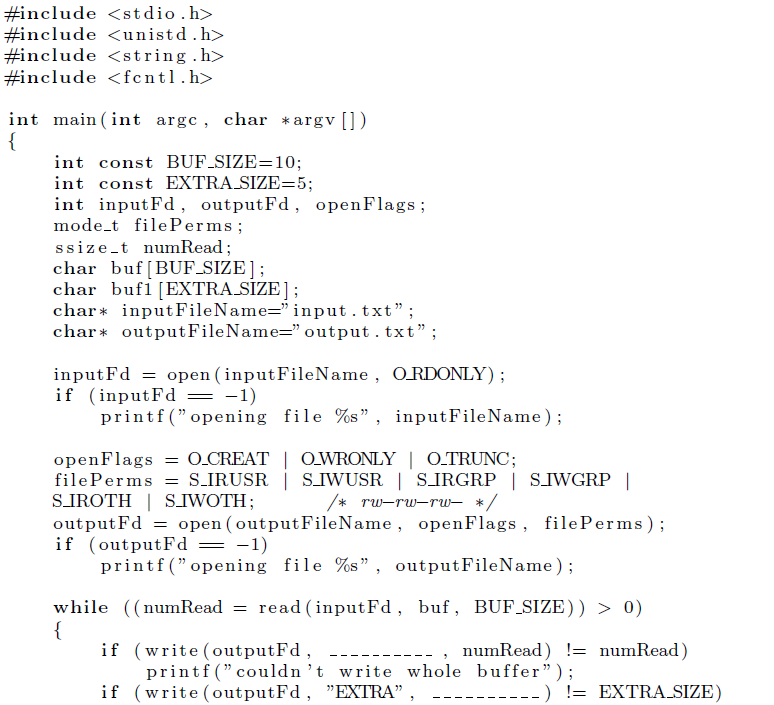
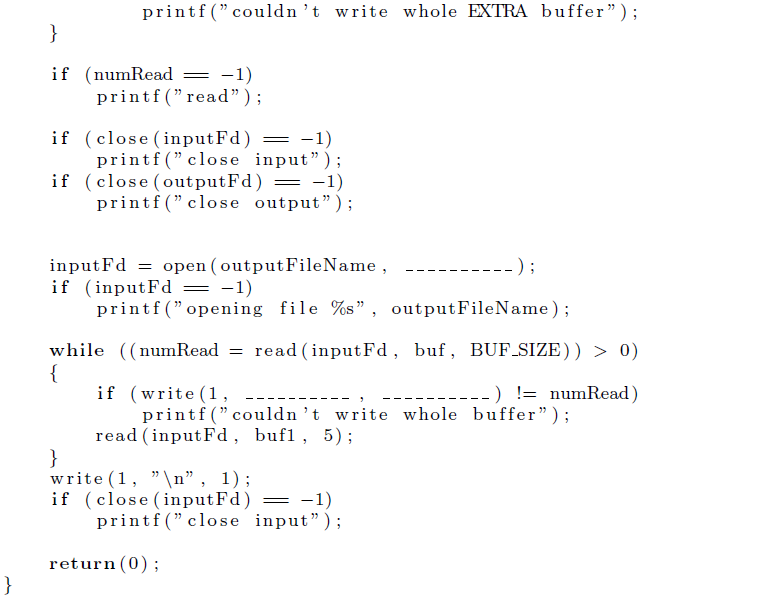
#include #include #include #include int main (int argc, char *argv int const BUF-SIZE=10; int const EXTRA SIZE=5; int inputFd, outputFd, openFlags; mode t filePerms; ssize-t numRead; char buf [BUF_SIZE]; char bufi [EXTRASIZE]; char* inputFileName-" input . txt"; char outputFileName-" output . txt"; inputFd = open (inputFileName, ORDONLY); i f (inputFd _ -1) printf("opening file %s", inputFileName); openFlags = O.CREAT | OWRONLY | O-TRUNC; SIROTH|SIWOTH; output Fd= open (outputFileName, openFlags, filePerms); i f (outputFd- -1) printf("opening file %s", outputFileName); while ((num Read= read (inputFd, buf, B F-SIZE)) > 0) if (write (outputFd, , numRead) != numRead) printf(" couldn 't write whole buffer"); if (write (outputFd, "EXTRA" ) != EXTRASIZE) #include #include #include #include int main (int argc, char *argv int const BUF-SIZE=10; int const EXTRA SIZE=5; int inputFd, outputFd, openFlags; mode t filePerms; ssize-t numRead; char buf [BUF_SIZE]; char bufi [EXTRASIZE]; char* inputFileName-" input . txt"; char outputFileName-" output . txt"; inputFd = open (inputFileName, ORDONLY); i f (inputFd _ -1) printf("opening file %s", inputFileName); openFlags = O.CREAT | OWRONLY | O-TRUNC; SIROTH|SIWOTH; output Fd= open (outputFileName, openFlags, filePerms); i f (outputFd- -1) printf("opening file %s", outputFileName); while ((num Read= read (inputFd, buf, B F-SIZE)) > 0) if (write (outputFd, , numRead) != numRead) printf(" couldn 't write whole buffer"); if (write (outputFd, "EXTRA" ) != EXTRASIZE)









 Study Help