







Question: LINUX: PLEASE WRITE IN C PLEASE WRITE EASY TO UNDERSTAND CODE Task1 Implement a program that will communicate the value of an integer x, between
LINUX: PLEASE WRITE IN C
PLEASE WRITE EASY TO UNDERSTAND CODE
Task1
Implement a program that will communicate the value of an integer x, between processes. You can do this using a file to store the value of x, or you can use shared memory with shmget or mmap. Shared memory is out of the scope of this class, so you will have to teach yourself how to use it, however if you put in the effort to learn, it results in simpler more elegant code.
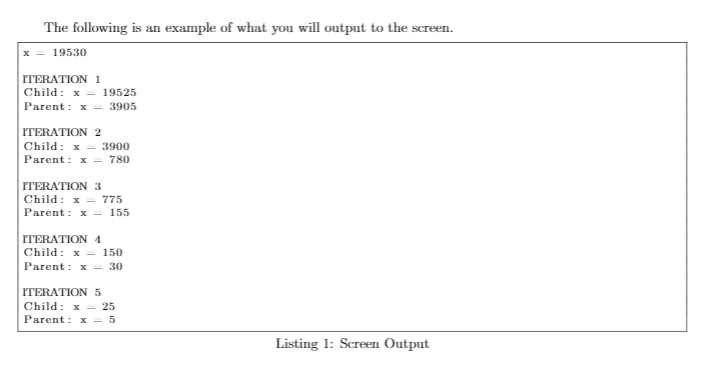
x will start with the value 19530, and you must print that value. Then you will loop 5 times where in each loop: the child goes first and subtracts 5 from x, the parent then divides x by 5, and both processes print who they are and their result of x after the operation. If you use a file and not shared memory, then during each iteration of the loop both processes must get the value of x from the file, and store the resulting value of x to the file. wait() is a required function call, so you will need to create a new process, and terminate it each time through the loop.
The following system calls are required for this lab:
fork()
wait()
The following functions may be useful for this lab:
open(), read(), write()
sleep(): make the process wait for a number of seconds
atoi(): converts string to integer
sprintf(): can be used to convert integer to string
fflush(): forces a file buffer to flush. This is useful to flush stdout before creating a child so you dont have two processes printing the same buffer to the screen. This can sometimes fix strange printing behavior.
TEMPLATE.c
#include
#include
#include
#include
#include
#include
// Function ptototypes
int readX();
void writeX(int);
int main()
{
int pid; // pid: used to keep track of the child process
int x = 19530; // x: our value as integer
int i; // iterator
// Write x to file
writeX(x);
// output inital value to the screen
printf("x = %d ", x);
// loop 5 times
for( i = 0; i
{
// output the current loop iteration
printf(" ITERATION %d ", i+1);
// flush here so that the stdout buffer doesn't
// get printed in both processes
...
// fork child process
...
// Child waits a second for the parent to go first
...
// Both processes read x from file
...
// Parent prints parent, and performs subraction
...
// Child prints child, and performs division
...
// Both processes output x value and write x to file.
... // The child terminates
...
}
exit(0);
}
/// Returns the value read from .shareX.dat
int readX()
{
char xChar[10]; // xChar: our value as a char
int fd; // fd: file descriptor
// open to read and store x
if ( (fd = open(".shareX.dat", O_RDONLY )) == -1 )
{
perror("Error opening file");
exit(2);
}
// read xChar from the file
if ( read(fd, xChar, 10) == -1 )
{
perror("Error reading file");
exit(3);
}
// close file for reading
close(fd);
// convert xChar to int and return
return atoi(xChar);
}
/// Writes the writeX value to the file .shareX.dat
void writeX(int writeX)
{
char xChar[10]; // xChar: our value as a char
int fd; // fd: file descriptor int xBytes; // how much to write
// open, clear, and create file if not createdi
if ( (fd = open(".shareX.dat",O_CREAT | O_TRUNC | O_WRONLY, 0644 )) == -1 )
{
perror("Error opening file");
exit(4);
}
// convert x to char
xBytes = sprintf(xChar, "%d", writeX);
// put xChar in file
if ( write(fd, xChar, xBytes) == -1 )
{
perror("Error writing to file"); exit(5);
}
// close the file for writing
close(fd);
return;
}
The following is an example of what you will output to the screen 19530 ITERATION 1 Child: x = 19525 Parent: x = 3905 ITERATION 2 Child: x = 3900 Parent: x = 780 ITERATION 3 Child: x= 775 Parent : x = 155 ITERATION 1 Child: x = 150 Parent: x= 30 ITERATION 5 Child: x = 25 Parent: x = 5 Listing 1: Screen Output The following is an example of what you will output to the screen 19530 ITERATION 1 Child: x = 19525 Parent: x = 3905 ITERATION 2 Child: x = 3900 Parent: x = 780 ITERATION 3 Child: x= 775 Parent : x = 155 ITERATION 1 Child: x = 150 Parent: x= 30 ITERATION 5 Child: x = 25 Parent: x = 5 Listing 1: Screen Output
Step by Step Solution
There are 3 Steps involved in it

Get step-by-step solutions from verified subject matter experts
 Study Help