







Question: Linux Shell Scripting would be preferable Develop a Student Score Management system using Shell Scripting Requirement: The System should have below basic functions Add: add
Linux Shell Scripting would be preferable
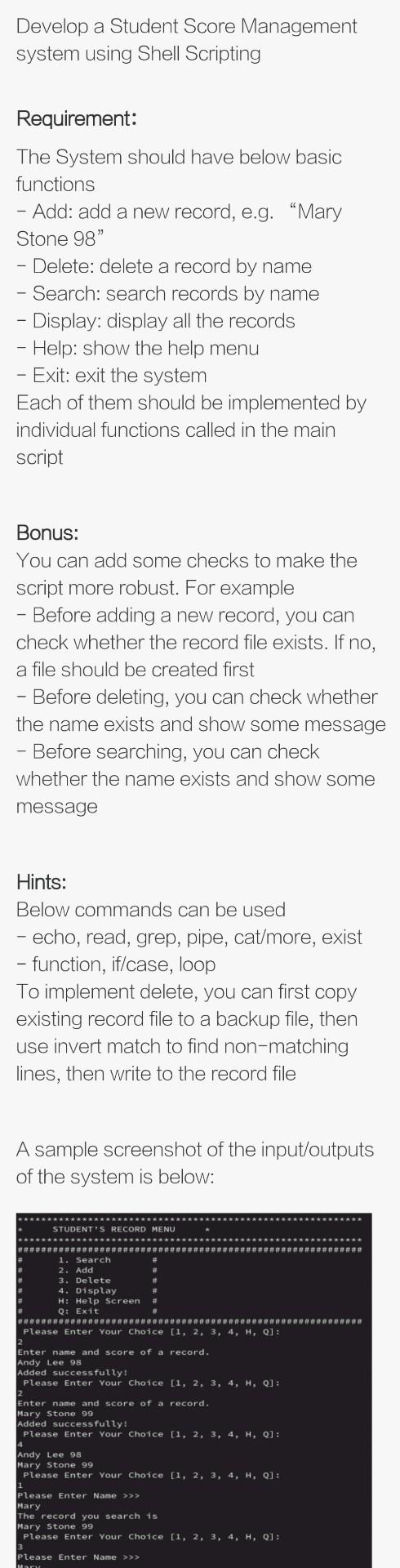
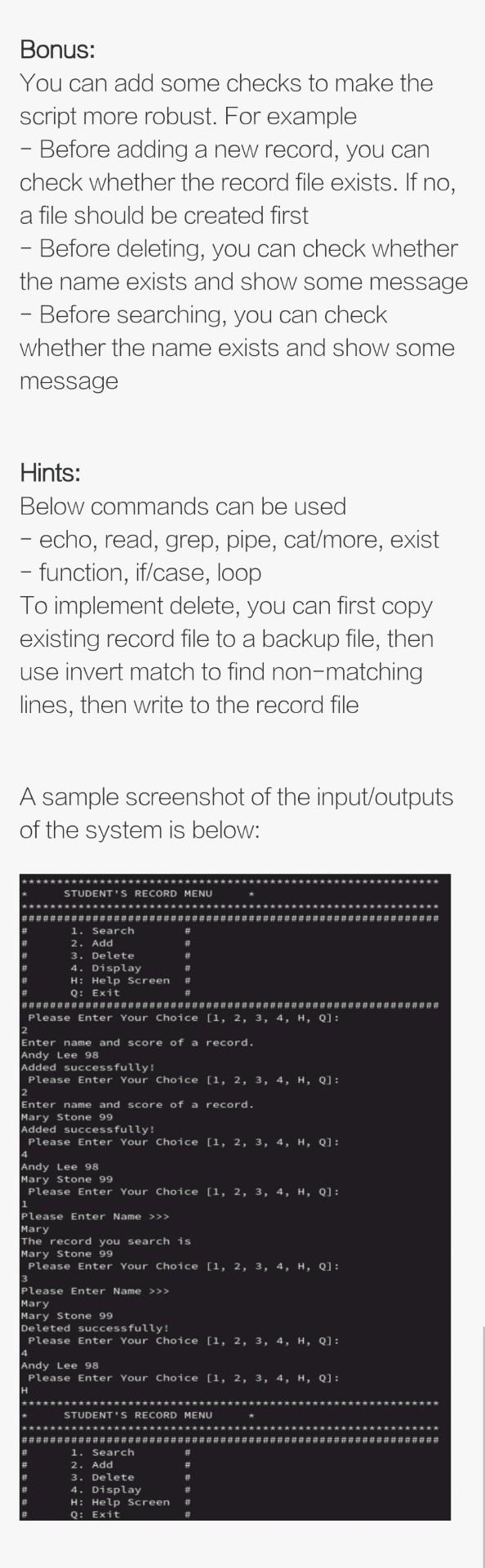
Develop a Student Score Management system using Shell Scripting Requirement: The System should have below basic functions Add: add a new record, e.g. Mary Stone 98" Delete: delete a record by name - Search: search records by name - Display: display all the records - Help: show the help menu - Exit: exit the system Each of them should be implemented by individual functions called in the main script Bonus: You can add some checks to make the script more robust. For example - Before adding a new record, you can check whether the record file exists. If no, a file should be created first - Before deleting, you can check whether the name exists and show some message - Before searching, you can check whether the name exists and show some message Hints: Below commands can be used - echo, read, grep, pipe, cat/more, exist - function, if/case, loop To implement delete, you can first copy existing record file to a backup file, then use invert match to find non-matching lines, then write to the record file A sample screenshot of the input/outputs of the system is below: ************ STUDENT'S RECORD MENU 1. Search 2. Add 3. Delete 4. Display H: Help Screen Q: Exit ********************************************************** Please Enter Your Choice [1, 2, 3, 4, H, 01: Enter name and score of a record. Andy Lee 98 Added successfully! Please Enter Your Choice [1, 2, 3, 4, H, 0]: 2 Enter name and score of a record. Mary Stone 99 Added successfully! Please Enter Your Choice [1, 2, 3, 4, H, 01: Andy Lee 98 Mary Stone 99 Please Enter Your Choice [1, 2, 3, 4, H, 01: Please Enter Name >>> Mary The record you search is Mary Stone 99 Please Enter Your Choice [1, 2, 3, 4, H, 01: please Enter Name >>> Bonus: You can add some checks to make the script more robust. For example - Before adding a new record, you can check whether the record file exists. If no, a file should be created first - Before deleting, you can check whether the name exists and show some message Before searching, you can check whether the name exists and show some message Hints: Below commands can be used - echo, read, grep, pipe, cat/more, exist - function, if/case, loop To implement delete, you can first copy existing record file to a backup file, then use invert match to find non-matching lines, then write to the record file A sample screenshot of the input/outputs of the system is below: STUDENT'S RECORD MENU 1. Search 2. Add 3. Delete 4. Display H: Help Screen Q: Exit ########################################################### Please Enter Your Choice [1, 2, 3, 4, H, 0]: 2 Enter name and score of a record. Andy Lee 98 Added successfully! Please Enter Your Choice [1, 2, 3, 4, H, 0]: 2 Enter name and score of a record. Mary Stone 99 Added successfully! Please Enter Your Choice [1, 2, 3, 4, H, 0]: 4 Andy Lee 98 Mary Stone 99 Please Enter Your Choice [1, 2, 3, 4, H, 0]: 1 Please Enter Name >>> Mary The record you search is Mary Stone 99 Please Enter Your Choice [1, 2, 3, 4, H, 0]: Please Enter Name >>> Mary Mary Stone 99 Deleted successfully! Please Enter Your Choice [1, 2, 3, 4, H, 0]: 4 Andy Lee 98 Please Enter Your Choice [1, 2, 3, 4, H, 0]: H STUDENT'S RECORD MENU 1. Search 2. Add 3. Delete 4. Display H: Help Screen Q: Exit
Step by Step Solution
There are 3 Steps involved in it

Get step-by-step solutions from verified subject matter experts
 Study Help