







Question: Linux Write a bash command line for the following actions: Display your current directony. 2. Change to the /etc directory 3. Now change to your
Linux
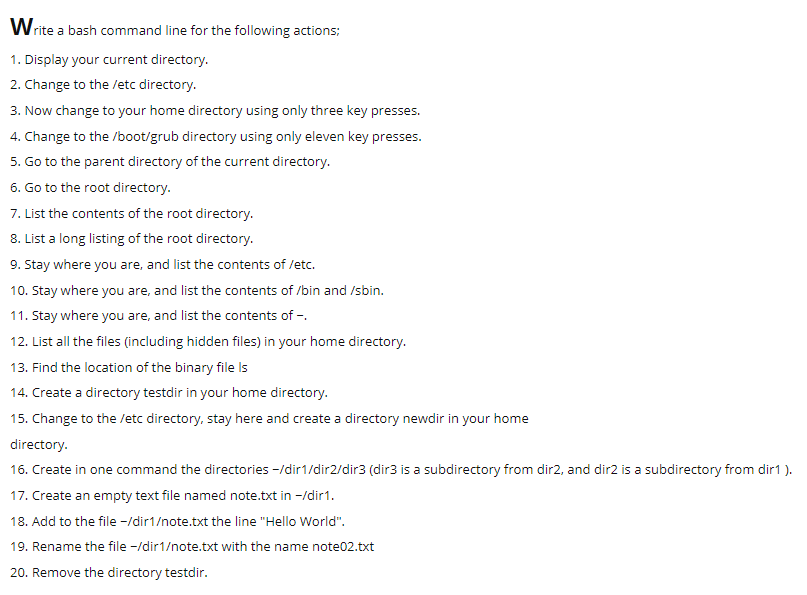
Write a bash command line for the following actions: Display your current directony. 2. Change to the /etc directory 3. Now change to your home directory using only three key presses. 4. Change to the /boot/grub directory using only eleven key presses 5. Go to the parent directory of the current directory. 6. Go to the root directory 7. List the contents of the root directory. 8. List a long listing of the root directory 9. Stay where you are, and list the contents of lec. 10. Stay where you are, and list the contents of /bin and /sbin 11. Stay where you are, and list the contents of - 12. List all the files (including hidden files) in your home directory 13. Find the location of the binary file Is 14. Create a directory testdir in your home directory. 15. Change to the /etc directory, stay here and create a directory newdir in your home directory 16. Create in one command the directories -/dir1/dir2/dir3 (dir3 is a subdirectory from dir2, and dir2 is a subdirectory from dir1 ). 17. Create an empty text file named note.txt in -Idir1 18. Add to the file -/dir1ote.txt the line "Hello World". 19. Rename the file -/dir1ote.txt with the name note02.txt 20. Remove the directory testdir
Step by Step Solution
There are 3 Steps involved in it

Get step-by-step solutions from verified subject matter experts
 Study Help