







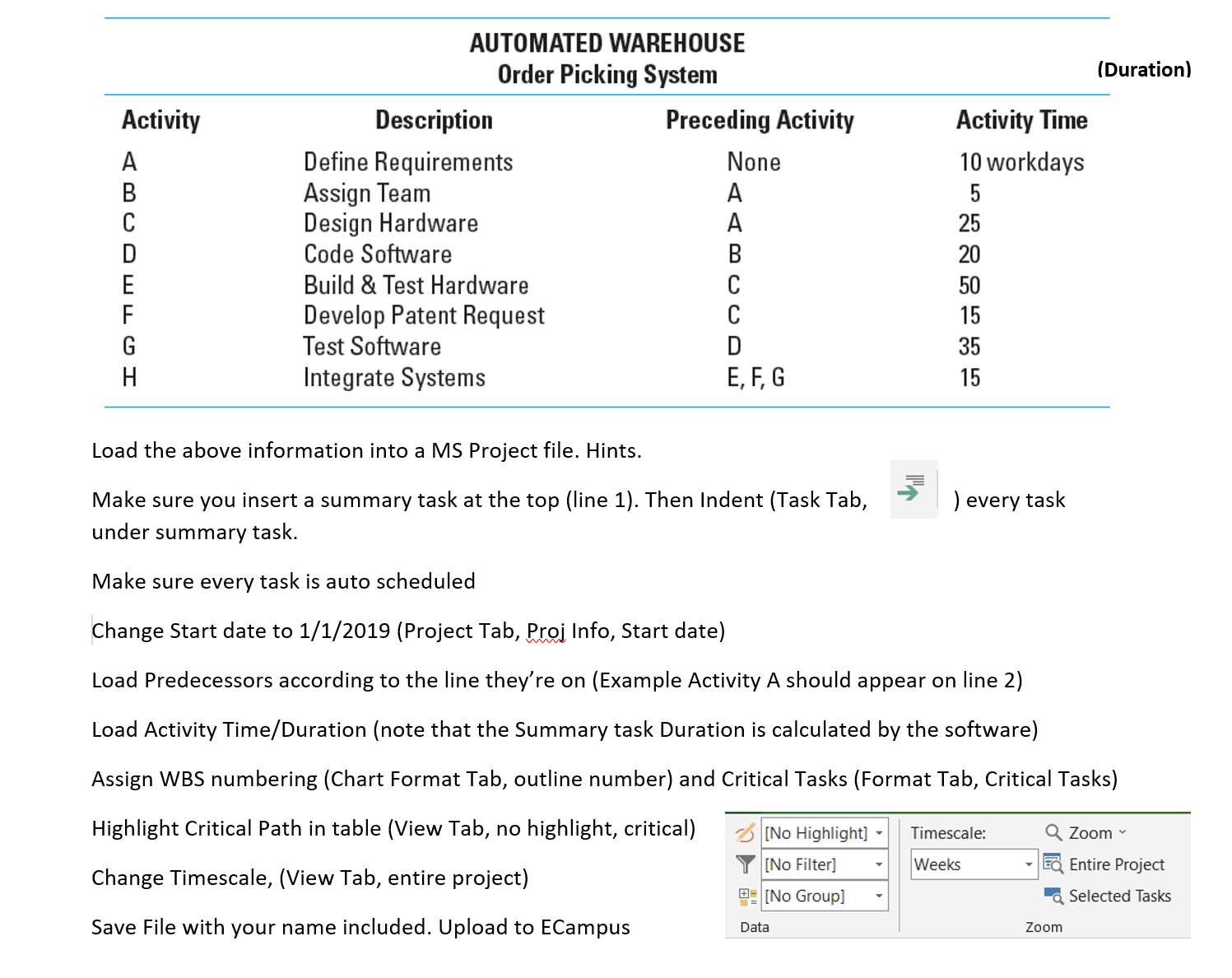
Question: Load the above information into a MS Project file. Hints. Make sure you insert a summary task at the top ( line 1 ) .
Load the above information into a MS Project file. Hints.
Make sure you insert a summary task at the top line Then Indent Task Tab,
under summary task.
Make sure every task is auto scheduled
Change Start date to Project Tab, Proj Info, Start date
Load Predecessors according to the line they're on Example Activity A should appear on line
Load Activity TimeDuration note that the Summary task Duration is calculated by the software
Assign WBS numbering Chart Format Tab, outline number and Critical Tasks Format Tab, Critical Tasks
Highlight Critical Path in table View Tab, no highlight, critical
Change Timescale, View Tab, entire project
Save File with your name included. Upload to ECampus
Step by Step Solution
There are 3 Steps involved in it
1 Expert Approved Answer
Step: 1 Unlock

Question Has Been Solved by an Expert!
Get step-by-step solutions from verified subject matter experts
Step: 2 Unlock
Step: 3 Unlock
 Study Help