







Question: Load the following program into LC3 Simulator (You need to first use LC3 Edit before loading the program into the simulator) 1. 0001 0000 0000
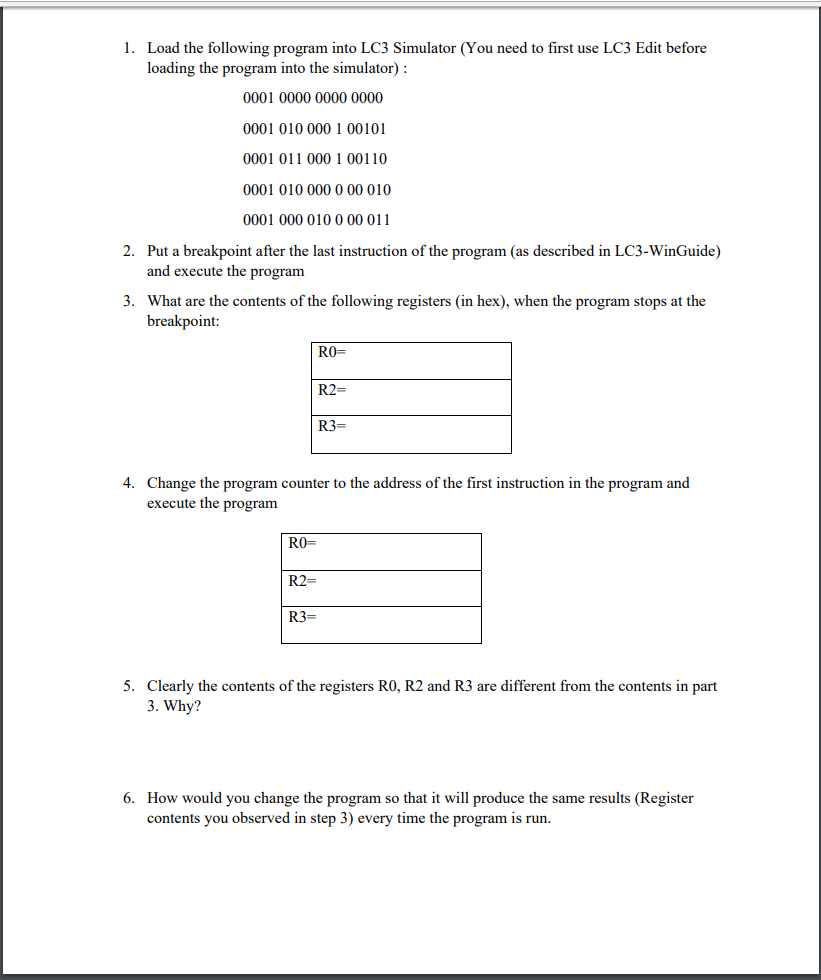
Load the following program into LC3 Simulator (You need to first use LC3 Edit before loading the program into the simulator) 1. 0001 0000 0000 0000 0001 010 000 1 00101 0001 011 000 1 00110 0001 010 000 0 00 010 0001 000 010 0 00 011 Put a breakpoint after the last instruction of the program (as described in LC3-WinGuide) and execute the progranm What are the contents of the following registers (in hex), when the program stops at the breakpoint: 2. 3. R2- R3- Change the program counter to the address of the first instruction in the program and execute the program 4. RO- R2- R3- 5. Clearly the contents of the registers RO, R2 and R3 are different from the contents in part 3. Why? How would you change the program so that it will produce the same results (Register contents you observed in step 3) every time the program is run. 6
Step by Step Solution
There are 3 Steps involved in it

Get step-by-step solutions from verified subject matter experts
 Study Help