







Question: Looking at my debugged code can someone please help with these questions? I know commands like info, or print can be used, but I think
Looking at my debugged code can someone please help with these questions? I know commands like "info", or "print" can be used, but I think I am not using them the correct way.
- Find the Addresses
- system()
- /bin/sh
- Any exit() function that exits the shell cleanly (no errors displayed).
- Figure out Padding
- Just putting those three addresses in the gtid_data.txt is not enough for this return-to-libc exploit to work. There is a required amount of padding that goes in this file before the exploit works. To maximize understanding of the padding you should read and understand the code. Knowing how the data is read into the buffer/registers will help you complete this exploit.
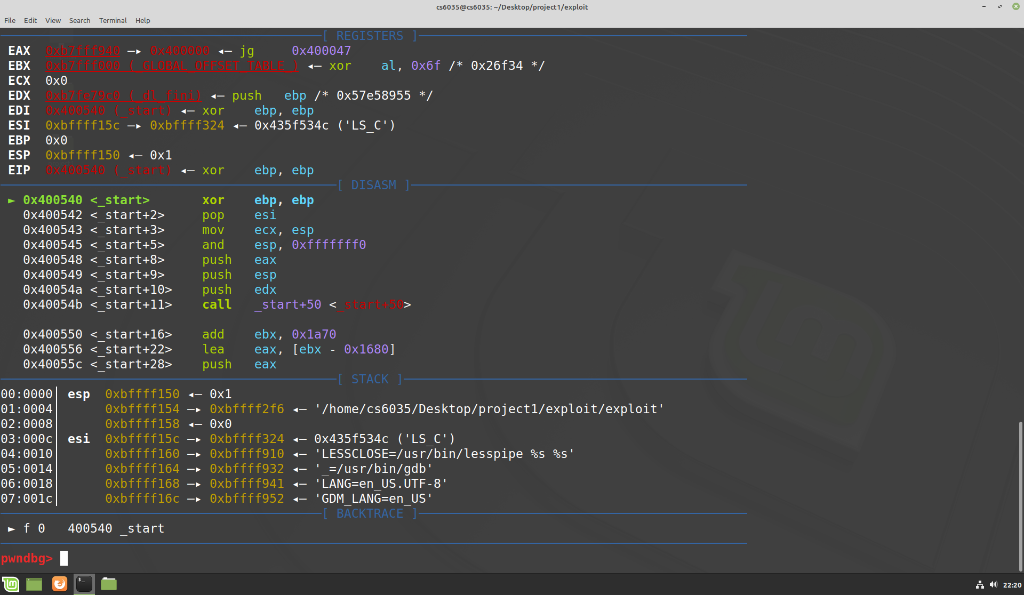
036055@5035:-/Desktop/project 1/exploit File Edit View Search Terminal Help REGISTERS EAX Oxb-00000 -- jg Ox400047 EBX X1000 1- xor al, Ox6f /* Ox26f34 */ ECX Oxo EDX Oxb//code - push ebp /* Ox57e58955 */ EDI 1- xor ebp, ebp ESI Oxbffff15c - Oxbffff324 - 0x435f534C ('LS_C') EBP Oxo ESP Oxbffff150 -- 0x1 EIP 0x004- xor ebp, ebp [DISASM 0x400540 <_start> xor ebp, ebp 0x400542 pop esi 0x400543 mov ecx, esp Ox400545 and esp, Oxfffffffo Ox400548 push eax 0x400549 push esp Ox40054a <_start> push edx 0x40054b <_start> call _start+50 add ebx, Oxla70 0x400556 lea eax, [ebx - 0x1680) 0x40055C push eax [ STACK ] 00:0000 espexbffff150 -- 0x1 01:0004 Oxbffff154 oxbffff2f6 -- '/home/cs6035/Desktop/project1/exploit/exploit' 02:0008 Oxbffff158 OxO 03:0000 esi Oxbffff15c - Oxbffff324 -- 0x435f534c ('LS C') 04:0010 Oxbffff160 - Oxbffff910 - 'LESSCLOSE=/usr/bin/lesspipe %s %s' 05:0014 Oxbffff164 Oxbffff932 ' =/usr/bin/gdb' 06:0018 Oxbffff168 Oxbffff941 "LANG=en US.UTF-8 07:0010 Oxbffff16c - Oxbffff952 - "GDM_LANG=en_US' BACKTRACE fo 400540 start - - pwndbg> 1m i 4 22:20 036055@5035:-/Desktop/project 1/exploit File Edit View Search Terminal Help REGISTERS EAX Oxb-00000 -- jg Ox400047 EBX X1000 1- xor al, Ox6f /* Ox26f34 */ ECX Oxo EDX Oxb//code - push ebp /* Ox57e58955 */ EDI 1- xor ebp, ebp ESI Oxbffff15c - Oxbffff324 - 0x435f534C ('LS_C') EBP Oxo ESP Oxbffff150 -- 0x1 EIP 0x004- xor ebp, ebp [DISASM 0x400540 <_start> xor ebp, ebp 0x400542 pop esi 0x400543 mov ecx, esp Ox400545 and esp, Oxfffffffo Ox400548 push eax 0x400549 push esp Ox40054a <_start> push edx 0x40054b <_start> call _start+50 add ebx, Oxla70 0x400556 lea eax, [ebx - 0x1680) 0x40055C push eax [ STACK ] 00:0000 espexbffff150 -- 0x1 01:0004 Oxbffff154 oxbffff2f6 -- '/home/cs6035/Desktop/project1/exploit/exploit' 02:0008 Oxbffff158 OxO 03:0000 esi Oxbffff15c - Oxbffff324 -- 0x435f534c ('LS C') 04:0010 Oxbffff160 - Oxbffff910 - 'LESSCLOSE=/usr/bin/lesspipe %s %s' 05:0014 Oxbffff164 Oxbffff932 ' =/usr/bin/gdb' 06:0018 Oxbffff168 Oxbffff941 "LANG=en US.UTF-8 07:0010 Oxbffff16c - Oxbffff952 - "GDM_LANG=en_US' BACKTRACE fo 400540 start - - pwndbg> 1m i 4 22:20
Step by Step Solution
There are 3 Steps involved in it

Get step-by-step solutions from verified subject matter experts
 Study Help