







Question: /* * LStack.h */ #ifndef STACK_H_ #define STACK_H_ #include #include using namespace std; template struct SNode { T data; SNode *next; }; template class Stack
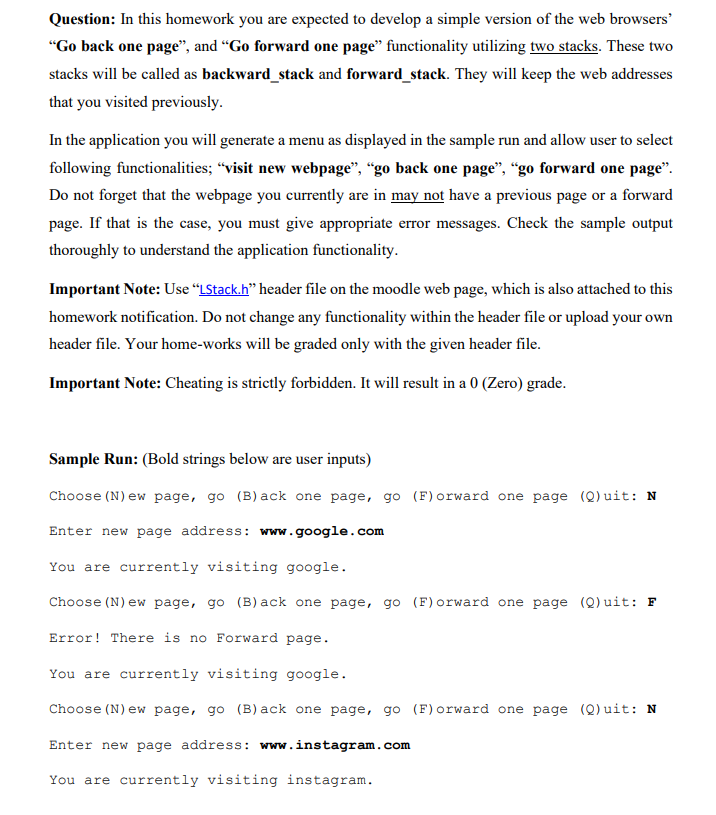
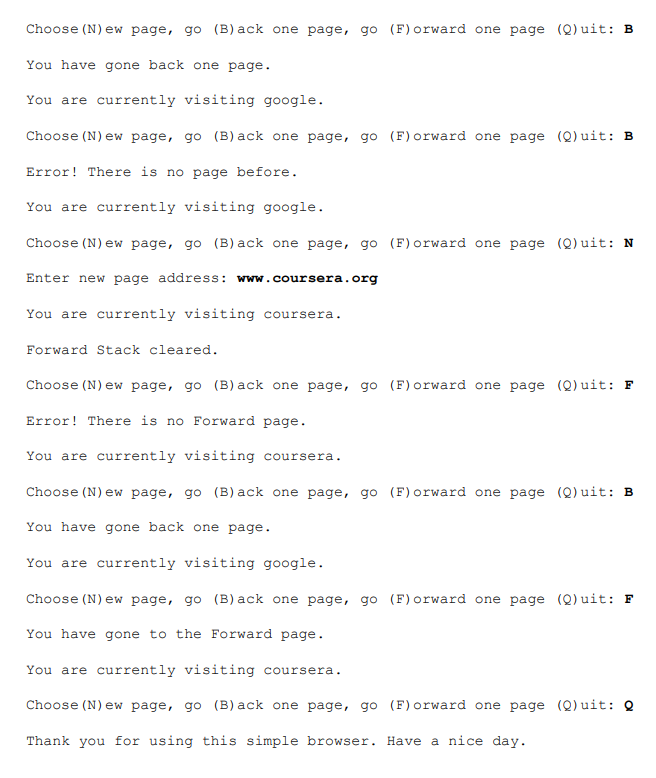
/* * LStack.h */ #ifndef STACK_H_ #define STACK_H_ #include #include using namespace std; template struct SNode { T data; SNode *next; }; template class Stack { protected: SNode *top; //head becomes top. Items should be inserted from top. int cnt; public: //Constructor Stack() { top = NULL; //sets top initial value to NULL cnt = 0; } //Destructor ~Stack() { clear(); } bool isEmpty() { return top == NULL; } //There is no size limitation in Stack using LinkedList implementation. We do not need to check if the stack is full or not. T peek() { // you can name it as peek assert( !isEmpty() ); //if not empty return top->data;//return the value on the top } T pop(); void push(const T&); void clear(); int size(); }; //resets the stack to its initial state template void Stack::clear() { SNode *p; while (top != NULL) { p = top; top = top->next; delete p; } cnt = 0; } //insert a new item to the top of stack template void Stack::push(const T &item) { SNode *newNode = new SNode; newNode->data = item; newNode->next = top; top = newNode; cnt++; } //retrieve (remove and return) the top value template T Stack::pop() { SNode *p; //pointer to traverse T item; assert(!isEmpty()); //if the stack is empty terminate p = top; item = top->data; top = top->next; delete p; cnt--; return item; } template int Stack:: size(){ return cnt; } #endif /* STACK_H_ */Question: In this homework you are expected to develop a simple version of the web browsers' Go back one page, and Go forward one page functionality utilizing two stacks. These two stacks will be called as backward_stack and forward_stack. They will keep the web addresses that you visited previously. In the application you will generate a menu as displayed in the sample run and allow user to select following functionalities; visit new webpage, go back one page, go forward one page. Do not forget that the webpage you currently are in may not have a previous page or a forward page. If that is the case, you must give appropriate error messages. Check the sample output thoroughly to understand the application functionality. Important Note: Use LStack.h header file on the moodle web page, which is also attached to this homework notification. Do not change any functionality within the header file or upload your own header file. Your home-works will be graded only with the given header file. Important Note: Cheating is strictly forbidden. It will result in a 0 (Zero) grade. Sample Run: (Bold strings below are user inputs) Choose (N) ew page, go (B)ack one page, go (F)orward one page (0)uit: N Enter new page address: www.google.com You are currently visiting google. Choose (N) ew page, go (B)ack one page, go (F) orward one page (Q) uit: F Error! There is no Forward page. You are currently visiting google. Choose (N) ew page, go (B)ack one page, go (F) orward one page (Quit: N Enter new page address: www.instagram.com You are currently visiting instagram. Choose (N) ew page, go (B)ack one page, go (F)orward one page (Quit: B You have gone back one page. You are currently visiting google. Choose (N) ew page, go (B)ack one page, go (F)orward one page (Quit: B Error! There is no page before. You are currently visiting google. Choose (N) ew page, go (B)ack one page, go (F)orward one page (Quit: N Enter new page address: www.coursera.org You are currently visiting coursera. Forward Stack cleared. Choose (N) ew page, go (B)ack one page, go (F) orward one page (Quit: F Error! There is no Forward page. You are currently visiting coursera. Choose (N) ew page, go (B) ack one page, go (F) orward one page (Q) uit: B You have gone back one page. You are currently visiting google. Choose (N) ew page, go (B) ack one page, go (F) orward one page (Q) uit: F You have gone to the Forward page. You are currently visiting coursera. Choose (N) ew page, go (B)ack one page, go (F) orward one page (Q) uit: Q Thank you for using this simple browser. Have a nice day
Step by Step Solution
There are 3 Steps involved in it

Get step-by-step solutions from verified subject matter experts
 Study Help