







Question: Macro Excel Assignment: Please help ! (macro screenshot) Thank you! In tab LEM Data of the spreadsheet are 6 columns of data: MONT CNC Date
Macro Excel Assignment: Please help ! (macro screenshot) Thank you!
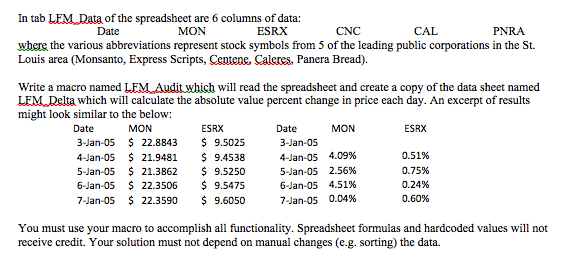
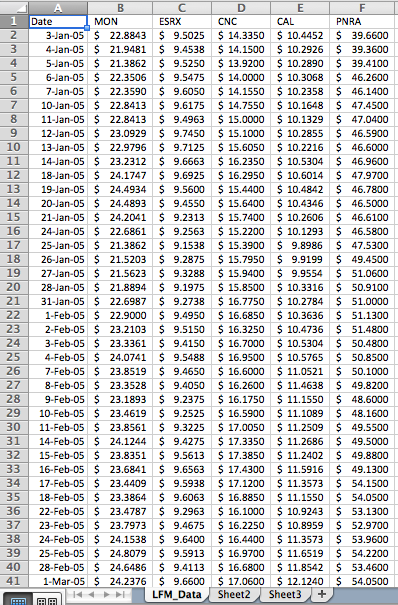
In tab LEM Data of the spreadsheet are 6 columns of data: MONT CNC Date ESRX PNRA where the various abbreviations represent stock symbols from 5 of the leading public corporations in the St. Louis area (Monsanto, Express Scripts, Centene, Caleres, Panera Bread) Write a macro named LEMLAudit which will read the spreadsheet and create a copy of the data sheet named LEML Delta which will calculate the absolute value percent change in price each day. An excerpt of results might look similar to the below: MON MON Date ESRX Date ESRX 3-Jan-05 22.8843 9.5025 3 Jan-05 4 Jan 05 4.09% 0.51% 4-Jan-05 21.9481 9.4538 5-Jan-05 21.3862 9.5250 5-Jan-05 2.56% 0.75% 6-Jan-05 22.3506 9.5475 6-Jan-05 4.51% 0.24% 7-Jan-05 22.3590 9.6050 7 Jan-05 0.04% 0.60% You must use your macro to accomplish all functionality. Spreadsheet formulas and hardcoded values will not receive credit. Your solution must not depend on manual changes (e.g. sorting) the data. In tab LEM Data of the spreadsheet are 6 columns of data: MONT CNC Date ESRX PNRA where the various abbreviations represent stock symbols from 5 of the leading public corporations in the St. Louis area (Monsanto, Express Scripts, Centene, Caleres, Panera Bread) Write a macro named LEMLAudit which will read the spreadsheet and create a copy of the data sheet named LEML Delta which will calculate the absolute value percent change in price each day. An excerpt of results might look similar to the below: MON MON Date ESRX Date ESRX 3-Jan-05 22.8843 9.5025 3 Jan-05 4 Jan 05 4.09% 0.51% 4-Jan-05 21.9481 9.4538 5-Jan-05 21.3862 9.5250 5-Jan-05 2.56% 0.75% 6-Jan-05 22.3506 9.5475 6-Jan-05 4.51% 0.24% 7-Jan-05 22.3590 9.6050 7 Jan-05 0.04% 0.60% You must use your macro to accomplish all functionality. Spreadsheet formulas and hardcoded values will not receive credit. Your solution must not depend on manual changes (e.g. sorting) the data
Step by Step Solution
There are 3 Steps involved in it

Get step-by-step solutions from verified subject matter experts
 Study Help