







Question: Main topics: If Statement, User functions, while loop, Find function 1 Fruit Classification process, this Suppose you work for a company that processes fruits. To
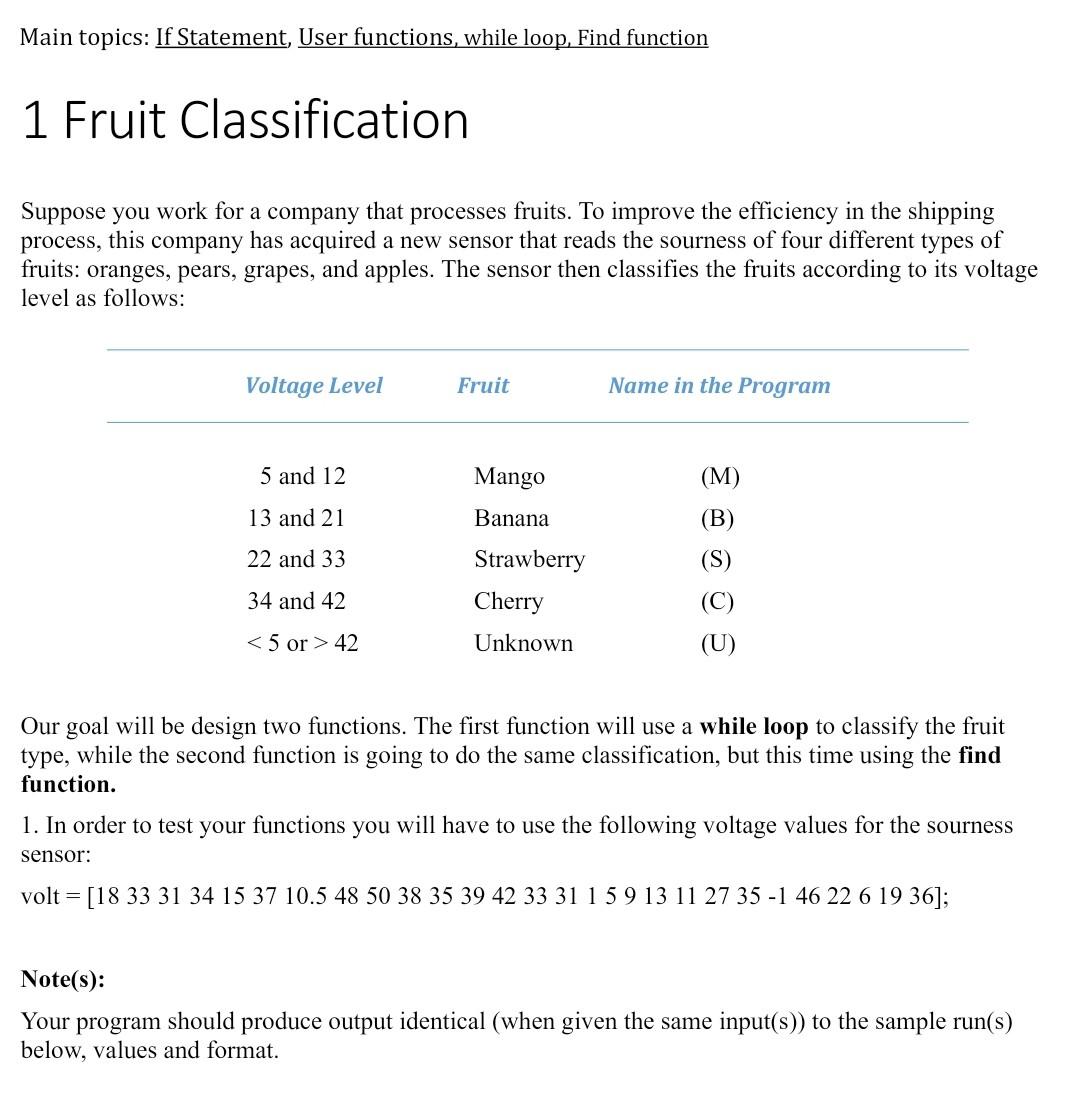
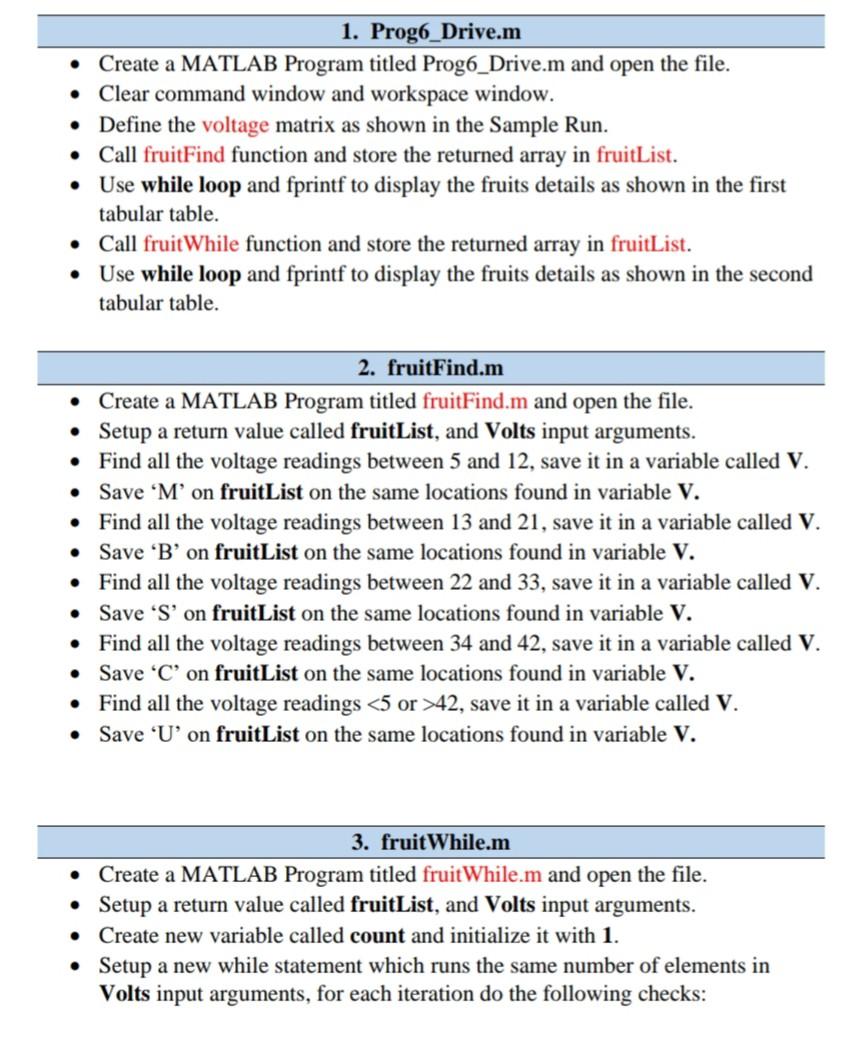
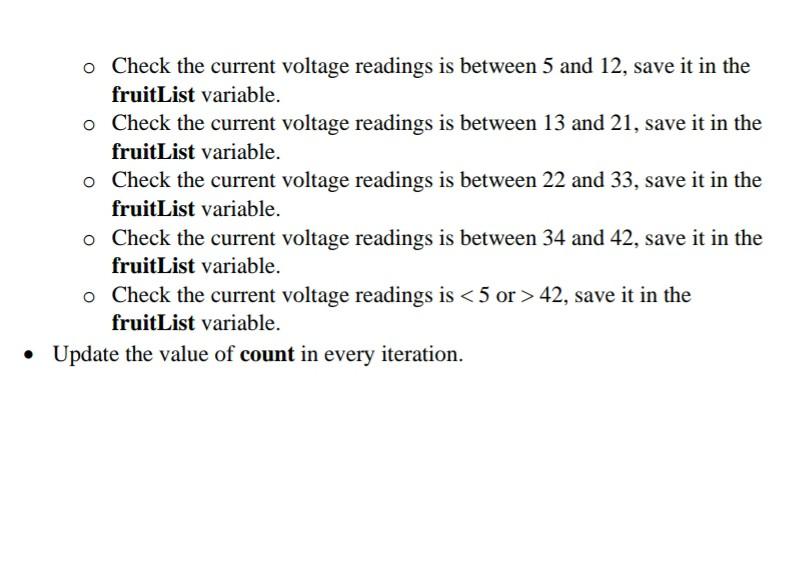
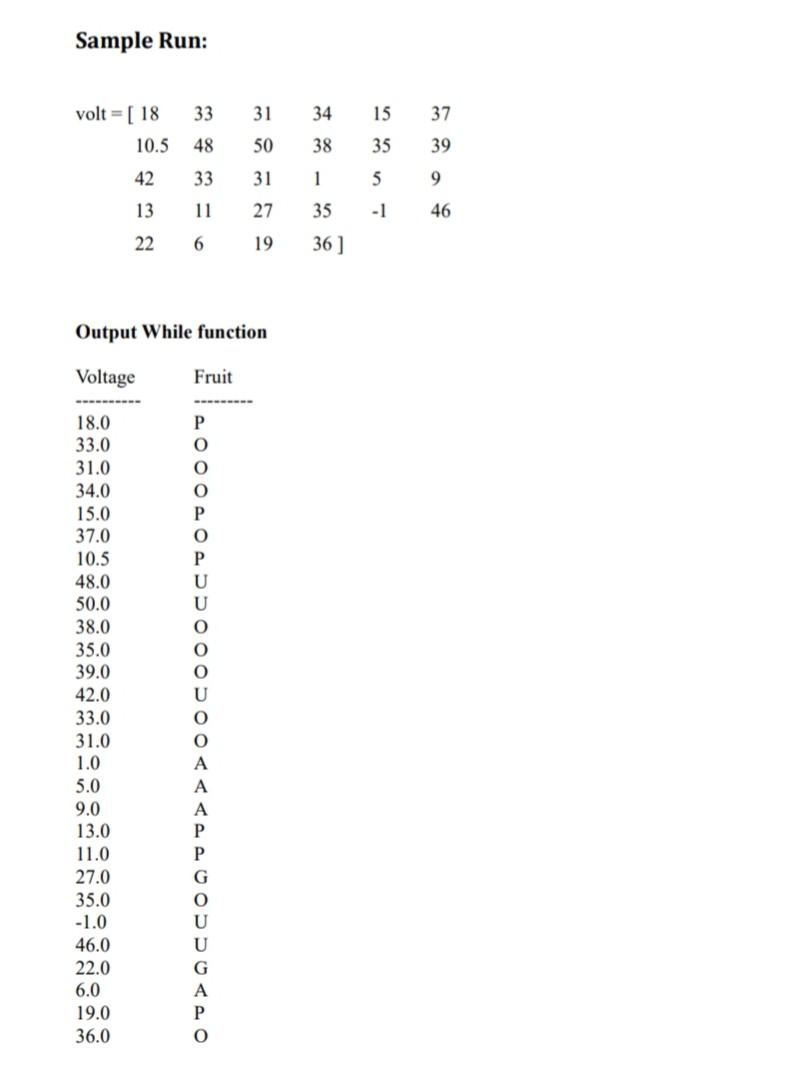
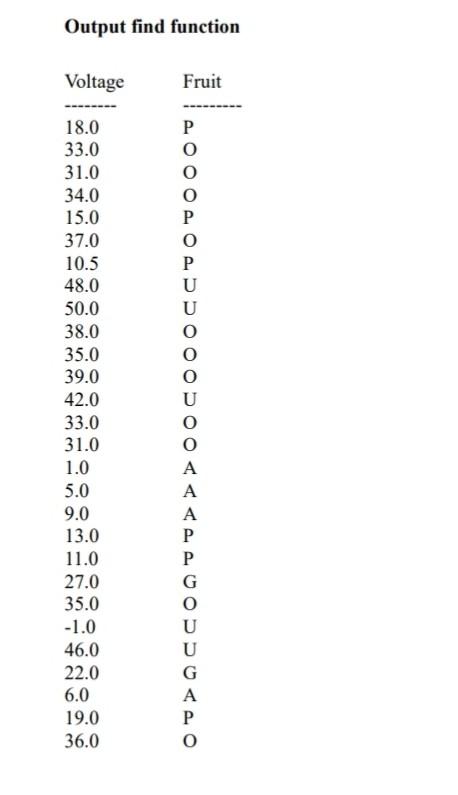
Main topics: If Statement, User functions, while loop, Find function 1 Fruit Classification process, this Suppose you work for a company that processes fruits. To improve the efficiency in the shipping company has acquired a new sensor that reads the sourness of four different types of fruits: oranges, pears, grapes, and apples. The sensor then classifies the fruits according to its voltage level as follows: Voltage Level Fruit Name in the Program 5 and 12 Mango 13 and 21 Banana (M) (B) (S) 22 and 33 34 and 42 Strawberry Cherry Unknown 42 (U) Our goal will be design two functions. The first function will use a while loop to classify the fruit type, while the second function is going to do the same classification, but this time using the find function. 1. In order to test your functions you will have to use the following voltage values for the sourness sensor: volt = [18 33 31 34 15 37 10.5 48 50 38 35 39 42 33 31 1 5 9 13 11 27 35 -1 46 22 6 19 36]; Note(s): Your program should produce output identical (when given the same input(s)) to the sample run(s) below, values and format. 1. Prog6_Drive.m Create a MATLAB Program titled Prog6_Drive.m and open the file. Clear command window and workspace window. Define the voltage matrix as shown in the Sample Run. Call fruitFind function and store the returned array in fruitList. Use while loop and fprintf to display the fruits details as shown in the first tabular table. Call fruitWhile function and store the returned array in fruitList. Use while loop and fprintf to display the fruits details as shown in the second tabular table. 2. fruitFind.m Create a MATLAB Program titled fruitFind.m and open the file. Setup a return value called fruitList, and Volts input arguments. Find all the voltage readings between 5 and 12, save it in a variable called V. Save Mon fruitList on the same locations found in variable V. Find all the voltage readings between 13 and 21, save it in a variable called V. Save 'B' on fruitList on the same locations found in variable V. Find all the voltage readings between 22 and 33, save it in a variable called V. Save S'on fruitList on the same locations found in variable V. Find all the voltage readings between 34 and 42, save it in a variable called V. Save 'C' on fruitList on the same locations found in variable V. Find all the voltage readings 42, save it in a variable called V. Save 'U' on fruitList on the same locations found in variable V. 3. fruit While.m a MATLAB Program titled fruitWhile.m and open the file. Setup a return value called fruitList, and Volts input arguments. Create new variable called count and initialize it with 1. Setup a new while statement which runs the same number of elements in Volts input arguments, for each iteration do the following checks: . o Check the current voltage readings is between 5 and 12, save it in the fruitList variable. o Check the current voltage readings is between 13 and 21, save it in the fruitList variable. o Check the current voltage readings is between 22 and 33, save it in the fruitList variable. o Check the current voltage readings is between 34 and 42, save it in the fruitList variable. o Check the current voltage readings is 42, save it in the fruitList variable. Update the value of count in every iteration. Sample Run: 33 31 34 15 37 volt = [ 18 10.5 48 50 38 35 39 42 33 31 1 5 9 13 11 27 35 -1 46 22 6 19 36] Output While function Voltage Fruit P 0 P O P U U O O O 18.0 33.0 31.0 34.0 15.0 37.0 10.5 48.0 50.0 38.0 35.0 39.0 42.0 33.0 31.0 1.0 5.0 9.0 13.0 11.0 27.0 35.0 -1.0 46.0 22.0 6.0 19.0 36.0 A A P P G A P o Output find function Voltage Fruit P O 0 P O P U U 18.0 33.0 31.0 34.0 15.0 37.0 10.5 48.0 50.0 38.0 35.0 39.0 42.0 33.0 31.0 1.0 5.0 9.0 13.0 11.0 27.0 35.0 -1.0 46.0 22.0 6.0 19.0 36.0 A A A P P G O U U G A o
Step by Step Solution
There are 3 Steps involved in it

Get step-by-step solutions from verified subject matter experts
 Study Help