







Question: Main.c #include #include #include #include launchpad.h #include seg7.h #include seg7digit.h /* * System states */ // The running state of the stopwatch system enum {
Main.c
#include#include #include #include "launchpad.h" #include "seg7.h" #include "seg7digit.h" /* * System states */ // The running state of the stopwatch system enum { Reset, Run, Pause } sysState = Run; // The initial state of the 7-segment display: "00:00" with colon on seg7Display_t seg7Display = { 0, 0, 0, 0, 1 }; /* * Callback function for updating clock watch */ extern stopWatchIncrement(seg7Display_t *); void stopWatchUpdate(uint32_t time) // The scheduled time { // Update clock and display, only if the stopwatch is running if (sysState == Run) { stopWatchIncrement(&seg7Display); } seg7DigitUpdate(&seg7Display); // Call back after 10 milliseconds schdCallback(stopWatchUpdate, time + 10); } /* * Callback function for checking push button. SW1 is the RESET button, and * SW2 is the START/PAUSE/RESUME button. */ void checkPushButton(uint32_t time) { int code = pbRead(); uint32_t delay; switch (code) { case 1: // SW1 is the Reset button, only when the stopwatch is paused // // YOUR CODE // delay = 250; // software debouncing break; case 2: // SW2 is the Start/Pause/Resume button // // YOUR CODE // delay = 250; // software debouncing break; default: delay = 10; } schdCallback(checkPushButton, time + delay); } /* * The main function */ int main(void) { lpInit(); seg7Init(); uprintf("%s ", "Lab 3: Stopwatch"); // Update the clock display seg7DigitUpdate(&seg7Display); // Schedule the first callback events for LED flashing and push button checking. // Those trigger callback chains. The time unit is millisecond. schdCallback(stopWatchUpdate, 1000); schdCallback(checkPushButton, 1005); // Run the event scheduler to process callback events while (true) { schdExecute(); } }
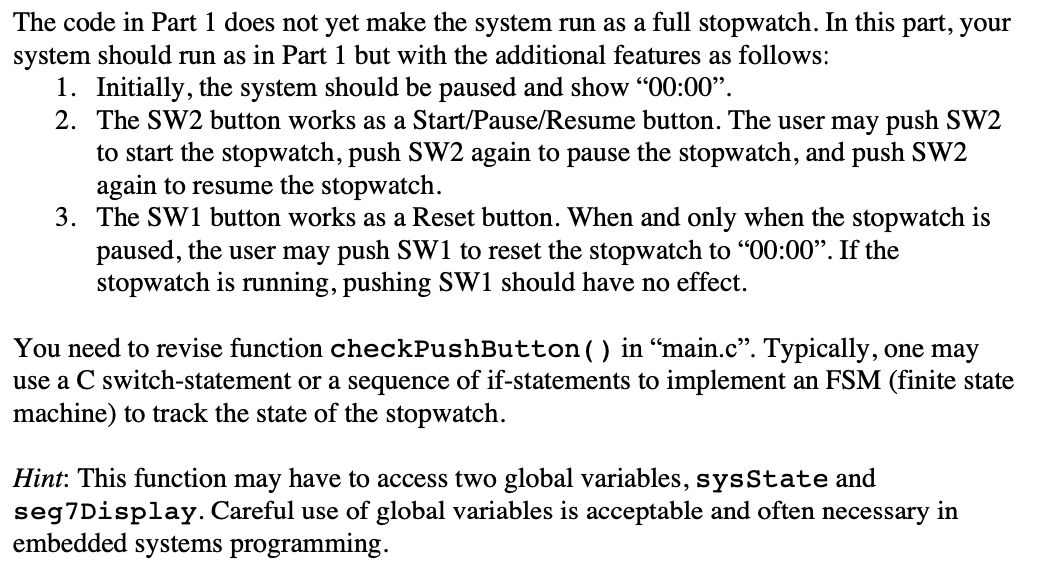
The code in Part 1 does not yet make the system run as a full stopwatch. In this part, your system should run as in Part 1 but with the additional features as follows: 1. Initially, the system should be paused and show 00:00". 2. The SW2 button works as a Start/Pause/Resume button. The user may push SW2 to start the stopwatch, push SW2 again to pause the stopwatch, and push SW2 again to resume the stopwatch. 3. The SW1 button works as a Reset button. When and only when the stopwatch is paused, the user may push SW1 to reset the stopwatch to 00:00". If the stopwatch is running, pushing SW1 should have no effect. You need to revise function checkPushButton() in main.c. Typically, one may use a C switch-statement or a sequence of if-statements to implement an FSM (finite state machine) to track the state of the stopwatch. Hint: This function may have to access two global variables, sysState and seg7Display. Careful use of global variables is acceptable and often necessary in embedded systems programming. The code in Part 1 does not yet make the system run as a full stopwatch. In this part, your system should run as in Part 1 but with the additional features as follows: 1. Initially, the system should be paused and show 00:00". 2. The SW2 button works as a Start/Pause/Resume button. The user may push SW2 to start the stopwatch, push SW2 again to pause the stopwatch, and push SW2 again to resume the stopwatch. 3. The SW1 button works as a Reset button. When and only when the stopwatch is paused, the user may push SW1 to reset the stopwatch to 00:00". If the stopwatch is running, pushing SW1 should have no effect. You need to revise function checkPushButton() in main.c. Typically, one may use a C switch-statement or a sequence of if-statements to implement an FSM (finite state machine) to track the state of the stopwatch. Hint: This function may have to access two global variables, sysState and seg7Display. Careful use of global variables is acceptable and often necessary in embedded systems programming
Step by Step Solution
There are 3 Steps involved in it

Get step-by-step solutions from verified subject matter experts
 Study Help