







Question: Main.cpp #include #include using namespace std; int main() { cout > option; /* Load files here */ cout > option; /* Work your magic here
Main.cpp
#include
int main() { cout > option;
/* Load files here */
cout > option; /* Work your magic here */ return 0; }
And you have one extrafile.h and one extrafile.cpp at your disposale.
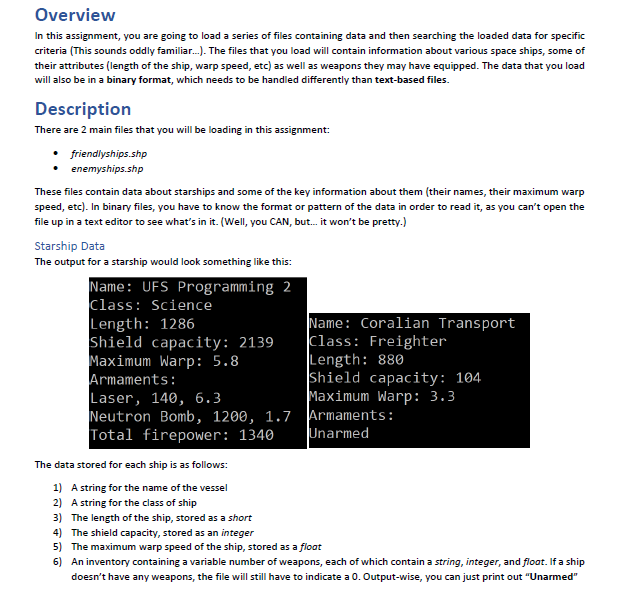
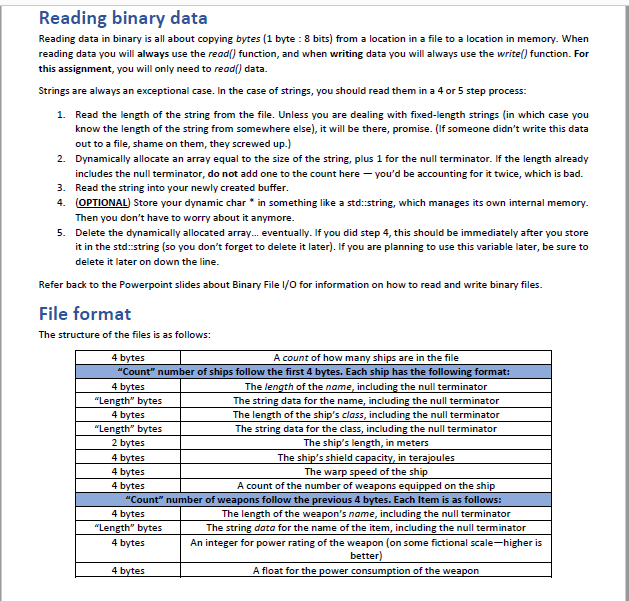
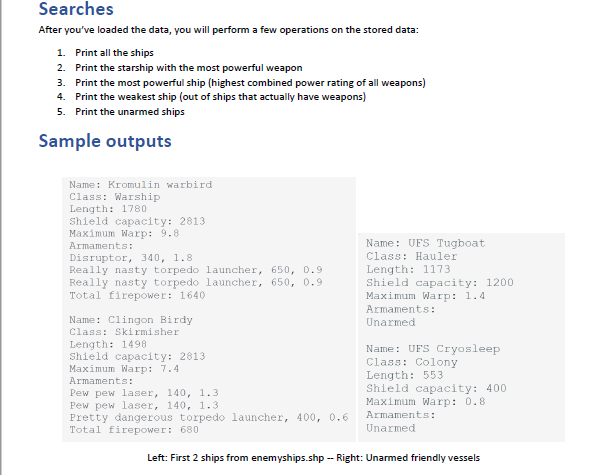
Overview In this assignment, you are going to load a series of files containing data and then searching the loaded data for specific criteria (This sounds oddly familiar... The files that you load will contain information about various space ships, some of their attributes (length of the ship, warp speed, etc) as well as weapons they may have equipped. The data that you load will also be in a binary format, which needs to be handled differently than text-based files. Description There are 2 main files that you will be loading in this assignment: friendlyships.shp enemyships.shp These files contain data about starships and some of the key information about them (their names, their maximum warp speed, etc). In binary files, you have to know the format or pattern of the data in order to read it, as you can't open the file up in a text editor to see what's in it. (Well, you CAN, but... it won't be pretty.) Starship Data The output for a starship would look something like this: Name: UFS Programming 2 Class: Science Length: 1286 Name: Coralian Transport Shield capacity: 2139 Class: Freighter Maximum Warp: 5.8 Length: 880 Armaments: Shield capacity: 104 Laser, 140, 6.3 Maximum Warp: 3.3 Neutron Bomb, 1200, 1.7 Armaments: Total firepower: 1340 Unarmed The data stored for each ship is as follows: 1) A string for the name of the vessel 2) A string for the class of ship 3) The length of the ship, stored as a short 4) The shield capacity, stored as an integer 5) The maximum warp speed of the ship, stored as a float 6) An inventory containing a variable number of weapons, each of which contain a string, integer, and float. If a ship doesn't have any weapons, the file will still have to indicate a 0. Output-wise, you can just print out "Unarmed" Reading binary data Reading data in binary is all about copying bytes (1 byte : 8 bits) from a location in a file to a location in memory. When reading data you will always use the read() function, and when writing data you will always use the write() function. For this assignment, you will only need to read() data. Strings are always an exceptional case. In the case of strings, you should read them in a 4 or 5 step process: 1. Read the length of the string from the file. Unless you are dealing with fixed-length strings (in which case you know the length of the string from somewhere else), it will be there, promise. (If someone didn't write this data out to a file, shame on them, they screwed up) 2. Dynamically allocate an array equal to the size of the string, plus 1 for the null terminator. If the length already includes the null terminator, do not add one to the count here you'd be accounting for it twice, which is bad. 3. Read the string into your newly created buffer. 4. OPTIONAL) Store your dynamic char * in something like a std::string, which manages its own internal memory Then you don't have to worry about it anymore. 5. Delete the dynamically allocated array... eventually. If you did step 4, this should be immediately after you store it in the std::string (so you don't forget to delete it later). If you are planning to use this variable later, be sure to delete it later on down the line. Refer back to the Powerpoint slides about Binary File 1/0 for information on how to read and write binary files. File format The structure of the files is as follows: 4 bytes A count of how many ships are in the file "Count" number of ships follow the first 4 bytes. Each ship has the following format: 4 bytes The length of the name, including the null terminator "Length" bytes The string data for the name, including the null terminator 4 bytes The length of the ship's class, including the null terminator "Length" bytes The string data for the class, including the null terminator 2 bytes The ship's length, in meters 4 bytes The ship's shield capacity, in terajoules 4 bytes The warp speed of the ship 4 bytes A count of the number of weapons equipped on the ship "Count" number of weapons follow the previous 4 bytes. Each item is as follows: 4 bytes The length of the weapon's name, including the null terminator "Length" bytes The string data for the name of the item, including the null terminator 4 bytes An integer for power rating of the weapon (on some fictional scale-higher is better) 4 bytes A float for the power consumption of the weapon Searches After you've loaded the data, you will perform a few operations on the stored data: 1. Print all the ships 2. Print the starship with the most powerful weapon 3. Print the most powerful ship (highest combined power rating of all weapons) 4. Print the weakest ship (out of ships that actually have weapons) 5. Print the unarmed ships Sample outputs Name: Kromulin warbird Class: Warship Length: 1780 Shield capacity: 2813 Maximum Warp: 9.8 Armaments: Disruptor, 340, 1.8 Really nasty torpedo launcher, 650, 0.9 Really nasty torpedo launcher, 650, 0.9 Total firepower: 1640 Name: UFS Tugboat Class: Hauler Length: 1173 Shield capacity: 1200 Maximum Warp: 1.4 Armaments: Unarmed Name: Clingon Birdy Class: Skirmisher Length: 1498 Shield capacity: 2813 Maximum Warp: 7.4 Armaments: Pew pew laser, 140, 1.3 Pew pew laser, 140, 1.3 Pretty dangerous torpedo launcher, 400, 0.6 Total firepower: 680 Name: UFS Cryosleep Class: Colony Length: 553 Shield capacity: 400 Maximum Warp: 0.8 Armaments: Unarmed Left: First 2 ships from enemyships.shp -- Right: Unarmed friendly vessels Overview In this assignment, you are going to load a series of files containing data and then searching the loaded data for specific criteria (This sounds oddly familiar... The files that you load will contain information about various space ships, some of their attributes (length of the ship, warp speed, etc) as well as weapons they may have equipped. The data that you load will also be in a binary format, which needs to be handled differently than text-based files. Description There are 2 main files that you will be loading in this assignment: friendlyships.shp enemyships.shp These files contain data about starships and some of the key information about them (their names, their maximum warp speed, etc). In binary files, you have to know the format or pattern of the data in order to read it, as you can't open the file up in a text editor to see what's in it. (Well, you CAN, but... it won't be pretty.) Starship Data The output for a starship would look something like this: Name: UFS Programming 2 Class: Science Length: 1286 Name: Coralian Transport Shield capacity: 2139 Class: Freighter Maximum Warp: 5.8 Length: 880 Armaments: Shield capacity: 104 Laser, 140, 6.3 Maximum Warp: 3.3 Neutron Bomb, 1200, 1.7 Armaments: Total firepower: 1340 Unarmed The data stored for each ship is as follows: 1) A string for the name of the vessel 2) A string for the class of ship 3) The length of the ship, stored as a short 4) The shield capacity, stored as an integer 5) The maximum warp speed of the ship, stored as a float 6) An inventory containing a variable number of weapons, each of which contain a string, integer, and float. If a ship doesn't have any weapons, the file will still have to indicate a 0. Output-wise, you can just print out "Unarmed" Reading binary data Reading data in binary is all about copying bytes (1 byte : 8 bits) from a location in a file to a location in memory. When reading data you will always use the read() function, and when writing data you will always use the write() function. For this assignment, you will only need to read() data. Strings are always an exceptional case. In the case of strings, you should read them in a 4 or 5 step process: 1. Read the length of the string from the file. Unless you are dealing with fixed-length strings (in which case you know the length of the string from somewhere else), it will be there, promise. (If someone didn't write this data out to a file, shame on them, they screwed up) 2. Dynamically allocate an array equal to the size of the string, plus 1 for the null terminator. If the length already includes the null terminator, do not add one to the count here you'd be accounting for it twice, which is bad. 3. Read the string into your newly created buffer. 4. OPTIONAL) Store your dynamic char * in something like a std::string, which manages its own internal memory Then you don't have to worry about it anymore. 5. Delete the dynamically allocated array... eventually. If you did step 4, this should be immediately after you store it in the std::string (so you don't forget to delete it later). If you are planning to use this variable later, be sure to delete it later on down the line. Refer back to the Powerpoint slides about Binary File 1/0 for information on how to read and write binary files. File format The structure of the files is as follows: 4 bytes A count of how many ships are in the file "Count" number of ships follow the first 4 bytes. Each ship has the following format: 4 bytes The length of the name, including the null terminator "Length" bytes The string data for the name, including the null terminator 4 bytes The length of the ship's class, including the null terminator "Length" bytes The string data for the class, including the null terminator 2 bytes The ship's length, in meters 4 bytes The ship's shield capacity, in terajoules 4 bytes The warp speed of the ship 4 bytes A count of the number of weapons equipped on the ship "Count" number of weapons follow the previous 4 bytes. Each item is as follows: 4 bytes The length of the weapon's name, including the null terminator "Length" bytes The string data for the name of the item, including the null terminator 4 bytes An integer for power rating of the weapon (on some fictional scale-higher is better) 4 bytes A float for the power consumption of the weapon Searches After you've loaded the data, you will perform a few operations on the stored data: 1. Print all the ships 2. Print the starship with the most powerful weapon 3. Print the most powerful ship (highest combined power rating of all weapons) 4. Print the weakest ship (out of ships that actually have weapons) 5. Print the unarmed ships Sample outputs Name: Kromulin warbird Class: Warship Length: 1780 Shield capacity: 2813 Maximum Warp: 9.8 Armaments: Disruptor, 340, 1.8 Really nasty torpedo launcher, 650, 0.9 Really nasty torpedo launcher, 650, 0.9 Total firepower: 1640 Name: UFS Tugboat Class: Hauler Length: 1173 Shield capacity: 1200 Maximum Warp: 1.4 Armaments: Unarmed Name: Clingon Birdy Class: Skirmisher Length: 1498 Shield capacity: 2813 Maximum Warp: 7.4 Armaments: Pew pew laser, 140, 1.3 Pew pew laser, 140, 1.3 Pretty dangerous torpedo launcher, 400, 0.6 Total firepower: 680 Name: UFS Cryosleep Class: Colony Length: 553 Shield capacity: 400 Maximum Warp: 0.8 Armaments: Unarmed Left: First 2 ships from enemyships.shp -- Right: Unarmed friendly vessels
Step by Step Solution
There are 3 Steps involved in it

Get step-by-step solutions from verified subject matter experts
 Study Help