







Question: //main.cpp #include #include using namespace std; // Priority Queue vector priorityqueue {-65536, 12, 7, 8, 4, 6, 5, 3 ,1}; // void enQueue(const int &x){
//main.cpp
#include
#include
using namespace std;
// Priority Queue
vector
//
void enQueue(const int &x){
priorityqueue.push_back(x);
int hole = priorityqueue.size() - 1;
for(; hole > 1 && x > priorityqueue[hole/2]; hole /= 2){
priorityqueue[hole] = priorityqueue[hole/2];
}
priorityqueue[hole] = x;
}
void percolateDown(int hole){
// Your codes here.
}
int deQueue(){
int minItem = priorityqueue[1];
priorityqueue[1] = priorityqueue[priorityqueue.size() - 1];
priorityqueue.pop_back();
percolateDown(1);
return minItem;
}
void printQueue(){
cout
for(auto i = priorityqueue.begin() + 1; i != priorityqueue.end(); ++i){
cout
}
cout
}
int main() {
enQueue(13);
enQueue(-1);
enQueue(10);
enQueue(15);
printQueue();
while(priorityqueue.size() != 1){
cout
}
return 0;
}
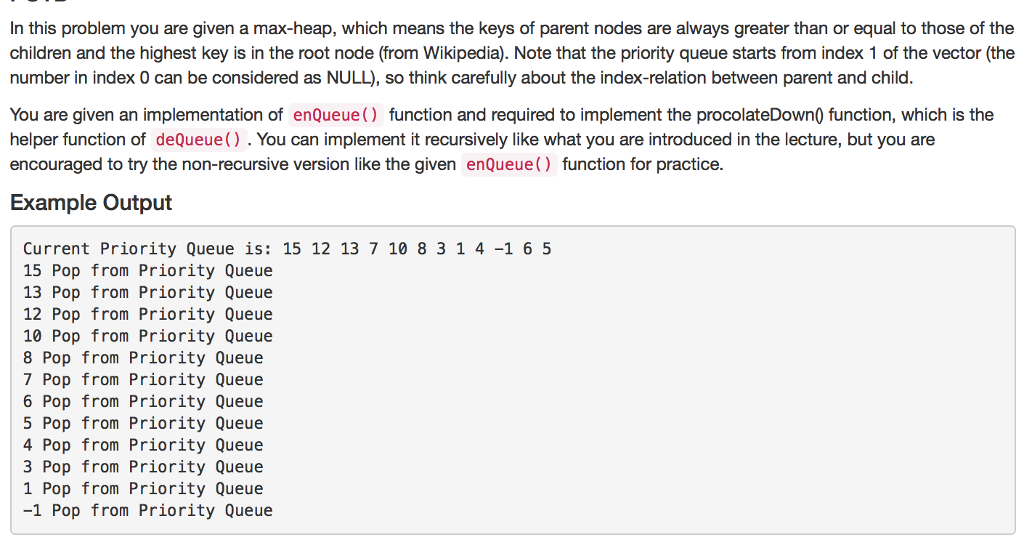
In this problem you are given a max-heap, which means the keys of parent nodes are always greater than or equal to those of the children and the highest key is in the root node (from Wikipedia). Note that the priority queue starts from index 1 of the vector (the number in index 0 can be considered as NULL, so think carefully about the index-relation between parent and child. You are given an implementation of enQueue function and required to implement the procolateDown0 function, which is the helper function of deQueue() You can implement it recursively like what you are introduced in the lecture, but you are encouraged to try the non-recursive version like the given enQueue function for practice Example output Current Priority Queue is: 15 12 13 7 10 8 3 1 4-1 6 5 15 Pop from Priority Queue 13 Pop from Priority Queue 12 Pop from Priority Queue 10 Pop from Priority Queue 8 Pop from Priority Queue 7 Pop from Priority Queue 6 Pop from Priority Queue 5 Pop from Priority Queue 4 Pop from Priority Queue 3 Pop from Priority Queue 1 Pop from Priority Queue 1 Pop from Priority Queue
Step by Step Solution
There are 3 Steps involved in it

Get step-by-step solutions from verified subject matter experts
 Study Help