







Question: Make a project schedule using Microsoft Project and the WBS you created in Week 3. Once you create your Microsoft Project schedule, make a column
Make a project schedule using Microsoft Project and the WBS you created in Week3. Once you create your Microsoft Project schedule, make a column for resources and add the resources associated with the activities in your schedule. Make sure that you not only consider human resources but also other resources (i.e., meeting space, construction equipment, etc.).
WBS BELOW.
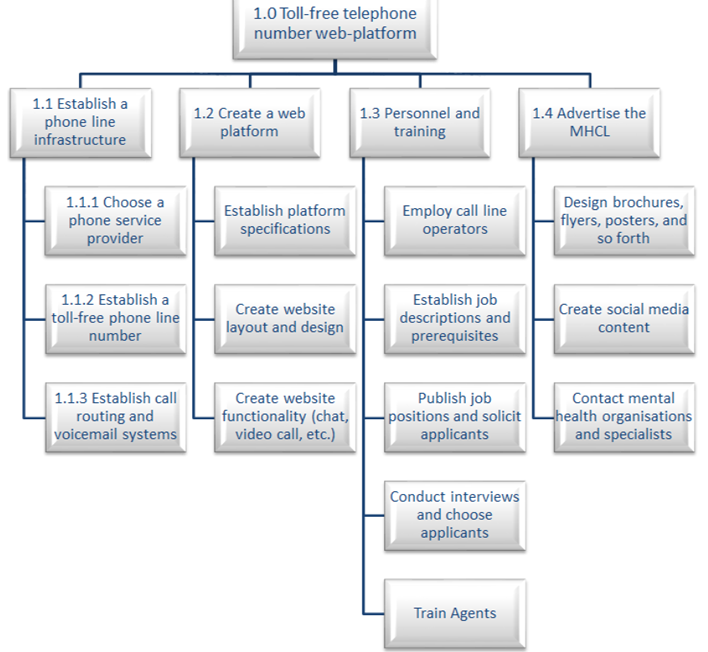
1.0 Toll-free telephone number web-platform 1.1 Establish a phone line 1.2 Create a web 1.3 Personnel and 1.4 Advertise the infrastructure platform training MHCL 1.1.1 Choose a phone service Establish platform Employ call line Design brochures, specifications flyers, posters, and provider operators so forth 1.1.2 Establish a Establish job toll-free phone line Create website descriptions and Create social media number layout and design prerequisites content 1.1.3 Establish call Create website Publish job Contact mental routing and functionality (chat, positions and solicit -health organisations voicemail systems video call, etc.) applicants and specialists Conduct interviews and choose applicants Train Agents
Step by Step Solution
There are 3 Steps involved in it

Get step-by-step solutions from verified subject matter experts
 Study Help