







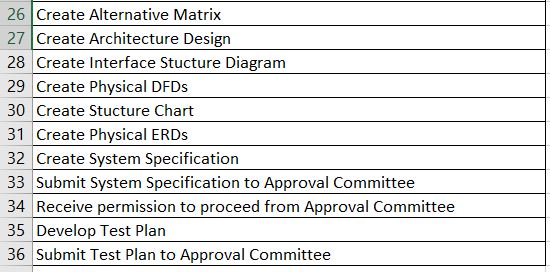
Question: Make a Project Work Plan Gantt Chart utilizing Microsoft Project. Open thisIndividual Project Work Plan Data (XLSX)spreadsheet (added below) and use the categorical data that
Make a Project Work Plan Gantt Chart utilizing Microsoft Project. Open thisIndividual Project Work Plan Data (XLSX)spreadsheet (added below) and use the categorical data that is presented in the spreadsheet to fill in the Gantt Chart with appropriate data. Your Gantt Chart must contain the following data: Tasks Resources (assigned to) Duration Start Date Finish Date Predecessors Remember from the previous individual practical exercise that you have five resources (team members) working with you on this project. One employee has been 'loaned' to the team from the IT department, one from the Finance Department, one from the HR Department, and two are 'outside' consultants that will be brought in at the starting point of the Analysis phase to assist with their process modeling and data modeling skill sets and experience. Due to the constraints of a nine-week course term, some of the deliverables listed in the Individual Work Plan Data Sheet and subsequently presented in the Gantt Chart will not be required to be completed in the assignments. It is assumed that these deliverables will be hypothetically completed at the appropriate stage of the project. Use January 7, 2019, as the project Start date when you make your Gantt Chart. Each task should have a duration of three days,except for the submission of the five deliverables to the Approval Committee. Those tasks have a duration of one day. The work week periods are eight hours per day, five days per week, Mondays through Fridays. Since the three tasks that make up the Feasibility Analysis can run concurrently, Tasks 1, 2, and 3 will have no predecessors. Task 4, the Feasibility Analysis, will have Tasks 1, 2, and 3 as predecessors. The multi-component Feasibility Analysis, Risk Assessment, System Proposal, and System Specification deliverables should each have multiple Predecessors . Save and submit your Gantt Chart in MPP file format.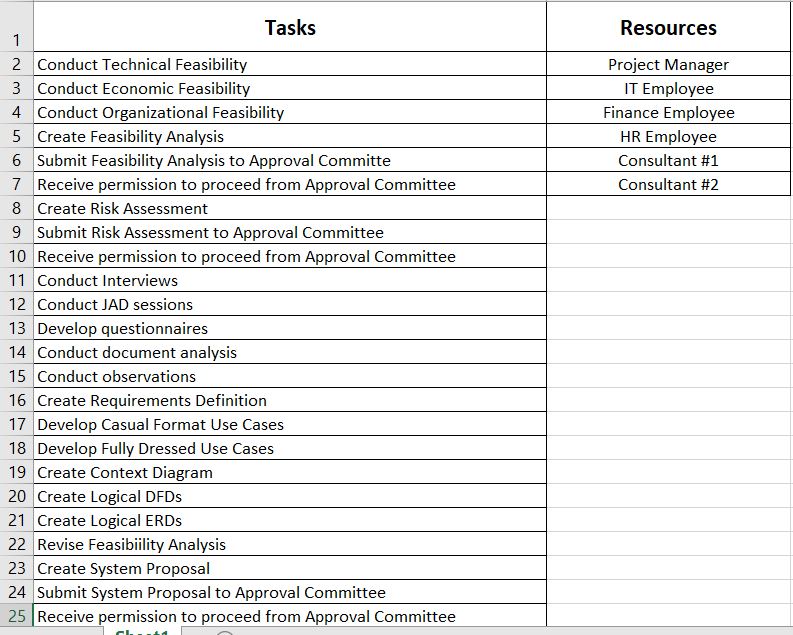
\f\f
Step by Step Solution
There are 3 Steps involved in it

Get step-by-step solutions from verified subject matter experts
 Study Help