







Question: Make changes to the lab1.mcode in order to implement the following features. Do NOT generate any additional Matlab functions please. You do not need any
Make changes to the lab1.mcode in order to implement the following features. Do NOT generate any additional Matlab functions please. You do not need any additional functions beyond what is already in the lab1.mfile.Also, you do not need to change any of the initialization calls at the beginning of lab1.m. The first two pictures is the lab1 m file. The third is the changes needed to be made to it. Thank you
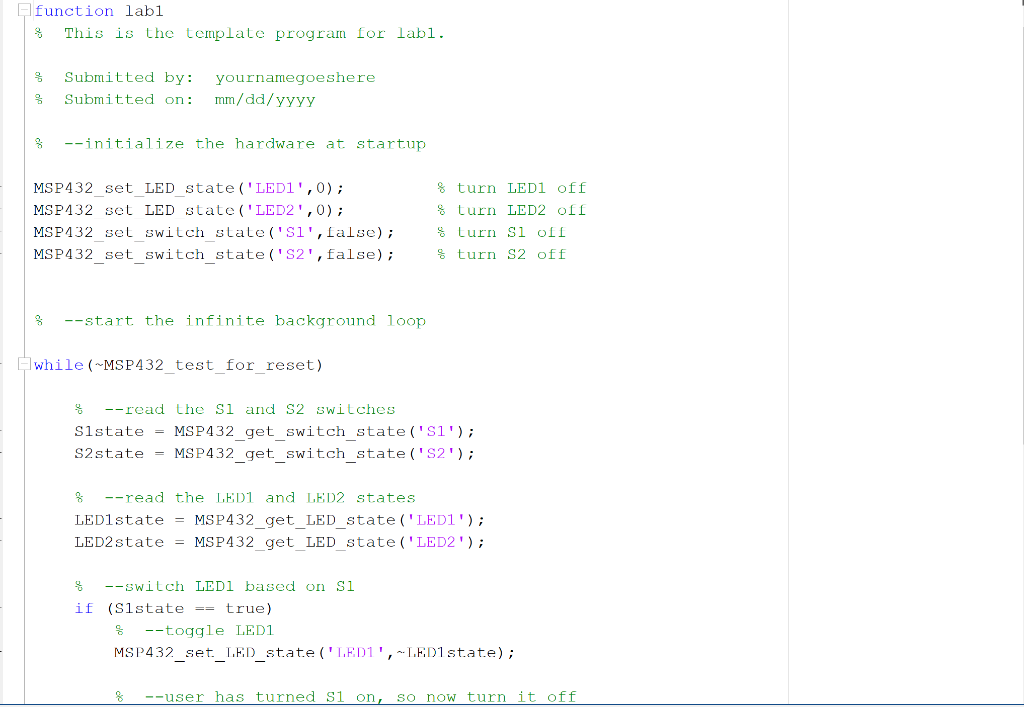
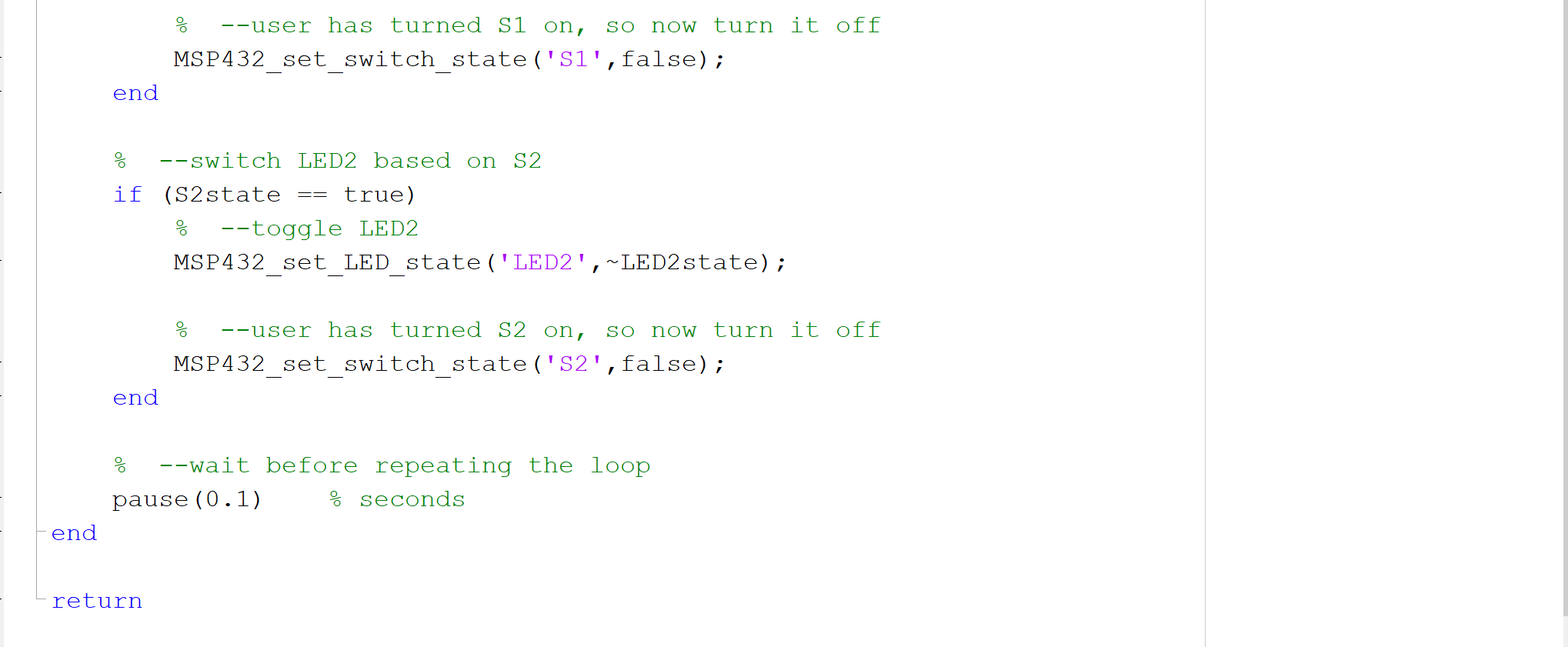
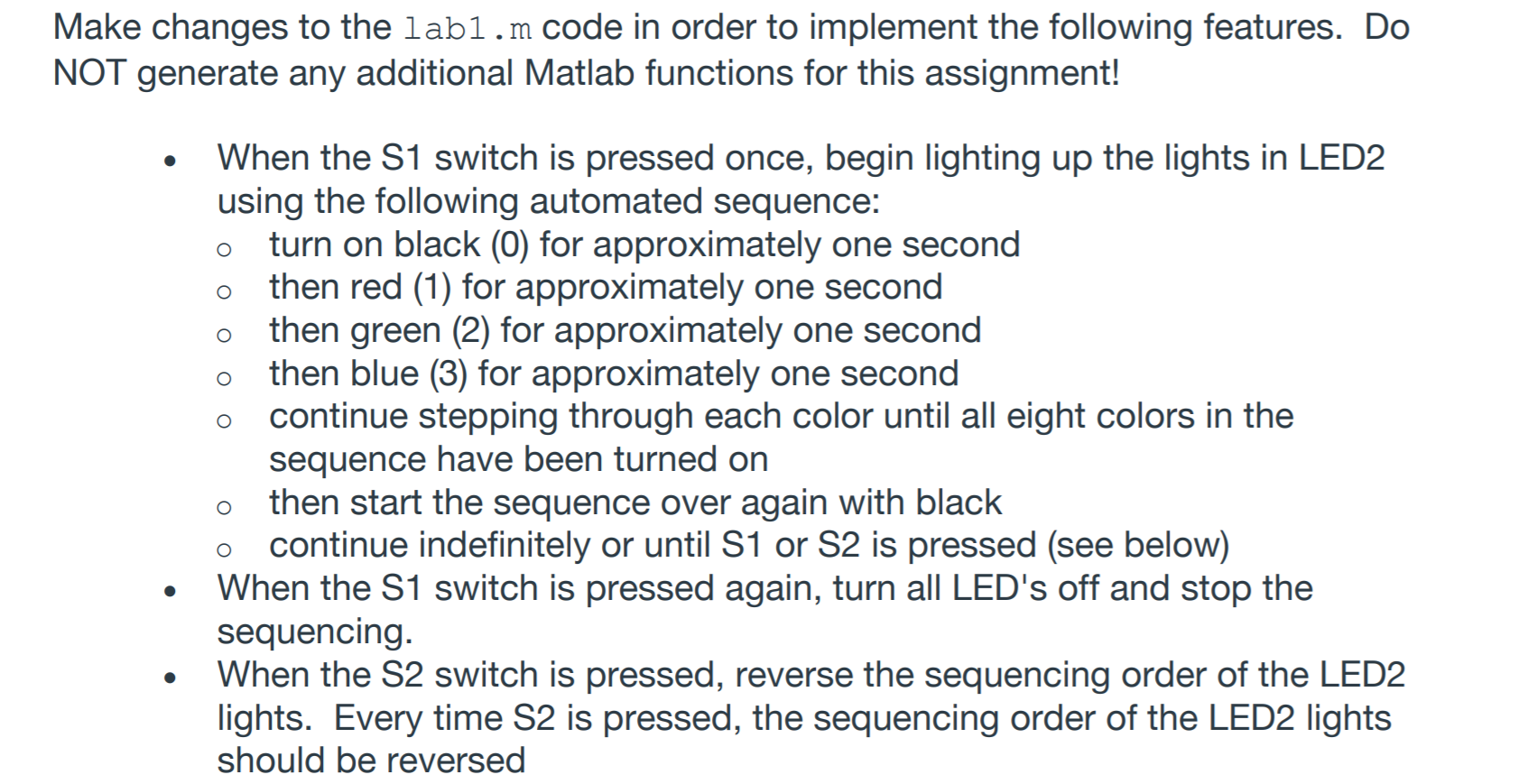
function labi This is the template program for labi. 8 Submitted by: Submitted on: yournamegoeshere mm/dd/yyyy 3 % --initialize the hardware at startup MSP432_set_LED_state ('LEDI', 0); MSP432 set LED state ('LED2', 0); MSP432_set_switch state ('Si',false); MSP432_set_switch_state ('82',false); 8 turn LED1 off 8 turn LED2 off & turn Si oll $ turn S2 off % --start the infinite background loop while (MSP432_test_for_reset) --read the si and S2 switches Slstate = MSP432_get_switch_state ('Si'); S2state = MSP432_get_switch_state('S2'); 8 --read the LED1 and LED2 states LED1state = MSP432_get_LED_state ('LEDI'); LED2 state = MSP432_get_LED_state ('LED2'); 8 --switch LEDI based on si if (Slstate == true) --toggle LED1 MSP432_set_LED_state('LEDI', -LEDistate); % --user has turned si on, So now turn it off --user has turned Si on, SO now turn it off MSP432 set switch state ('Si',false); end == --switch LED2 based on S2 if (S2state true) --toggle LED2 MSP432_set_LED_state ('LED2',~LED2state); --user has turned S2 on, So now turn it off MSP432 set switch state ('82',false); end --wait before repeating the loop pause (0.1) % seconds end return Make changes to the lab1.m code in order to implement the following features. Do NOT generate any additional Matlab functions for this assignment! O o O o When the S1 switch is pressed once, begin lighting up the lights in LED2 using the following automated sequence: turn on black (0) for approximately one second then red (1) for approximately one second then green (2) for approximately one second then blue (3) for approximately one second continue stepping through each color until all eight colors in the sequence have been turned on then start the sequence over again with black continue indefinitely or until S1 or S2 is pressed (see below) When the S1 switch is pressed again, turn all LED's off and stop the sequencing. When the S2 switch is pressed, reverse the sequencing order of the LED2 lights. Every time S2 is pressed, the sequencing order of the LED2 lights should be reversed O . function labi This is the template program for labi. 8 Submitted by: Submitted on: yournamegoeshere mm/dd/yyyy 3 % --initialize the hardware at startup MSP432_set_LED_state ('LEDI', 0); MSP432 set LED state ('LED2', 0); MSP432_set_switch state ('Si',false); MSP432_set_switch_state ('82',false); 8 turn LED1 off 8 turn LED2 off & turn Si oll $ turn S2 off % --start the infinite background loop while (MSP432_test_for_reset) --read the si and S2 switches Slstate = MSP432_get_switch_state ('Si'); S2state = MSP432_get_switch_state('S2'); 8 --read the LED1 and LED2 states LED1state = MSP432_get_LED_state ('LEDI'); LED2 state = MSP432_get_LED_state ('LED2'); 8 --switch LEDI based on si if (Slstate == true) --toggle LED1 MSP432_set_LED_state('LEDI', -LEDistate); % --user has turned si on, So now turn it off --user has turned Si on, SO now turn it off MSP432 set switch state ('Si',false); end == --switch LED2 based on S2 if (S2state true) --toggle LED2 MSP432_set_LED_state ('LED2',~LED2state); --user has turned S2 on, So now turn it off MSP432 set switch state ('82',false); end --wait before repeating the loop pause (0.1) % seconds end return Make changes to the lab1.m code in order to implement the following features. Do NOT generate any additional Matlab functions for this assignment! O o O o When the S1 switch is pressed once, begin lighting up the lights in LED2 using the following automated sequence: turn on black (0) for approximately one second then red (1) for approximately one second then green (2) for approximately one second then blue (3) for approximately one second continue stepping through each color until all eight colors in the sequence have been turned on then start the sequence over again with black continue indefinitely or until S1 or S2 is pressed (see below) When the S1 switch is pressed again, turn all LED's off and stop the sequencing. When the S2 switch is pressed, reverse the sequencing order of the LED2 lights. Every time S2 is pressed, the sequencing order of the LED2 lights should be reversed O
Step by Step Solution
There are 3 Steps involved in it

Get step-by-step solutions from verified subject matter experts
 Study Help