



Question: make sure to show formulas in excel please begin{tabular}{|l|l|l|l|} hline 9/1/26 & Interest Expense & & hline & Discount on Bonds Payable &
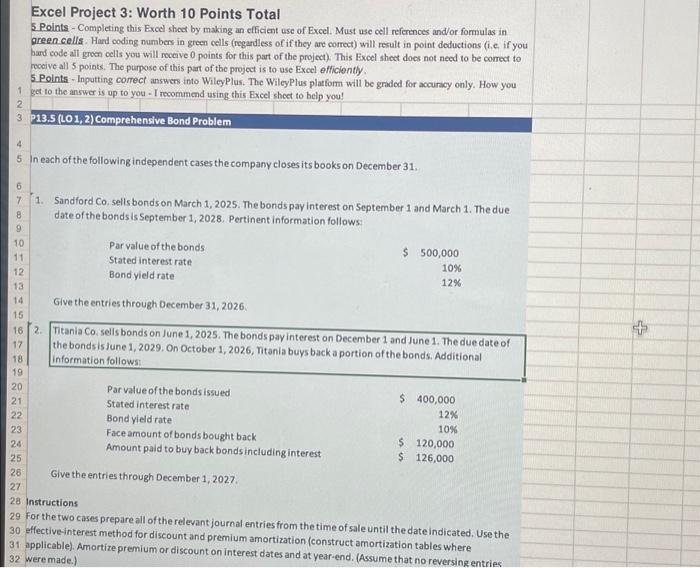
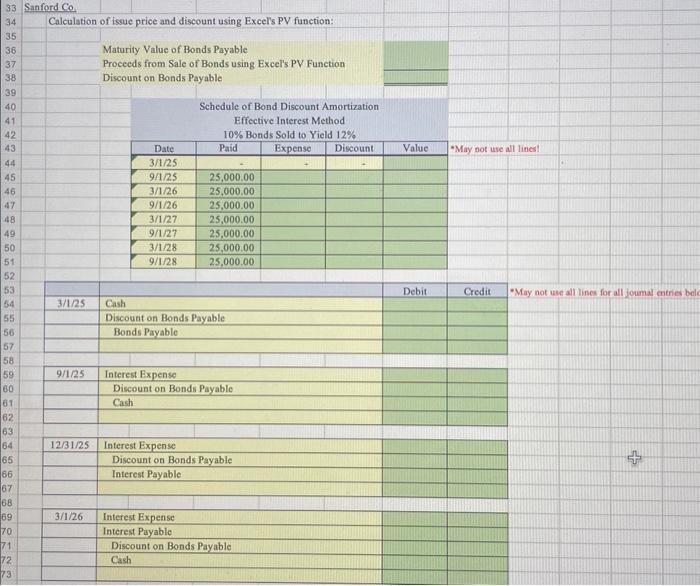
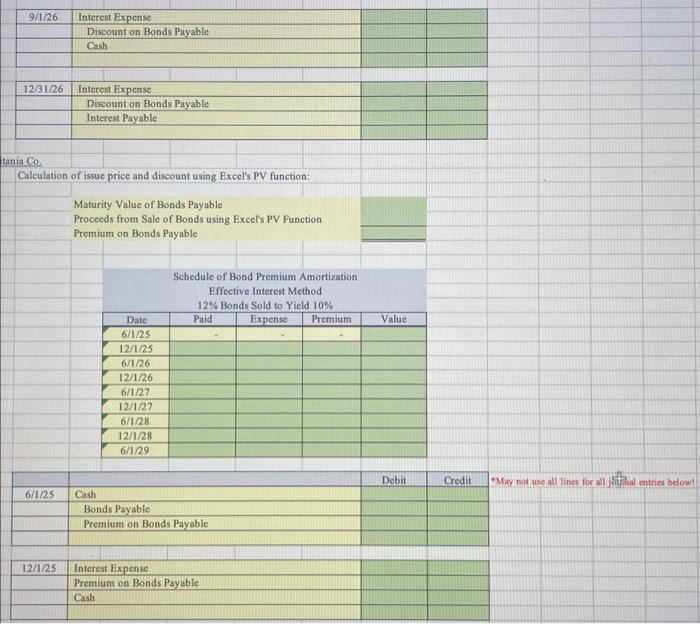
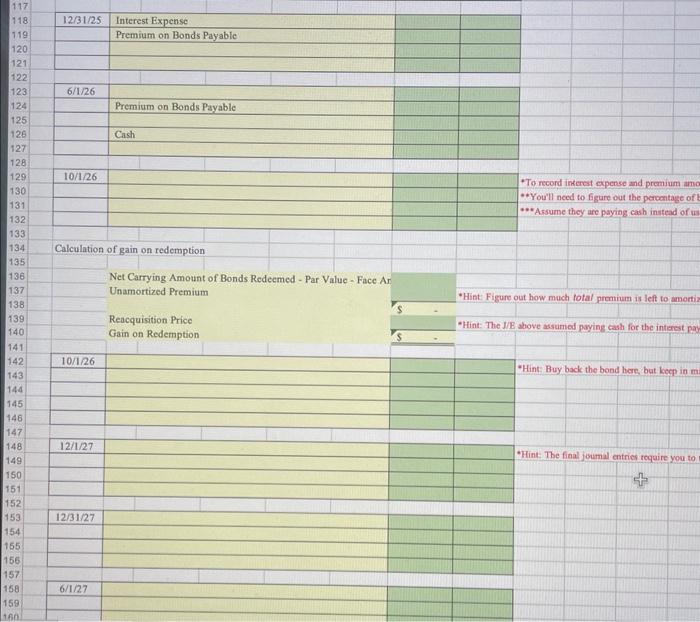
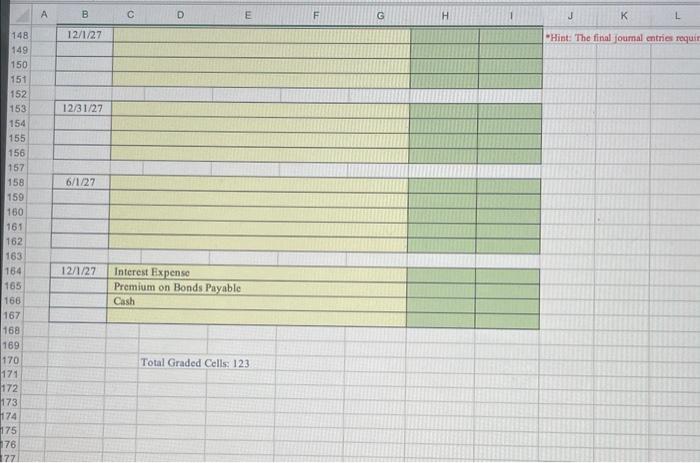
\begin{tabular}{|l|l|l|l|} \hline 9/1/26 & Interest Expense & & \\ \hline & Discount on Bonds Payable & \\ \hline & Cssh & \\ \hline & & \\ \hline \end{tabular} \begin{tabular}{|l|l|l|l|} \hline 12/31/26 & Interest Expense & \\ \hline & Discount on Bonds Payable & \\ \hline & Interest Payable & \\ \hline & & \\ \hline \end{tabular} tinia Co Calculation of issue price and discount using Excel's PV function: Maturity Value of Bonds Payable Proceeds from Salc of Bonds using Excel's PV Function Premium on Bonds Payable Schedule of Bond Premium Amortization Effoctive Interest Method 12% Bonds Sold to Yield 10% \begin{tabular}{|c|c|c|c|c|} \hline Date & Paid & Expense & Premium & Value \\ \hline 6/1/25 & & & & \\ \hline 12/1/25 & & & & \\ \hline 6/1/26 & & & & \\ \hline 12/1/26 & & & & \\ \hline 6/1/27 & & & & \\ \hline 12/1/27 & & & & \\ \hline 6/1/28 & & & & \\ \hline 12/1/28 & & & & \\ \hline 6/1/29 & & & & \\ \hline \end{tabular} \begin{tabular}{|l|l|l|} \hline 12/125 & Interest Expense & \\ \hline & Premium on Bonds Payable & \\ \hline & Cash & \\ \hline & & \\ \hline \end{tabular} Excel Project 3: Worth 10 Points Total 5 Points - Completing this Excel shect by making an efficient use of Excel. Must use cell references and/or formulas in green cells. Hard coding numbers in green cells (regardless of if they are correct) will result in point deductions (i.e. if you hand code all green cells you will roceive 0 points for this part of the project). This Excel sheet does not need to be correct to neceive all 5 points. The purpose of this part of the project is to use Excel efficiontly. 5 Points - Inputting correct answers into Wiley Plus. The WileyPlus platform will be graded for accuincy only. How you get to the answer is up to you - I reoommend using this Fxcel shect to help you! 213.5 (201,2) Comprehensive Bond Problem In each of the following independent cases the company closes its books on December 31. 1. Sandford C0, sells bonds on March 1, 2025. The bonds pay interest on September 1 and March 1. The due date of the bonds is September 1,2028 . Pertinent information follows: Give the entries through December 31, 2026. 2. Titanla Co, sells bonds on June 1, 2025. The bonds pay interest on December 1 and June 1 . The due date of the bonds is June 1, 2029. On October 1,2026, ntania buys back a portion of the bonds. Additional information follows: Give the entries through December 1, 2027. 8 Instructions 9 for the two cases prepare all of the relevant journal entries from the time of sale until the date indicated. Use the 0 effective-interest method for discount and premium amortization (construct amortization tables where 1 applicable). Amortize premium or discount on interest dates and at year-end. (Assume that no reversing entries 2 were made.) \begin{tabular}{|l|l|l|l|} \hline 9/1/26 & Interest Expense & & \\ \hline & Discount on Bonds Payable & \\ \hline & Cssh & \\ \hline & & \\ \hline \end{tabular} \begin{tabular}{|l|l|l|l|} \hline 12/31/26 & Interest Expense & \\ \hline & Discount on Bonds Payable & \\ \hline & Interest Payable & \\ \hline & & \\ \hline \end{tabular} tinia Co Calculation of issue price and discount using Excel's PV function: Maturity Value of Bonds Payable Proceeds from Salc of Bonds using Excel's PV Function Premium on Bonds Payable Schedule of Bond Premium Amortization Effoctive Interest Method 12% Bonds Sold to Yield 10% \begin{tabular}{|c|c|c|c|c|} \hline Date & Paid & Expense & Premium & Value \\ \hline 6/1/25 & & & & \\ \hline 12/1/25 & & & & \\ \hline 6/1/26 & & & & \\ \hline 12/1/26 & & & & \\ \hline 6/1/27 & & & & \\ \hline 12/1/27 & & & & \\ \hline 6/1/28 & & & & \\ \hline 12/1/28 & & & & \\ \hline 6/1/29 & & & & \\ \hline \end{tabular} \begin{tabular}{|l|l|l|} \hline 12/125 & Interest Expense & \\ \hline & Premium on Bonds Payable & \\ \hline & Cash & \\ \hline & & \\ \hline \end{tabular} Excel Project 3: Worth 10 Points Total 5 Points - Completing this Excel shect by making an efficient use of Excel. Must use cell references and/or formulas in green cells. Hard coding numbers in green cells (regardless of if they are correct) will result in point deductions (i.e. if you hand code all green cells you will roceive 0 points for this part of the project). This Excel sheet does not need to be correct to neceive all 5 points. The purpose of this part of the project is to use Excel efficiontly. 5 Points - Inputting correct answers into Wiley Plus. The WileyPlus platform will be graded for accuincy only. How you get to the answer is up to you - I reoommend using this Fxcel shect to help you! 213.5 (201,2) Comprehensive Bond Problem In each of the following independent cases the company closes its books on December 31. 1. Sandford C0, sells bonds on March 1, 2025. The bonds pay interest on September 1 and March 1. The due date of the bonds is September 1,2028 . Pertinent information follows: Give the entries through December 31, 2026. 2. Titanla Co, sells bonds on June 1, 2025. The bonds pay interest on December 1 and June 1 . The due date of the bonds is June 1, 2029. On October 1,2026, ntania buys back a portion of the bonds. Additional information follows: Give the entries through December 1, 2027. 8 Instructions 9 for the two cases prepare all of the relevant journal entries from the time of sale until the date indicated. Use the 0 effective-interest method for discount and premium amortization (construct amortization tables where 1 applicable). Amortize premium or discount on interest dates and at year-end. (Assume that no reversing entries 2 were made.)
Step by Step Solution
There are 3 Steps involved in it

Get step-by-step solutions from verified subject matter experts