Question: Make sure you have 2 sheets: 1-Documentation and 2-Data. (you will need to rename the sheets from -- Sheet1 and Sheet2) On a new sheet
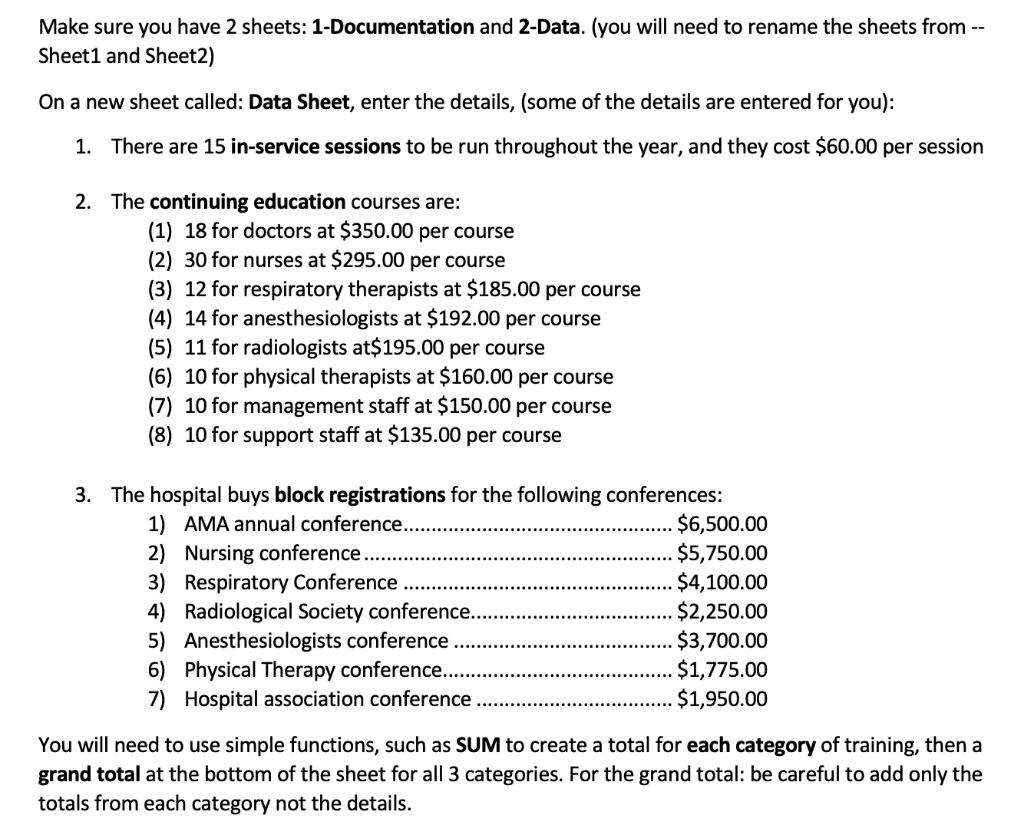
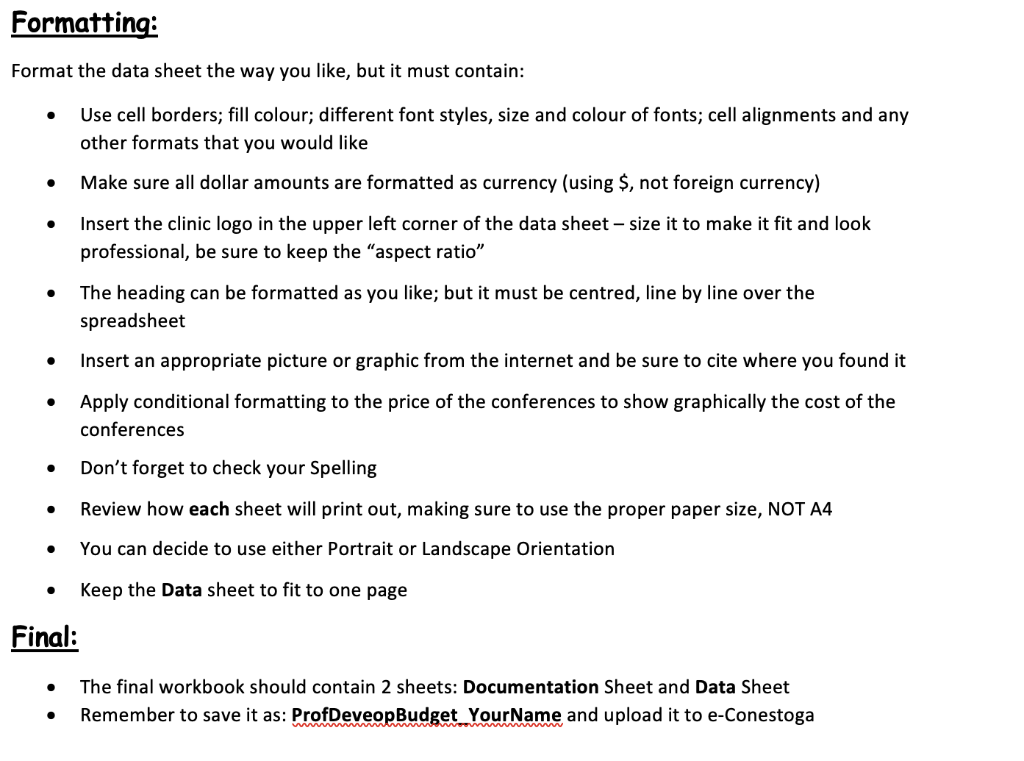
Make sure you have 2 sheets: 1-Documentation and 2-Data. (you will need to rename the sheets from -- Sheet1 and Sheet2) On a new sheet called: Data Sheet, enter the details, (some of the details are entered for you): 1. There are 15 in-service sessions to be run throughout the year, and they cost $60.00 per session 2. The continuing education courses are: (1) 18 for doctors at $350.00 per course (2) 30 for nurses at $295.00 per course (3) 12 for respiratory therapists at $185.00 per course (4) 14 for anesthesiologists at $192.00 per course (5) 11 for radiologists at$195.00 per course (6) 10 for physical therapists at $160.00 per course (7) 10 for management staff at $150.00 per course (8) 10 for support staff at $135.00 per course 3. The hospital buys block registrations for the following conferences: 1) AMA annual conference... $6,500.00 2) Nursing conference ...... $5,750.00 3) Respiratory Conference $4,100.00 4) Radiological Society conference... $2,250.00 5) Anesthesiologists conference $3,700.00 6) Physical Therapy conference... $1,775.00 7) Hospital association conference $1,950.00 You will need to use simple functions, such as SUM to create a total for each category of training, then a grand total at the bottom of the sheet for all 3 categories. For the grand total: be careful to add only the totals from each category not the details. Formatting: Format the data sheet the way you like, but it must contain: Use cell borders; fill colour; different font styles, size and colour of fonts; cell alignments and any other formats that you would like Make sure all dollar amounts are formatted as currency (using $, not foreign currency) Insert the clinic logo in the upper left corner of the data sheet - size it to make it fit and look professional, be sure to keep the "aspect ratio" The heading can be formatted as you like; but it must be centred, line by line over the spreadsheet Insert an appropriate picture or graphic from the internet and be sure to cite where you found it Apply conditional formatting to the price of the conferences to show graphically the cost of the conferences Don't forget to check your Spelling Review how each sheet will print out, making sure to use the proper paper size, NOT A4 You can decide to use either Portrait or Landscape Orientation . . Keep the Data sheet to fit to one page Final: The final workbook should contain 2 sheets: Documentation Sheet and Data Sheet Remember to save it as: ProfDeveopBudget_Your Name and upload it to e-Conestoga . Make sure you have 2 sheets: 1-Documentation and 2-Data. (you will need to rename the sheets from -- Sheet1 and Sheet2) On a new sheet called: Data Sheet, enter the details, (some of the details are entered for you): 1. There are 15 in-service sessions to be run throughout the year, and they cost $60.00 per session 2. The continuing education courses are: (1) 18 for doctors at $350.00 per course (2) 30 for nurses at $295.00 per course (3) 12 for respiratory therapists at $185.00 per course (4) 14 for anesthesiologists at $192.00 per course (5) 11 for radiologists at$195.00 per course (6) 10 for physical therapists at $160.00 per course (7) 10 for management staff at $150.00 per course (8) 10 for support staff at $135.00 per course 3. The hospital buys block registrations for the following conferences: 1) AMA annual conference... $6,500.00 2) Nursing conference ...... $5,750.00 3) Respiratory Conference $4,100.00 4) Radiological Society conference... $2,250.00 5) Anesthesiologists conference $3,700.00 6) Physical Therapy conference... $1,775.00 7) Hospital association conference $1,950.00 You will need to use simple functions, such as SUM to create a total for each category of training, then a grand total at the bottom of the sheet for all 3 categories. For the grand total: be careful to add only the totals from each category not the details. Formatting: Format the data sheet the way you like, but it must contain: Use cell borders; fill colour; different font styles, size and colour of fonts; cell alignments and any other formats that you would like Make sure all dollar amounts are formatted as currency (using $, not foreign currency) Insert the clinic logo in the upper left corner of the data sheet - size it to make it fit and look professional, be sure to keep the "aspect ratio" The heading can be formatted as you like; but it must be centred, line by line over the spreadsheet Insert an appropriate picture or graphic from the internet and be sure to cite where you found it Apply conditional formatting to the price of the conferences to show graphically the cost of the conferences Don't forget to check your Spelling Review how each sheet will print out, making sure to use the proper paper size, NOT A4 You can decide to use either Portrait or Landscape Orientation . . Keep the Data sheet to fit to one page Final: The final workbook should contain 2 sheets: Documentation Sheet and Data Sheet Remember to save it as: ProfDeveopBudget_Your Name and upload it to e-Conestoga









 Study Help