







Question: Make the connect php login php and register php work with these table instead Connect.php (connect it with the database table) define('DB_SERVER', 'localhost:3306'); define('DB_USERNAME', 'root');
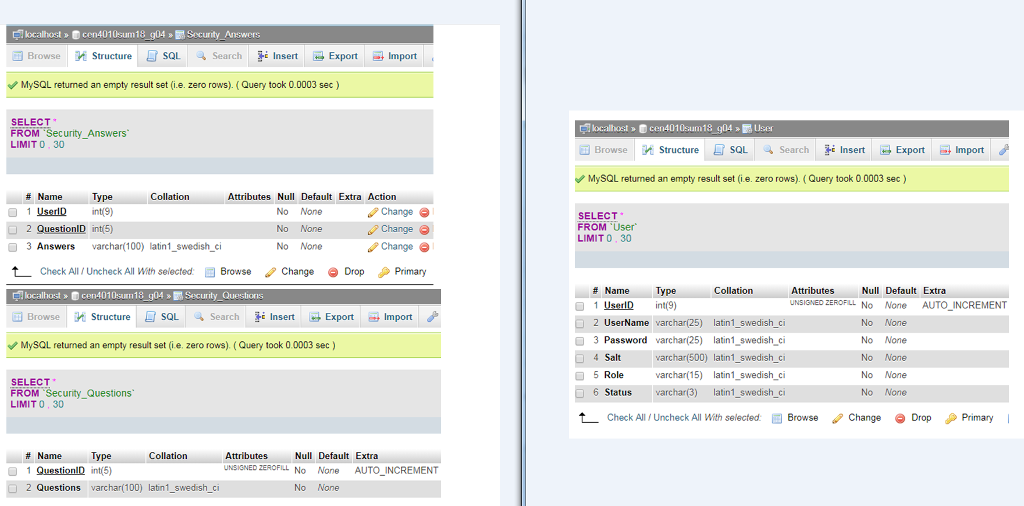
Make the connect php login php and register php work with these table instead
Connect.php (connect it with the database table)
define('DB_SERVER', 'localhost:3306');
define('DB_USERNAME', 'root');
define('DB_PASSWORD', '');
define('DB_DATABASE', 'db_registration');
$con = mysqli_connect(DB_SERVER,DB_USERNAME,DB_PASSWORD,DB_DATABASE);
?>
That is the login php file. When I use connect to connect the login and registration php file to my php admin data base
login php:
session_start();
include ("connect.php");
if($_SESSION['counter']==null)
{
$_SESSION['counter']=1;
}
$msg = "";
if(isset($_POST["check"]))
{
if($_POST["username1"]=='')
{
$msg = "Enter User Name...";
//return false;
}
else if($_POST["ddlsecurity"]=="0")
{
$msg = "Select Security Question...";
//return false;
}
else if(empty($_POST["answer"]))
{
$msg = "Enter Answer...";
//return false;
}
else{
$username1 = $_POST["username1"];
$ddlsecurity = $_POST["ddlsecurity"];
$answer = $_POST["answer"];
$username1 = mysqli_real_escape_string($con, $username1);
$ddlsecurity = mysqli_real_escape_string($con, $ddlsecurity);
$answer = mysqli_real_escape_string($con, $answer);
$sql="SELECT Password FROM `tbl_user_registration` WHERE User_Name='$username1' and Security_Question_Id='$ddlsecurity' and Security_Answer='$answer'";
$result=mysqli_query($con,$sql);
$row=mysqli_fetch_array($result,MYSQLI_ASSOC);
if(mysqli_num_rows($result) == 1)
{
//$_SESSION['User_Id'] = $row['Password'];
$msg = "Your Password is:".$row['Password']; /* Redirect browser */
//exit();
}
else
{
$msg = "Sorry..! Invalid Answer";
}
}
}
if(isset($_POST["submit"]))
{
if($_POST["username"]=='')
{
$msg = "Enter User Name...";
//return false;
}
else if($_POST["password"]=='')
{
$msg = "Enter Password...";
//return false;
}
else
{
$username = $_POST["username"];
$password = $_POST["password"];
$username = mysqli_real_escape_string($con, $username);
$password = mysqli_real_escape_string($con, $password);
//$password = md5($password);
$sql="SELECT User_Id FROM `tbl_user_registration` WHERE User_Name='$username' and Password='$password'";
$result=mysqli_query($con,$sql);
$row=mysqli_fetch_array($result,MYSQLI_ASSOC);
if(mysqli_num_rows($result) == 1)
{
$_SESSION['User_Id'] = $row['User_Id'];
$msg = "Successfully Log in"; /* Redirect browser */
//exit();
}
else
{
$msg = "Sorry..! Invalid UserName and Password".$_SESSION['counter'];
$_SESSION['counter']=$_SESSION['counter']+1;
if($_SESSION['counter']==3)
{
?>
$_SESSION['counter']=1;
}
}
}
}
?>
.txtcontrol{
height: 40px;
font-size: 22px;
border: single;
border-color:black;
width: 100%;
margin-bottom:10px;
text-align:center;
}
.mcontainer {
max-width: 600px;
margin: 0 auto;
padding: 80px 0;
height: 400px;
text-align: center;
}
.mcontainer {
width: 100%;
padding-right: 10px;
padding-left: 10px;
margin-right: auto;
margin-left: auto;
}
.sbutton
{
width: 42%;
height: 42px;
background-color: #75d4b6;
border: none;
color: #f9f5ee;
font-size: 17px;
}
Welcome
this is the registration php that needs to have the same username, password, and security question as these tables below. When I did it i did not use the tables from the data base.
include ("connect.php");
$msg = "";
if(isset($_POST["submit"]))
{
if($_POST["User_Name"]=='')
{
$msg = "Enter User Name...";
//return false;
}
else if($_POST["password"]=='')
{
$msg = "Enter Password...";
//return false;
}
else if($_POST["ddlsecurity"]=="0")
{
$msg = "Select Security Question...";
//return false;
}
else if($_POST["answer"]=='')
{
$msg = "Enter Answer...";
//return false;
}
else
{
$User_Name = $_POST["User_Name"];
$password = $_POST["password"];
$ddlsecurity = $_POST["ddlsecurity"];
$answer = $_POST["answer"];
$User_Name = mysqli_real_escape_string($con, $User_Name);
$ddlsecurity = mysqli_real_escape_string($con, $ddlsecurity);
$answer = mysqli_real_escape_string($con, $answer);
$password = mysqli_real_escape_string($con, $password);
//$password = md5($password);
$sql="SELECT * FROM `tbl_user_registration` WHERE User_Name='".$User_Name."'";
$result=mysqli_query($con,$sql);
if(!$result)
{
$msg = "Sorry...This email already exist...";
}
else
{
$query = mysqli_query($con, "INSERT INTO `tbl_user_registration`(`User_Name`, `Password`, `Security_Question_Id`, `Security_Answer`) VALUES ('".$User_Name."','".$password."','".$ddlsecurity."','".$answer."')");
if($query)
{
$msg = "Thank You! you are now registered.";
header("Location: login.php"); /* Redirect browser */
exit();
}
}
}
}
?>
.txtcontrol{
height: 40px;
font-size: 22px;
border: single;
border-color:black;
width: 100%;
margin-bottom:10px;
text-align:center;
}
.mcontainer {
max-width: 600px;
margin: 0 auto;
padding: 80px 0;
height: 400px;
text-align: center;
}
.mcontainer {
width: 100%;
padding-right: 10px;
padding-left: 10px;
margin-right: auto;
margin-left: auto;
}
.sbutton
{
width: 42%;
height: 42px;
background-color: #75d4b6;
border: none;
color: #f9f5ee;
font-size: 17px;
}
Welcome
Now I need the login/registration, connect. php file to work with the tables from the database below.
Step by Step Solution
There are 3 Steps involved in it

Get step-by-step solutions from verified subject matter experts
 Study Help