







Question: Make the following corrections to the program hover_button_test.rb: Provide the full Ruby code as the final answer. Any changes or deviation from this request will
Make the following corrections to the program hover_button_test.rb:
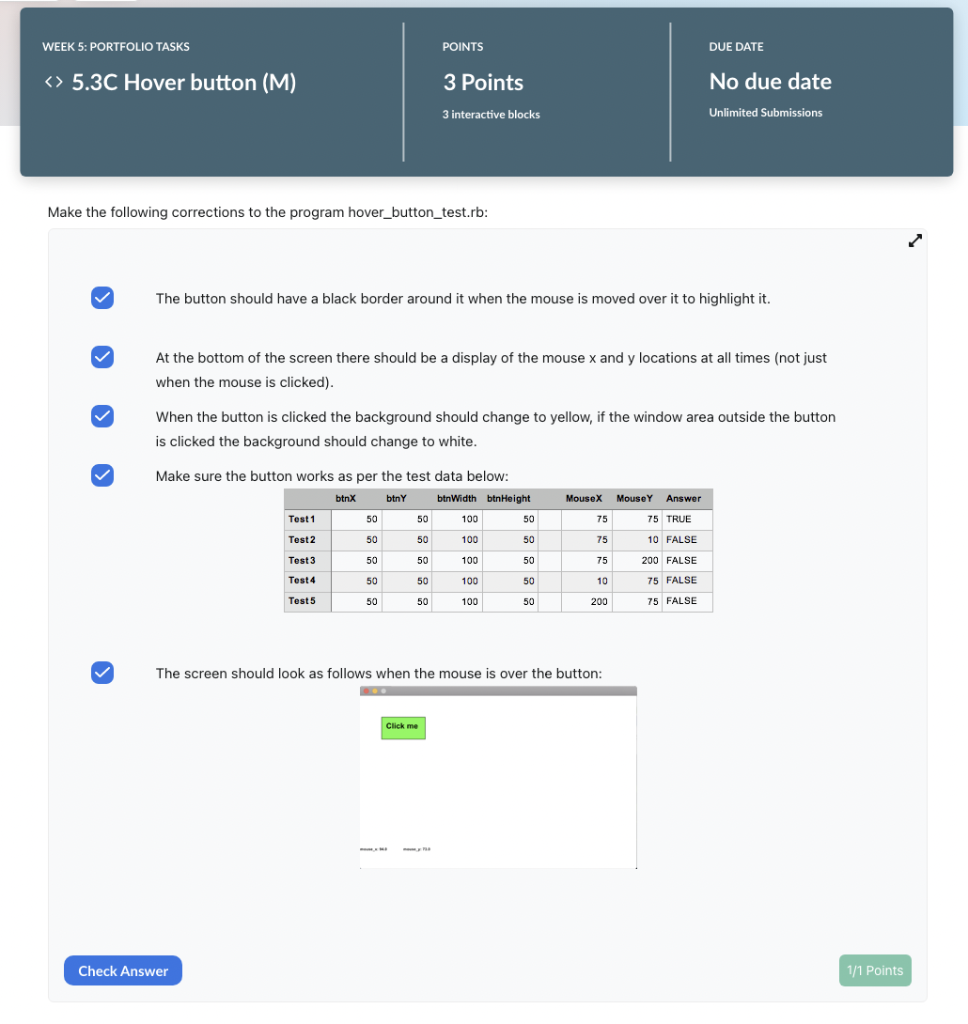
Provide the full Ruby code as the final answer. Any changes or deviation from this request will be reported (this includes the code not working)
Provided Code:
hover_button_test.rb:
require 'rubygems'
require 'gosu'
# Instructions: This code also needs to be fixed and finished!
# As in the earlier button tasks the "Click Me" text is not appearing
# on the button, also both the mouse_x and mouse_ co-ordinate should
# be shown, regardless of whether the mouse has been clicked or not.
# The button should be highlighted when the mouse moves over it
# (i.e it should have a black border around the outside)
# finally, a user has noticed that in this version also sometimes the
# button action occurs when you click outside the button area and vice-versa.
# FOR THE CREDIT VERSION:
# display a colored border that 'highlights' the button when the mouse moves over it
# determines whether a graphical widget is placed over others or not
module ZOrder
BACKGROUND, MIDDLE, TOP = *0..2
end
# Global constants
WIN_WIDTH = 640
WIN_HEIGHT = 400
class DemoWindow
# set up variables and attributes
def initialize()
super(WIN_WIDTH, WIN_HEIGHT, false)
@background = Gosu::Color::WHITE
@button_font = Gosu::Font.new(20)
@info_font = Gosu::Font.new(10)
@locs = [60,60]
end
# Draw the background, the button with 'click me' text and text
# showing the mouse coordinates
def draw()
# Draw background color
Gosu.draw_rect(0, 0, WIN_WIDTH, WIN_HEIGHT, @background, ZOrder::BACKGROUND, mode=:default)
# Draw the rectangle that provides the background.
# ????
# Draw the button
Gosu.draw_rect(50, 50, 100, 50, Gosu::Color::GREEN, ZOrder::TOP, mode=:default)
# Draw the button text
@button_font.draw("Click me", 60, 60, ZOrder::MIDDLE, 1.0, 1.0, Gosu::Color::BLACK)
# Draw the mouse_x position
@info_font.draw("mouse_x: #{mouse_x}", 0, 350, ZOrder::TOP, 1.0, 1.0, Gosu::Color::BLACK)
# Draw the mouse_y position
# @info_font.draw("mouse_y: #{mouse_y}", ......... )
end
# this is called by Gosu to see if it should show the cursor (or mouse)
def needs_cursor?; true; end
# This still needs to be fixed!
def mouse_over_button(mouse_x, mouse_y)
if ((mouse_x > 50 and mouse_x 50 and mouse_x
true
else
false
end
end
# If the button area (rectangle) has been clicked on change the background color
# also store the mouse_x and mouse_y attributes that we 'inherit' from Gosu
# you will learn about inheritance in the OOP unit - for now just accept that
# these are available and filled with the latest x and y locations of the mouse click.
def button_down(id)
case id
when Gosu::MsLeft
if mouse_over_button(mouse_x, mouse_y)
@background = Gosu::Color::YELLOW
else
@background = Gosu::Color::WHITE
end
end
end
end
# Lets get started!
DemoWindow.new.show()
Make the following corrections to the program hover_button_test.rb: The button should have a black border around it when the mouse is moved over it to highlight it. At the bottom of the screen there should be a display of the mouse x and y locations at all times (not just when the mouse is clicked). When the button is clicked the background should change to yellow, if the window area outside the button is clicked the background should change to white. Make sure the button works as per the test data below: The screen should look as follows when the mouse is over the button
Step by Step Solution
There are 3 Steps involved in it

Get step-by-step solutions from verified subject matter experts
 Study Help