







Question: Make the Rational class work with the GUI. Handling exceptions must be included. If you do not use the Rational class I will get a
Make the Rational class work with the GUI. Handling exceptions must be included.
If you do not use the Rational class I will get a 0 and you will get thumbs down.
Use eclipse
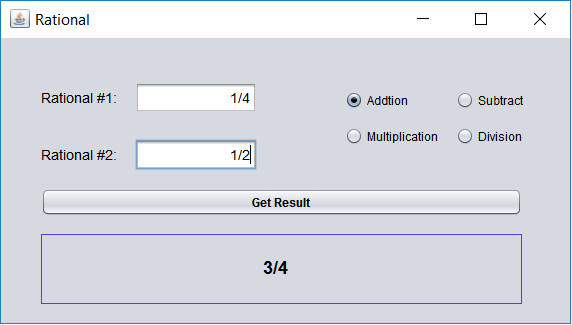
Code for Rational.java:
package edu.pupr.rational;
import java.util.Scanner;
public class Rational {
private int num;
private int den;
public Rational() {
num = 1;
den = 2;
}
public Rational(int num, int den) {
int g = gcd(num,den);
this.num = num/g;
this.den = den/g;
}
public int getNumerator() {
return num;
}
public void setNumerator(int numerator) {
this.num = numerator;
}
public int getDenominator() {
return den;
}
public void setDenominator(int denominator) {
this.den = denominator;
}
public Rational multiply(Rational r) {
int nume = num * r.num;
int denom = den * r.den;
return new Rational(nume, denom);
}
public Rational divide(Rational r) {
int nume = num * r.den;
int denom = den * r.num;
return new Rational(nume, denom);
}
public Rational add(Rational r) {
int nume = num * r.den + r.num * den;
int denom = den * r.den;
return new Rational(nume, denom);
}
public Rational subtract(Rational r) {
int nume = num * r.den - r.num * den;
int denom = den * r.den;
return new Rational(nume, denom);
}
public static int gcd(int a, int b){
if(b==0)return a;
return gcd(b,a%b);
}
public void ask() throws RationalException {
@SuppressWarnings("resource")
Scanner input = new Scanner(System.in);
System.out.print("Enter the numerator: ");
num = input.nextInt();
System.out.print("Enter the denominator(greater than 0): ");
den = input.nextInt();
if(den == 0) {
throw new RationalException("0 is not a valid denominator.");
}
}
public String toString() {
return "(" + num + "/" + den + ")";
}
}
Code for Rational_GUI.java:
package edu.pupr.edu;
import java.awt.BorderLayout;
import java.awt.EventQueue;
import javax.swing.JFrame;
import javax.swing.JPanel;
import javax.swing.border.EmptyBorder;
import javax.swing.JLabel;
import java.awt.FlowLayout;
import java.awt.CardLayout;
import javax.swing.JTextField;
import javax.swing.JRadioButton;
import javax.swing.JButton;
import java.awt.event.ActionListener;
import java.awt.event.ActionEvent;
import javax.swing.JTextArea;
public class Rational_GUI extends JFrame {
private JPanel contentPane;
private JTextField textField;
private JTextField textField_1;
/**
* Launch the application.
*/
public static void main(String[] args) {
EventQueue.invokeLater(new Runnable() {
public void run() {
try {
Rational_GUI frame = new Rational_GUI();
frame.setVisible(true);
} catch (Exception e) {
e.printStackTrace();
}
}
});
}
//Create the frame.
public Rational_GUI() {
int number1;
int number2;
setDefaultCloseOperation(JFrame.EXIT_ON_CLOSE);
setBounds(100, 100, 450, 300);
contentPane = new JPanel();
contentPane.setBorder(new EmptyBorder(5, 5, 5, 5));
setContentPane(contentPane);
contentPane.setLayout(null);
JLabel lblNewLabel = new JLabel("Rational #1:");
lblNewLabel.setBounds(12, 32, 71, 16);
contentPane.add(lblNewLabel);
JLabel lblRational = new JLabel("Rational #2:");
lblRational.setBounds(12, 70, 71, 16);
contentPane.add(lblRational);
textField = new JTextField();
textField.setBounds(95, 29, 116, 22);
contentPane.add(textField);
textField.setColumns(10);
textField_1 = new JTextField();
textField_1.setBounds(95, 67, 116, 22);
contentPane.add(textField_1);
textField_1.setColumns(10);
JRadioButton rdbtnNewRadioButton = new JRadioButton("Addition");
rdbtnNewRadioButton.setSelected(true);
rdbtnNewRadioButton.setBounds(245, 32, 75, 25);
contentPane.add(rdbtnNewRadioButton);
JRadioButton rdbtnNewRadioButton_1 = new JRadioButton("Multiplication");
rdbtnNewRadioButton_1.setBounds(245, 61, 103, 25);
contentPane.add(rdbtnNewRadioButton_1);
JRadioButton rdbtnNewRadioButton_2 = new JRadioButton("Subtract");
rdbtnNewRadioButton_2.setBounds(355, 32, 77, 25);
contentPane.add(rdbtnNewRadioButton_2);
JRadioButton rdbtnDivision = new JRadioButton("Division");
rdbtnDivision.setBounds(355, 61, 77, 25);
contentPane.add(rdbtnDivision);
JButton btnGetResults = new JButton("Get Result");
btnGetResults.addActionListener(new ActionListener() {
public void actionPerformed(ActionEvent arg0) {
}
});
btnGetResults.setBounds(20, 113, 408, 25);
contentPane.add(btnGetResults);
JTextArea textArea = new JTextArea();
textArea.setEditable(false);
textArea.setBounds(20, 151, 408, 89);
contentPane.add(textArea);
}
}
Code for Exception Handling (Rational_Exception.java):
package edu.pupr.rational;
@SuppressWarnings("serial")
public class RationalException extends Exception {
public RationalException() {
}
public RationalException(String message) {
super(message);
}
public RationalException(String message, Throwable cause) {
super(message, cause);
}
public RationalException(Throwable cause) {
super(cause);
}
public RationalException(String message, Throwable cause, boolean enableSuppression, boolean writableStackTrace) {
super(message, cause, enableSuppression, writableStackTrace);
}
@Override
public String toString() {
return "Rational Exception: " + getMessage() + " Cause: " + getCause();
}
}
Rational Rational #1: 1/4 Addtion O Subtract O Multiplication Division Rational #2: 1/2 Get Result 3/4
Step by Step Solution
There are 3 Steps involved in it

Get step-by-step solutions from verified subject matter experts
 Study Help