







Question: making Java code corrections CourseGradebook.java import java.util.ArrayList; import java.util.HashMap; import java.util.Map; import java.util.TreeSet; public class CourseGradebook extends Gradebook { private HashMap > gradebookData; public CourseGradebook()
making Java code corrections
CourseGradebook.java
import java.util.ArrayList; import java.util.HashMap; import java.util.Map; import java.util.TreeSet;
public class CourseGradebook extends Gradebook {
private HashMap
public CourseGradebook() { gradebookData = new HashMap(); }
@Override public void setScore(String assignment, int studentID, double score) { HashMap
@Override public Double getScore(String assignment, int studentID) { HashMap
public HashMap
public ArrayList
public ArrayList
public HashMap
}
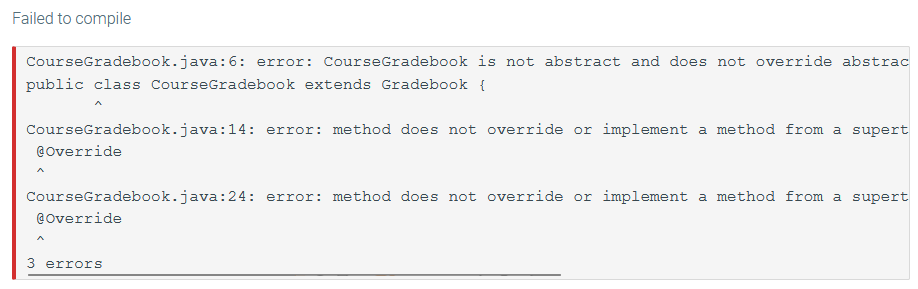
CourseGradebook.java:6: error: CourseGradebook is not abstract and does not override abstract method getStudentScores(Integer) in Gradebook public class CourseGradebook extends Gradebook { ^ CourseGradebook.java:14: error: method does not override or implement a method from a supertype @Override ^ CourseGradebook.java:24: error: method does not override or implement a method from a supertype @Override ^ 3 errors
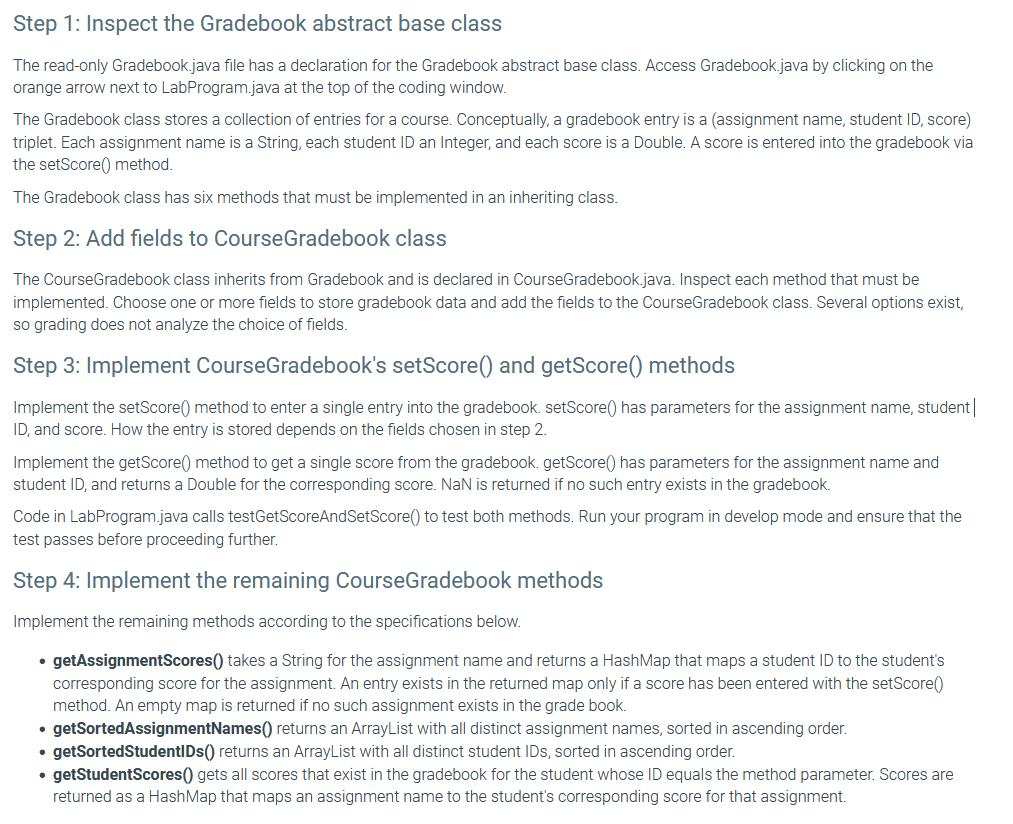
Step 1: Inspect the Gradebook abstract base class The read-only Gradebook.java file has a declaration for the Gradebook abstract base class. Access Gradebook.java by clicking on the orange arrow next to LabProgram.java at the top of the coding window. The Gradebook class stores a collection of entries for a course. Conceptually, a gradebook entry is a (assignment name, student ID, score) triplet. Each assignment name is a String, each student ID an Integer, and each score is a Double. A score is entered into the gradebook via the setScore() method. The Gradebook class has six methods that must be implemented in an inheriting class. Step 2: Add fields to CourseGradebook class The CourseGradebook class inherits from Gradebook and is declared in CourseGradebook.java. Inspect each method that must be implemented. Choose one or more fields to store gradebook data and add the fields to the CourseGradebook class. Several options exist, so grading does not analyze the choice of fields. Step 3: Implement CourseGradebook's setScore() and getScore() methods Implement the setScore() method to enter a single entry into the gradebook. setScore() has parameters for the assignment name, student ID, and score. How the entry is stored depends on the fields chosen in step 2. Implement the getScore( ) method to get a single score from the gradebook. getScore() has parameters for the assignment name and student ID, and returns a Double for the corresponding score. NaN is returned if no such entry exists in the gradebook. Code in LabProgram.java calls testGetScoreAndSetScore() to test both methods. Run your program in develop mode and ensure that the test passes before proceeding further. Step 4: Implement the remaining CourseGradebook methods Implement the remaining methods according to the specifications below. - getAssignmentScores() takes a String for the assignment name and returns a HashMap that maps a student ID to the student's corresponding score for the assignment. An entry exists in the returned map only if a score has been entered with the setScore) method. An empty map is returned if no such assignment exists in the grade book. - getSortedAssignmentNames() returns an ArrayList with all distinct assignment names, sorted in ascending order. - getSortedStudentIDs() returns an ArrayList with all distinct student IDs, sorted in ascending order. - getStudentScores() gets all scores that exist in the gradebook for the student whose ID equals the method parameter. Scores are returned as a HashMap that maps an assignment name to the student's corresponding score for that assignment. Falled to comple Coursegradebook.java: 6 : error: Coursegradebook is not abstract and does not override abstrac public class Coursegradebook extends Gradebook \{ Coursegradebook.java:14: error: method does not override or implement a method from a supert Qoverride C Coursegradebook.java:24: error: method does not override or implement a method from a supert eoverride errors
Step by Step Solution
There are 3 Steps involved in it

Get step-by-step solutions from verified subject matter experts
 Study Help