Question: management information system- for excel Assignment 1C: Additional Cargo Revenues Using the model you created in Assignment 1A, Rose Tree Regional Airline can also determine
management information system- for excel
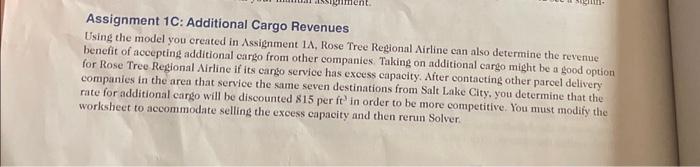
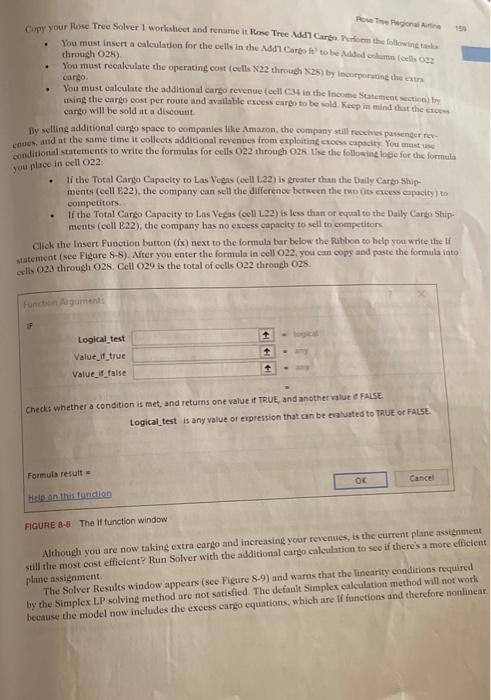
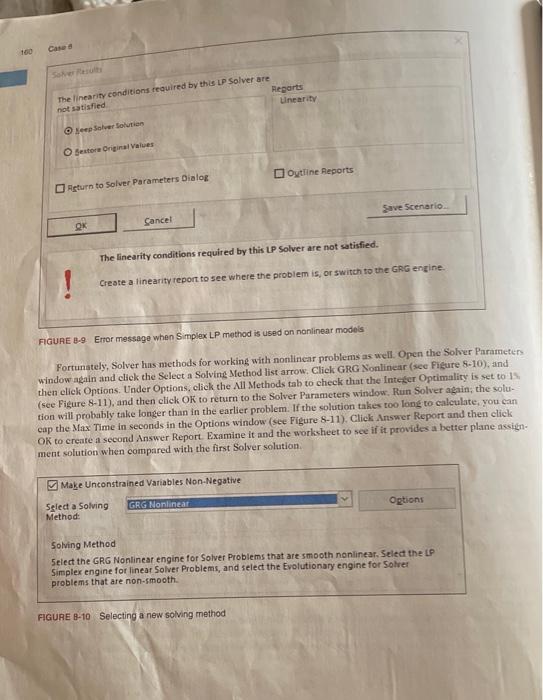
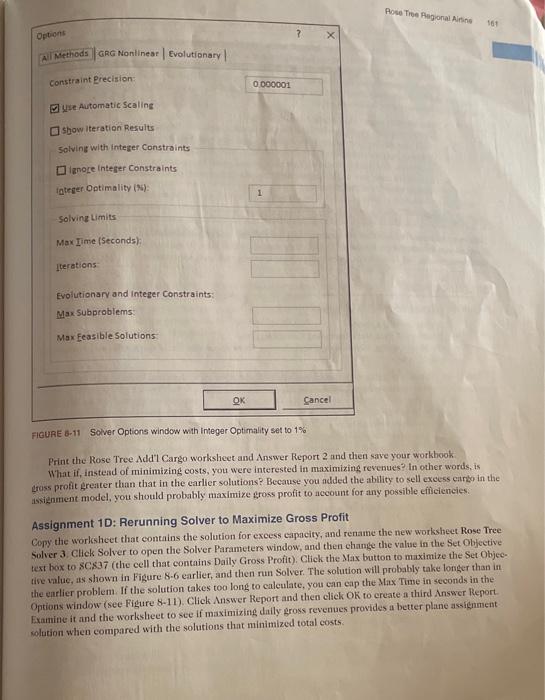
Assignment 1C: Additional Cargo Revenues Using the model you created in Assignment 1A, Rose Tree Regional Airline can also determine the revenue benefit of accepting additional eargo from other companies. Taking on additional cargo might be a good option for Rose Tree Regional Airline if its eango service has excess capacity. After contacting other parcel delivery companies in the area that service the same seven destinations from Salt Lake City; you determine that the rate for additional cargo will be discounted 815 per ft3 in order to be more competitive. You must modify the worksheet to accommodate selling the excess capacity and then rerun Solver. Pcie Tine fiwgional Aurlice throuch 02k ). carsio. wting the cargo cost per route and available excess carch to be sold heep in mind thut the ereest eargo will be sold at a disecuati. 15y welling additional eargo space to companies like Amaxon, the ocmpany still reccives paisender rexFnaet, and at the same time it collects additional reverines from explosting crocss capocity liou mast use you place in cell O2 : - If the Total Carigo Capaeity to Las Vegas (cell L.22) is ersater than the Dally Carkithipments (eell E22), the company can sell the difference between the two fits creess cupocity) to competitors. - If the Total Canso Capacity to Late Vecas (cell L22) is less than of equal to the Daily Carke Staip. ments (coll E22), the corvpany has no excess capacity to sell to crmpetitors click the Insert Fusction busteon (is) next to the formula har below the Rabboe to hidp you write the if stateratent (sec Figure 8-8). Aiter you enter the formula in oell O22, you cim copy and peate the formula iato cello 023 through 026 . Cell O29 is the total of cells O22 throwch 025 Checks whether a condition is met, and returns one value if TRUE, and ansther walut if FaLEE. Logical_test is any value of expression that can be eratuated to TRUE of FALSE. Formula result = Helpon this functien FIGUFE 8.8. The If function window Nlthotgh you are now taking extra cargo and inerejsing your rovenwes, is the current plane assidument Alill the nacst cost efficient? Run Solver with the additional carko caliculation to see if there's a more cifietent pintse assignment. The Solver Resules window appears (see Figure 8-9) and warns that the lincarity conditions reyulirtd by the Simplex L.P solving method are not satisfied. The default Simplex calculation miethod will not worle bectiuse the model now inclades the exeess cango equations, which are If fanctions and therefore nonlinear The linearity conditions required by this LP Solver are not satisfied. Create a linearity report to see where the problem is, or switth to the GRG engine. FIGUAE B.9. Entor message when Simplex LP method is used on nanlinear models Fortunately, Solver has methods for working with nonlinear problems as well. Open the Solver Parameters window again and cliek the Select a Solving Method list arrow, Click GrG Nonlinear (see Fieure 8-10), and then elieli Options. Under Options, click the Nil Methods tab to check that the Intefer Optimality is ret to 1 s. (see Figure 8-11), and then click OK to return to the Solver Parameters window, Run Solver again; the solution will probably take longer than in the earlier problem. If the solution takes too long to caleulate, you can eap the Max. Time in seconds in the Options window (see Figure 8-11). Click Answer Report and then click OK to create a second Answer Report. Examine it and the worksheet to see if it provides a better plane axsignment solution when compared with the first Solver solution. Make Unconstrained Variables Non-Negative 5elect a Solving Method: Solving Method 5elect the GRG Nonlinear engine for Solver Problems that are smooth nonlinear. Select the IP Simplex engine for linear Solver Problems, and select the Evolutionary engine for Solvet problems that are non-smooth. FIGURE B-10 Selecting a new solving method FIGURE -11 Solver Options window with integar Optimality set to 1% Print the Rose Tree Add' Cargo worksheet and Answer Report 2 and then save your workhook What if, instead of minimizing costs, you were interested in maximixing revenues? In other words, is gross protit greater than that in the earlier solutions? Because you added the abllity to sell exeess carso in the issienment model, you should probably maximize sross profit to account for any possible efibciencies: Assignment 1D: Rerunning Solver to Maximize Gross Profit Copy the worlsheet that contains the solution for exeess capacity, and rename the new worksheet Rose Tree Solver 3 . Cliek Solver to open the Solver Parameters window, and then change the value in the Set Objective text hox to SCS37 (the cell that contains Daily Gross Profit). Click the Max button to maximize the Set Objective value, as shown in Figure 8-6 earlier, and then run Solver. The solution will probably take longer than in the earlier problem. If the solution takes too long to caleulate, you can eap the Max Time in seconds in the Options window (see Figure 8-11). Click Answer Report and then click OK to ereate a third Answer Report. Examine it and the worksheet to see if maximizing daily gross revenues provides a better plane assignment wlation when compared with the solutions that minimized total eosts. You have built a series of worksheets to determine the best plane assignments with and without selling excesy cargo space and maximizing profit versus minimizing costs. You will now complete the case by using your solutions and Answer Reports to make recommendations in a memorandum. Use Microsoft Word to write a memo to the management team at Rose Tree Regional Airline. State the results of your analysis, whether youl think the current plane assignment method is still profitable, and whether you think plane assignmentr shond be based on lowest cost or maximum profit. - Set up your memo as described in Tutorial E. - In the first paragraph, briefly describe the situation and state the purpose of your analysis. - Next, summarize the results of your analysis and give your recommendations. - Support your recommendation with appropriate sereen shots or Excel objects from the Excel workbook. (Tutorial C deseribes how to copy and paste Exeel objects.) - In a future case, you might suggest revisiting the Solver analysis to determine the profitability of making changes to the plane fleet. ASSIGNMENT 3: GIVING AN ORAL PRESENTATION Your instructor may request that you summarize your analysis and recommendations in an oral presentation. If so, prepare a presentation for the CEO and other managers that lasts 10 minutes or less. When preparing your presentation, use PowerPoint slides or handouts that you think are appropriate. DELIVERABLES Prepare the following deliverables for your instructor: - A printout of the memo - Printouts of your worksheets and Answer Reports - Electronic media, which should include your Word doeument, Excel workbook, and PowerPoint presentation Staple the printouts together with the memo on top. If you have more than one Exeel workbook file for your case, write your instructor a note that deseribes the different files. Assignment 1C: Additional Cargo Revenues Using the model you created in Assignment 1A, Rose Tree Regional Airline can also determine the revenue benefit of accepting additional eargo from other companies. Taking on additional cargo might be a good option for Rose Tree Regional Airline if its eango service has excess capacity. After contacting other parcel delivery companies in the area that service the same seven destinations from Salt Lake City; you determine that the rate for additional cargo will be discounted 815 per ft3 in order to be more competitive. You must modify the worksheet to accommodate selling the excess capacity and then rerun Solver. Pcie Tine fiwgional Aurlice throuch 02k ). carsio. wting the cargo cost per route and available excess carch to be sold heep in mind thut the ereest eargo will be sold at a disecuati. 15y welling additional eargo space to companies like Amaxon, the ocmpany still reccives paisender rexFnaet, and at the same time it collects additional reverines from explosting crocss capocity liou mast use you place in cell O2 : - If the Total Carigo Capaeity to Las Vegas (cell L.22) is ersater than the Dally Carkithipments (eell E22), the company can sell the difference between the two fits creess cupocity) to competitors. - If the Total Canso Capacity to Late Vecas (cell L22) is less than of equal to the Daily Carke Staip. ments (coll E22), the corvpany has no excess capacity to sell to crmpetitors click the Insert Fusction busteon (is) next to the formula har below the Rabboe to hidp you write the if stateratent (sec Figure 8-8). Aiter you enter the formula in oell O22, you cim copy and peate the formula iato cello 023 through 026 . Cell O29 is the total of cells O22 throwch 025 Checks whether a condition is met, and returns one value if TRUE, and ansther walut if FaLEE. Logical_test is any value of expression that can be eratuated to TRUE of FALSE. Formula result = Helpon this functien FIGUFE 8.8. The If function window Nlthotgh you are now taking extra cargo and inerejsing your rovenwes, is the current plane assidument Alill the nacst cost efficient? Run Solver with the additional carko caliculation to see if there's a more cifietent pintse assignment. The Solver Resules window appears (see Figure 8-9) and warns that the lincarity conditions reyulirtd by the Simplex L.P solving method are not satisfied. The default Simplex calculation miethod will not worle bectiuse the model now inclades the exeess cango equations, which are If fanctions and therefore nonlinear The linearity conditions required by this LP Solver are not satisfied. Create a linearity report to see where the problem is, or switth to the GRG engine. FIGUAE B.9. Entor message when Simplex LP method is used on nanlinear models Fortunately, Solver has methods for working with nonlinear problems as well. Open the Solver Parameters window again and cliek the Select a Solving Method list arrow, Click GrG Nonlinear (see Fieure 8-10), and then elieli Options. Under Options, click the Nil Methods tab to check that the Intefer Optimality is ret to 1 s. (see Figure 8-11), and then click OK to return to the Solver Parameters window, Run Solver again; the solution will probably take longer than in the earlier problem. If the solution takes too long to caleulate, you can eap the Max. Time in seconds in the Options window (see Figure 8-11). Click Answer Report and then click OK to create a second Answer Report. Examine it and the worksheet to see if it provides a better plane axsignment solution when compared with the first Solver solution. Make Unconstrained Variables Non-Negative 5elect a Solving Method: Solving Method 5elect the GRG Nonlinear engine for Solver Problems that are smooth nonlinear. Select the IP Simplex engine for linear Solver Problems, and select the Evolutionary engine for Solvet problems that are non-smooth. FIGURE B-10 Selecting a new solving method FIGURE -11 Solver Options window with integar Optimality set to 1% Print the Rose Tree Add' Cargo worksheet and Answer Report 2 and then save your workhook What if, instead of minimizing costs, you were interested in maximixing revenues? In other words, is gross protit greater than that in the earlier solutions? Because you added the abllity to sell exeess carso in the issienment model, you should probably maximize sross profit to account for any possible efibciencies: Assignment 1D: Rerunning Solver to Maximize Gross Profit Copy the worlsheet that contains the solution for exeess capacity, and rename the new worksheet Rose Tree Solver 3 . Cliek Solver to open the Solver Parameters window, and then change the value in the Set Objective text hox to SCS37 (the cell that contains Daily Gross Profit). Click the Max button to maximize the Set Objective value, as shown in Figure 8-6 earlier, and then run Solver. The solution will probably take longer than in the earlier problem. If the solution takes too long to caleulate, you can eap the Max Time in seconds in the Options window (see Figure 8-11). Click Answer Report and then click OK to ereate a third Answer Report. Examine it and the worksheet to see if maximizing daily gross revenues provides a better plane assignment wlation when compared with the solutions that minimized total eosts. You have built a series of worksheets to determine the best plane assignments with and without selling excesy cargo space and maximizing profit versus minimizing costs. You will now complete the case by using your solutions and Answer Reports to make recommendations in a memorandum. Use Microsoft Word to write a memo to the management team at Rose Tree Regional Airline. State the results of your analysis, whether youl think the current plane assignment method is still profitable, and whether you think plane assignmentr shond be based on lowest cost or maximum profit. - Set up your memo as described in Tutorial E. - In the first paragraph, briefly describe the situation and state the purpose of your analysis. - Next, summarize the results of your analysis and give your recommendations. - Support your recommendation with appropriate sereen shots or Excel objects from the Excel workbook. (Tutorial C deseribes how to copy and paste Exeel objects.) - In a future case, you might suggest revisiting the Solver analysis to determine the profitability of making changes to the plane fleet. ASSIGNMENT 3: GIVING AN ORAL PRESENTATION Your instructor may request that you summarize your analysis and recommendations in an oral presentation. If so, prepare a presentation for the CEO and other managers that lasts 10 minutes or less. When preparing your presentation, use PowerPoint slides or handouts that you think are appropriate. DELIVERABLES Prepare the following deliverables for your instructor: - A printout of the memo - Printouts of your worksheets and Answer Reports - Electronic media, which should include your Word doeument, Excel workbook, and PowerPoint presentation Staple the printouts together with the memo on top. If you have more than one Exeel workbook file for your case, write your instructor a note that deseribes the different files









 Study Help