







Question: MASM 1 . Implement Bitwise Multiplication algorithm 2 . Apply loop 3 . Write user defined procedure 4 . Use user defined procedure 5 .
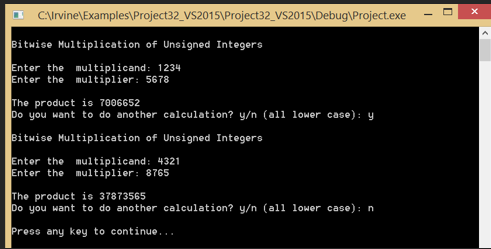
MASM Implement Bitwise Multiplication algorithm Apply loop Write user defined procedure Use user defined procedure Apply Irvineinc library Problem Description: Write a procedure named BitwiseMultiply that multiplies any unsinged bit integer by EAX, using only sifting and addition. Pass the integer to the procedure in the EBX register and return the product in the EXA register. Write a short test program that calls the procedure and displays the product We will assume that the product is never larger than bits This is a fairly challenging program to write. One possible approach is to use a loop to shift the multiplier to the right, keeping track of the number of shifts that occur before the Carry flag is set. The resulting shift count can then be applied to the SHL instruction, using the multiplicand as the destination operand. Then the same process must be repeated until you find the last bit in the multiplier Refer to Programming Exercise # on page Sample RunC:IrvineExamplesProjectVSProjectVSDebugProjectexe
I have a working code, but can't get a continue loop.
INCLUDE Irvineinc
data
prompt db "Enter the multiplicand:
prompt db "Enter the multiplier:
resultStr db "The product is
code
main PROC
call Clrscr
mov edx, OFFSET prompt
call WriteString
call ReadInt
mov ebx, eax
mov edx, OFFSET prompt
call WriteString
call ReadInt
call BitwiseMultiply
mov edx, OFFSET resultStr
call WriteString
call WriteInt
call Crlf
exit
main ENDP
BitwiseMultiply PROC
; EBX: multiplicand
; EAX: multiplier
; ECX: counter for loop times
; EDX: Temporary storage for accumulating result
xor edx, edx
multiplyloop:
test eax,
jz skipadd
add edx, ebx
skipadd:
shl ebx,
shr eax,
loop multiplyloop
mov eax, edx
ret
BitwiseMultiply ENDP
END main
Step by Step Solution
There are 3 Steps involved in it
1 Expert Approved Answer
Step: 1 Unlock

Question Has Been Solved by an Expert!
Get step-by-step solutions from verified subject matter experts
Step: 2 Unlock
Step: 3 Unlock
 Study Help