







Question: Match each Windows feature with its registry or folder location as stated in our textbook C:Windowsisystem32lsrulSRUDB.dat 1. Passwords HKLMISYSTEMICurrentControlSetiserviceslbamiUserSettingsi(SID) 2. Shimcache HKLMISYSTEMIMicrosoftWWindowsiCurrentVersioniUninstall 3. Amcache HKLMISYSTEMICurrentControlSetlContronSessionManagerlAppCompatCachelAppCompatCache
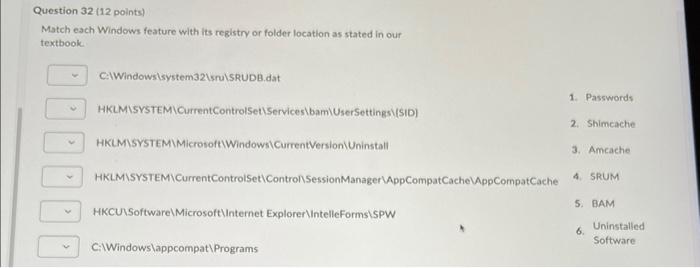
Match each Windows feature with its registry or folder location as stated in our textbook C:Windowsisystem32lsrulSRUDB.dat 1. Passwords HKLMISYSTEMICurrentControlSetiserviceslbamiUserSettingsi(SID) 2. Shimcache HKLMISYSTEMIMicrosoftWWindowsiCurrentVersioniUninstall 3. Amcache HKLMISYSTEMICurrentControlSetlContronSessionManagerlAppCompatCachelAppCompatCache 4. SRUM 5. BAM HKCUSSoftwarelMicrosoftlinternet ExplorerlintelleFormsiSPW 6. Uninstalled CilWindowslappcompat \Programs Software
Step by Step Solution
There are 3 Steps involved in it
1 Expert Approved Answer
Step: 1 Unlock

Question Has Been Solved by an Expert!
Get step-by-step solutions from verified subject matter experts
Step: 2 Unlock
Step: 3 Unlock
 Study Help