







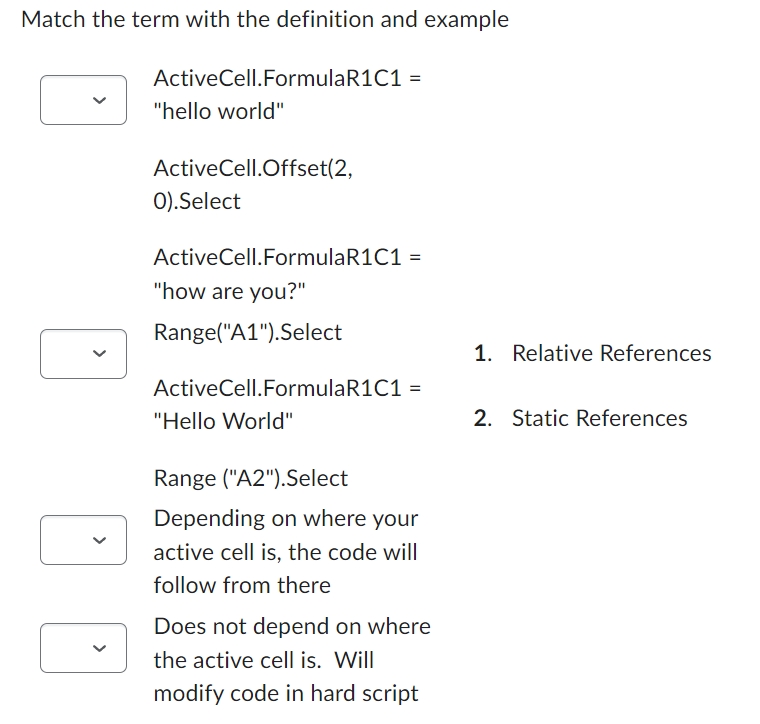
Question: Match the term with the definition and example ActiveCell.FormulaR 1 C 1 = hello world ActiveCell.Offset ( 2 , 0 . Select ActiveCell.FormulaR 1 C
Match the term with the definition and example
ActiveCell.FormulaRC
"hello world"
ActiveCell.Offset
Select
ActiveCell.FormulaRC
"how are you?"
RangeASelect
ActiveCell.FormulaRC
"Hello World"
Relative References
Range ASelect
Depending on where your
active cell is the code will
follow from there
Does not depend on where
the active cell is Will
modify code in hard script
Step by Step Solution
There are 3 Steps involved in it
1 Expert Approved Answer
Step: 1 Unlock

Question Has Been Solved by an Expert!
Get step-by-step solutions from verified subject matter experts
Step: 2 Unlock
Step: 3 Unlock
 Study Help