







Question: MATLAB 1. Create E as a 4 x 4 identity matrix, labelling and echoing the output. You can use MATLAB function eye to do this.
MATLAB
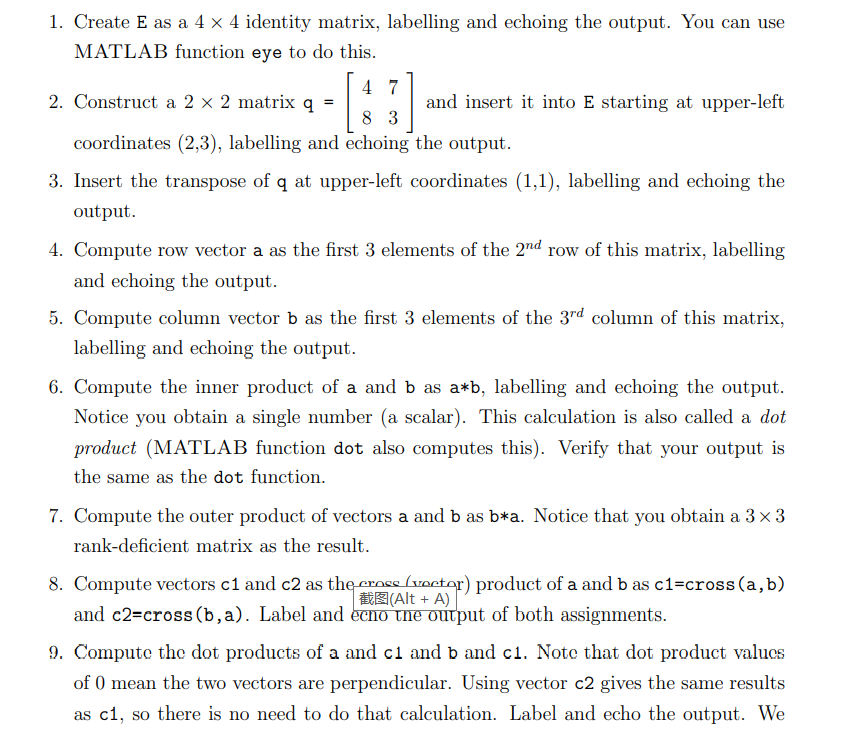
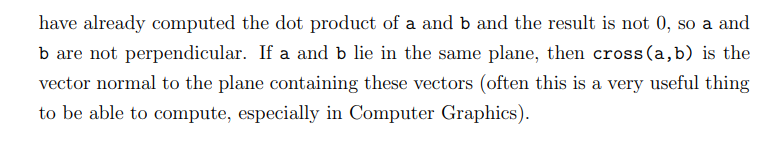
1. Create E as a 4 x 4 identity matrix, labelling and echoing the output. You can use MATLAB function eye to do this. 4 7 2. Construct a 2 x 2 matrix q and insert it into E starting at upper-left 8 3 coordinates (2,3), labelling and echoing the output. 3. Insert the transpose of q at upper-left coordinates (1,1), labelling and echoing the output. 4. Compute row vector a as the first 3 elements of the 2nd row of this matrix, labelling and echoing the output. 5. Compute column vector b as the first 3 elements of the 3rd column of this matrix, labelling and echoing the output. 6. Compute the inner product of a and b as a*b, labelling and echoing the output. Notice you obtain a single number (a scalar). This calculation is also called a dot product (MATLAB function dot also computes this). Verify that your output is the same as the dot function. 7. Compute the outer product of vectors a and b as b*a. Notice that you obtain a 3x3 rank-deficient matrix as the result. 8. Compute vectors c1 and c2 as the cross (voctor) product of a and b as c1=cross(a,b) # Alt + A) and c2=cross (b,a). Label and echo the output of both assignments. 9. Compute the dot products of a and c1 and b and c1. Note that dot product values of 0 mean the two vectors are perpendicular. Using vector c2 gives the same results as c1, so there is no need to do that calculation. Label and echo the output. We have already computed the dot product of a and b and the result is not 0, so a and b are not perpendicular. If a and b lie in the same plane, then cross(a,b) is the vector normal to the plane containing these vectors (often this is a very useful thing to be able to compute, especially in Computer Graphics)
Step by Step Solution
There are 3 Steps involved in it

Get step-by-step solutions from verified subject matter experts
 Study Help